Check the Runtime Audit History for File Server
The Runtime audit page shows the real-time audit history of runtime file and folder operations in File Server.
Learn who updated a file or folder, what changes they made, and when
they made the update. This information is helpful for various scenarios, including
troubleshooting unplanned changes. Audit history is retained for the retention period of
the instance.
- In the navigation pane, click Observability, then Dashboards.
- Click the File Server usage section.
- Click Runtime audit.The Runtime audit page shows details about the audit for all file and folder operations.
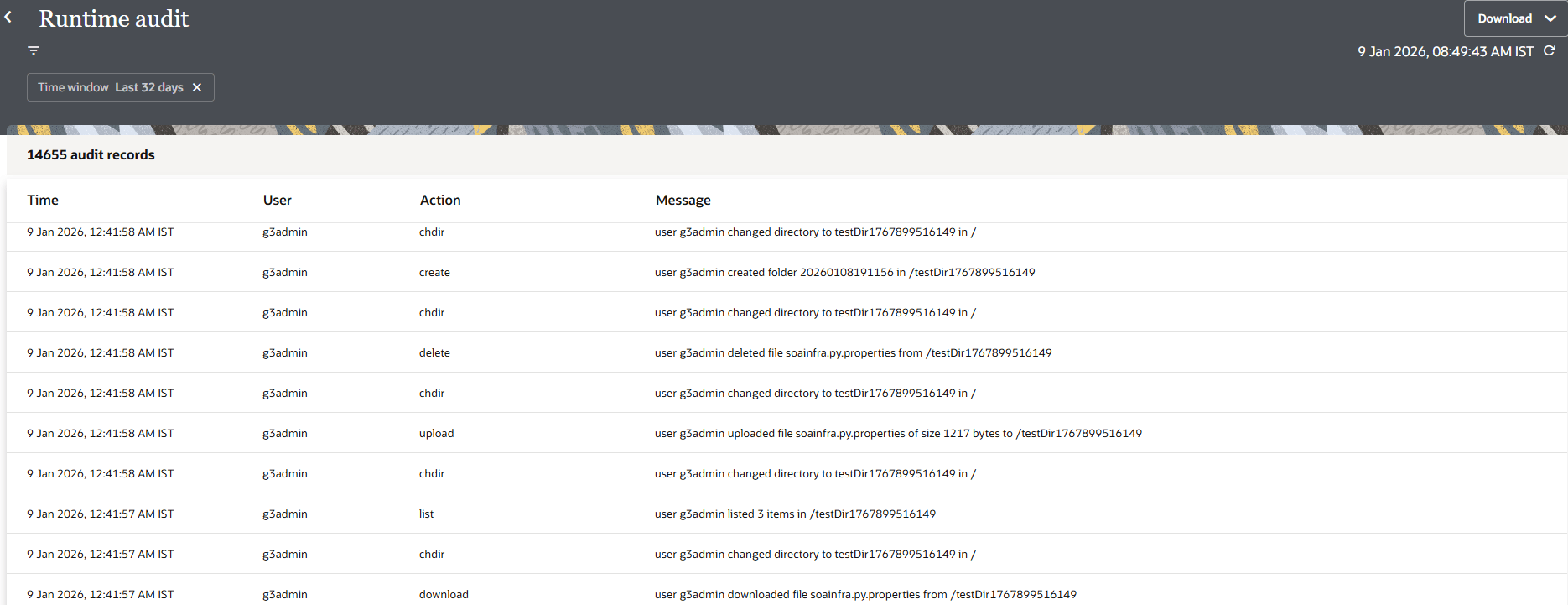
- Click Filter
 to filter data by time window, user name, or actions such as connect
and disconnect. You can click the Date range option to
specify a date range.
to filter data by time window, user name, or actions such as connect
and disconnect. You can click the Date range option to
specify a date range. - Click Download, and select the following:
- Download all: Downloads a maximum of 10,000 audit records.
- Download filtered: Downloads records for the currently-selected filters.
For example:[2026-01-08 19:11:57.987 Z] [userID: g3admin] [g3admin,LIST,FOLDERS,,/testDir1767899516149,,] user g3admin listed 3 items in /testDir1767899516149 [2026-01-08 19:11:57.940 Z] [userID: g3admin] [g3admin,CHDIR,FOLDERS,,,,] user g3admin changed directory to testDir1767899516149 in / [2026-01-08 19:11:57.917 Z] [userID: g3admin] [g3admin,DOWNLOAD,FILES,,,,] user g3admin downloaded file soainfra.py.properties from /testDir1767899516149 [2026-01-08 19:11:57.657 Z] [userID: g3admin] [g3admin,CHDIR,FOLDERS,,,,] user g3admin changed directory to testDir1767899516149 in / [2026-01-08 19:11:57.497 Z] [userID: g3admin] [g3admin,UPLOAD,FILES,,,,] user g3admin uploaded file soainfra.py.properties of size 1217 bytes to /testDir1767899516149 [2026-01-08 19:11:57.057 Z] [userID: g3admin] [g3admin,CHDIR,FOLDERS,,,,] user g3admin changed directory to testDir1767899516149 in / [2026-01-08 19:11:57.034 Z] [userID: g3admin] [g3admin,CHDIR,FOLDERS,,,,] user g3admin changed directory to testDir1767899516149 in / [2026-01-08 19:11:56.958 Z] [userID: g3admin] [g3admin,CONNECT,SESSION,,,,] user g3admin established a new connection with fileserver instance <instance_id> [2026-01-08 19:11:56.096 Z] [userID: g3admin] [g3admin,CONNECT,SESSION,,,,] user g3admin established a new connection with fileserver instance <instance_id> [2026-01-08 19:11:55.647 Z] [userID: g3admin] [g3admin,DISCONNECT,SESSION,,,,] user g3admin closed connection with fileserver instance <instance_id> [2026-01-08 19:11:55.636 Z] [userID: g3admin] [g3admin,DELETE,FOLDERS,,,,] user g3admin deleted folder 20260108191155 from /testDir1767899512230 [2026-01-08 19:11:55.582 Z] [userID: g3admin] [g3admin,CHDIR,FOLDERS,,,,] user g3admin changed directory to testDir1767899512230 in / [2026-01-08 19:11:55.507 Z] [userID: g3admin] [g3admin,RENAME,FOLDERS,,/testDir1767899512230/20260108191155,,] user g3admin renamed folder from /testDir1767899512230/20260108191152 to /testDir1767899512230/20260108191155 [2026-01-08 19:11:55.396 Z] [userID: g3admin] [g3admin,CHDIR,FOLDERS,,,,] user g3admin changed directory to testDir1767899512230 in / [2026-01-08 19:11:55.175 Z] [userID: g3admin] [g3admin,CREATE,FOLDERS,,,,] user g3admin created folder 20260108191152 in /testDir1767899512230 [2026-01-08 19:11:55.077 Z] [userID: g3admin] [g3admin,CHDIR,FOLDERS,,,,] user g3admin changed directory to testDir1767899512230 in / [2026-01-08 19:11:54.988 Z] [userID: g3admin] [g3admin,DELETE,FILES,,,,] user g3admin deleted file soainfra.py.properties from /testDir1767899512230 [2026-01-08 19:11:54.711 Z] [userID: g3admin] [g3admin,CHDIR,FOLDERS,,,,] user g3admin changed directory to testDir1767899512230 in / [2026-01-08 19:11:54.454 Z] [userID: g3admin] [g3admin,UPLOAD,FILES,,,,] user g3admin uploaded file soainfra.py.properties of size 1217 bytes to /testDir1767899512230The following table describes some of the actions that can appear.
Activity Type: File
Action Description User Action create Indicates that the user created a file. Create the file. delete Indicates that the user deleted a file. Delete the file. move Indicates that the user moved a file. Move the file. read Indicates that the user read from a file. Read from the file. Activity Type: Folder
Action Description User Action create Indicates that the user created a folder. Create the folder. delete Indicates that the user deleted a folder. Delete the folder. update Indicates that the user updated a folder. Update the folder. list Indicates that the user listed the number of items in the folder. List the number of items in the folder. Activity Type: Connection
Action Description User Action open Indicates that the user established a new connection with a File Server instance. Open a new connection. closed Indicates that the user closed the connection with a File Server instance. Close the connection.