Create an Instance Using the API
You can provision an Oracle Integration instance using the Oracle Integration Administrative API.
Oracle Integration lifecycle operations, including instance creation, are part of the Oracle Integration Administrative API. In particular, the CreateIntegrationInstance API supports creation of new Oracle Integration instances.
Supported Languages
In addition to supporting a REST API, there are also multiple language bindings.
The following languages are supported:
- REST
Can be used with Postman or Oracle Integration, for example.
- Java
- Python
- Go
- TypeScript
- .NET
- Ruby
The Software Development Kits and Command Line Interface documentation explains how to install and use the various language bindings for the Oracle Cloud Infrastructure (OCI) APIs, including the Oracle Integration Administrative API.
Calling CreateIntegrationInstance from an Oracle Integration Flow
The CreateIntegrationInstance API can be called using the REST Adapter from within an Oracle Integration flow. This section explains the steps required to call the API from an invoke action.
Set Up REST Connection
In order to invoke the CreateIntegrationInstance API, you need to have a connection to the APIs. We can create a REST Adapter connection to connect to the API and use the OCI ServiceInvocation security policy, which means that access is allowed based on OCI policies. This requires that the Oracle Integration instance be a member of a dynamic group. See RPST and OCI Service Invocation Security Policy Use.
Invoke CreateIntegrationInstance
You can invoke CreateIntegrationInstance as a POST operation as shown below.
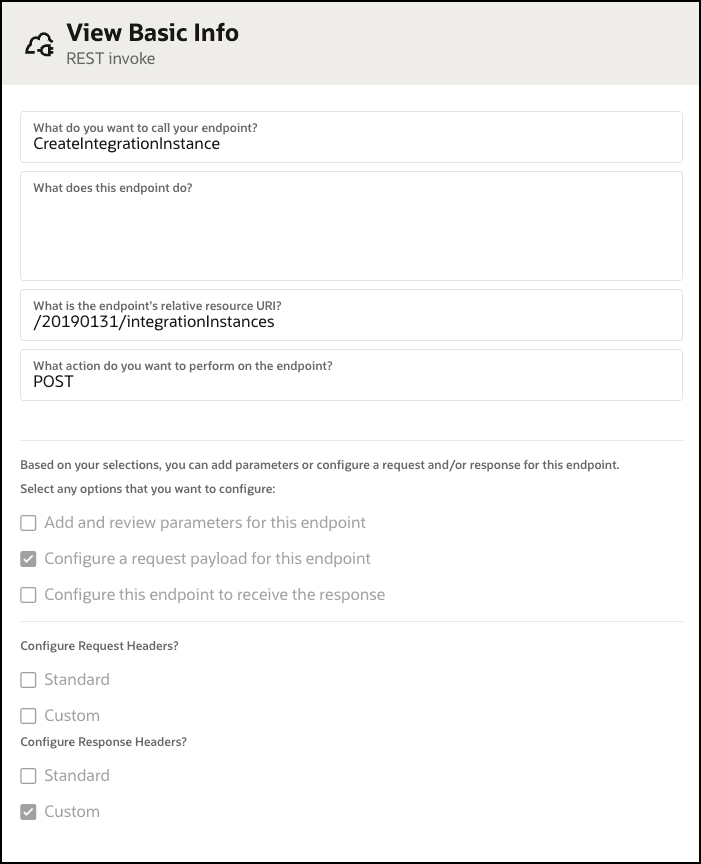
When invoking CreateIntegrationInstance use the following sample payload:
{
  "compartmentId": "string",
  "consumptionModel": "UCM|GOV|OIC4SAAS",
  "definedTags": {
    "tagNamespace1": {
      "tagKey1": "tagValue1",
      "tagKey2": "tagValue2"
    },
    "tagNamespace2": {
      "tagKey1": "tagValue1",
      "tagKey2": "tagValue2"
    }
  },
  "displayName": "string",
  "domainId": "string",
  "freeformTags": {
    "tagKey1": "tagValue1",
    "tagKey2": "tagValue2"
  },
  "isByol": true,
  "isDisasterRecoveryEnabled": true,
  "messagePacks": 1,
  "networkEndpointDetails": {
    "allowlistedHttpIps": [
      "string",
      "string"
    ],
    "allowlistedHttpVcns": [
      {
        "allowlistedIps": [
          "string",
          "string"
        ],
        "id": "string"
      },
      {
        "allowlistedIps": [
          "string",
          "string"
        ],
        "id": "string"
      }
    ],
    "isIntegrationVcnAllowlisted": true,
    "networkEndpointType": "PUBLIC"
  },
  "shape": "DEVELOPMENT|PRODUCTION",
  "integrationInstanceType": "STANDARDX|ENTERPRISEX|HEALTHCARE"
}| Parameter name | Description | Parameter |
|---|---|---|
| Compartment | Enter the compartment in which you want to create the instance. | compartmentId |
| Consumption model | This parameter is only required if you have both Subscription and UCM entitlements. | consumptionModel |
| Namespace tags | Enter predefined keys scoped to namespaces. | definedTags |
| Name | Enter a name for this instance. The name becomes part of the URL for accessing the instance. | displayName |
| Identity domain | This parameter isn't listed as required, but you must included it. Enter the OCID of the identity domain to which you want to associate the instance.
You can't use an identity domain outside your tenancy. |
domainId |
| Freeform tags | Optionally, add tags to help you organize your resources in your tenancy.
See Resource Tags. |
freeformTags |
| License type | Set this option to TRUE if you want to use an existing Oracle Fusion Middleware license.
See License Types. |
isByolAllowed values are |
| Disaster recovery | Set this option to TRUE if you want to configure disaster recovery. This installs a primary instance in one region and a secondary instance in another region. You must have selected ENTERPRISEX or HEALTHCARE as the edition and PRODUCTION as the shape, and you must be in a region that supports disaster recovery pairing.
See Introduction to Oracle-Managed Disaster Recovery in Configuring an Oracle-Managed Disaster Recovery Solution for Oracle Integration 3. |
isDisasterRecoveryEnabledAllowed values are |
| Network access | Configure an allowlist for your instance. See Configure an Allowlist for Your Instance. | networkEndpointDetails |
| Message packs | Enter the number of message packs you want to configure.
See Edit the Number of Message Packs Using the User Interface. |
–message-packs |
| Shape | This parameter isn't required, but it's recommended; it defaults to Production. Enter the shape you want to use for this instance.
See Shapes. |
shape |
| Edition | Enter the edition you want this instance to be. | integrationInstanceType |
You can generate a sample JSON load for any OCI command by using the –generate-full-command-json-input option on the CLI command.