Execute Robot Agents in Air-Gapped Environments

If you have a secure VM setup in an air-gapped environment with no internet access (offline environment) and want to execute robot agents without internet access, you can export the robots and their dependencies from an online source environment as a ZIP file. You can then import this ZIP file into an offline target environment and execute robot agents without internet access.

The process ensures that all robots and their dependencies are available in offline mode without internet access by running the scripts which are available in the scripts and offline_scripts folder of the robot agent ZIP file.

Note:

Oracle recommends refreshing your offline environments for every release. This can be done by getting the latest robot agent jar file from the online source environment and following the steps outlined in Export the Robot Agent and Dependencies from the Online Source Environment and Import the ZIP File to the Offline Target Environment.

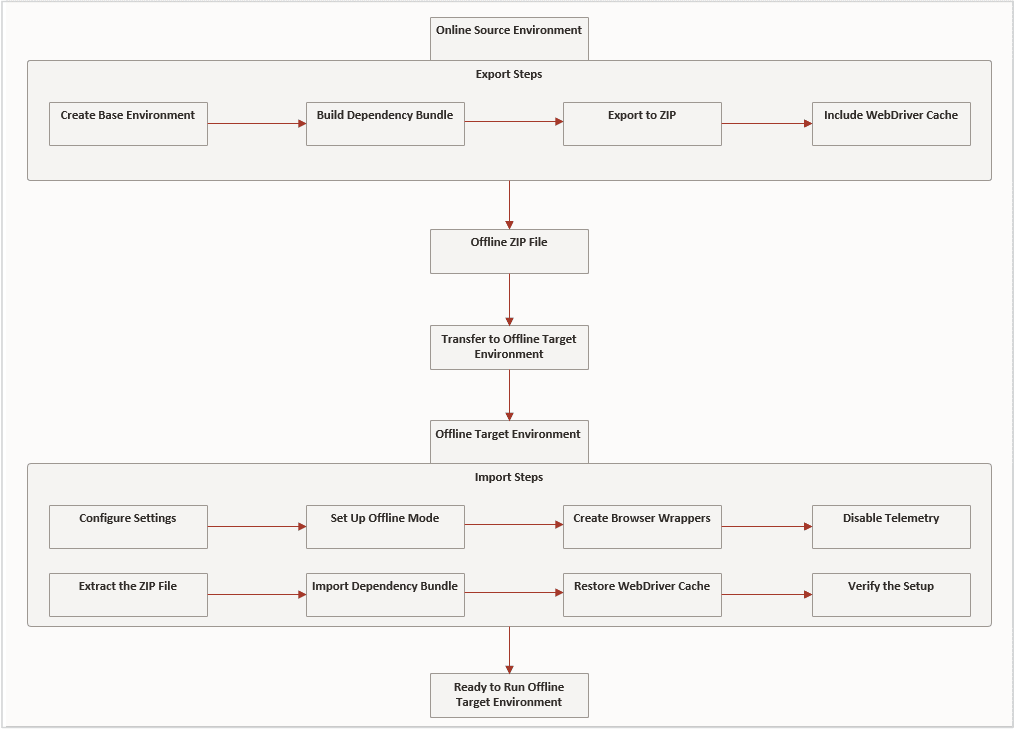
The following image illustrates the steps executed by the rpaAgentEnvDiagnosis, rcc_offline_export_all, and rcc_offline_import_all scripts described in the following sections.Steps to export the robots and their dependencies from an online source environment as a ZIP file. You can then import the ZIP file into an offline target environment and execute robot agents without internet access.
Export the Robot Agent and Dependencies from the Online Source Environment

Follow these steps to export the robots and their dependencies from the online source environment and create a ZIP file which can be imported into the offline target environment.

  1. Prepare the environment.
    Ensure that all robots run successfully and all required dependencies are installed.
  2. Run the rcc_agent_env_diagnosis script to validate the online source environment setup:
    • Linux: [AGENT_HOME]/scripts/rcc_agent_env_diagnosis.sh
    • Windows (PowerShell): [AGENT_HOME]\scripts\rcc_agent_env_diagnosis.ps1
  3. Run the rcc_offline_export_all script to generate the ZIP file which can be imported into the offline target environment:
    • Linux: ./rcc_offline_export_all.sh
    • Windows (PowerShell): .\rcc_offline_export_all.ps1
    The script creates a comprehensive ZIP file containing all runtime dependencies required for offline robot execution which you can import into your offline target environment.

    Note:

    • The ZIP file is self-contained and ONLY portable across environments with similar Operating System and CPU architecture.

    • You MUST use the same user account for exporting from the online source enviroment and importing into the offline target enviroment.

Import the ZIP File to the Offline Target Environment

Follow these steps to import the ZIP file from the online source environment to the offline target environment.

  1. Copy the rpa_agent.zip file from the online source environment to the offline target environment and unzip the file.
    Note: Make sure the user home directory structures are identical in the online source environment and offline target environment.
  2. Copy the <offline-bundle>.zip file and transfer the ZIP file from the online source environment to the offline target environment.
  3. Install the following prerequisites on the offline target environment using temporary internet access or by manually providing the installers:
    • JDK 17
    • Google Chrome
    • (Optional) Mozilla Firefox
  4. Run the rcc_offline_import_all script to import environments and restore caches:
    • Linux: ./rcc_offline_import_all.sh <offline-bundle>.zip
    • Windows (PowerShell): .\rcc_offline_import_all.ps1 <offline-bundle>.zip
  5. Run the rcc_agent_env_diagnosis script to validate the offline target environment setup:
    • Linux: [AGENT_HOME]/scripts/rcc_agent_env_diagnosis.sh
    • Windows (PowerShell): [AGENT_HOME]\scripts\rcc_agent_env_diagnosis.ps1
  6. Start the robot agent for offline execution: java -jar agent.jar.

    Once imported, the robot agent can run robots without any internet connectivity. The robot agent functions fully offline with robots, runtimes, browser drivers, and all required dependencies available locally.