Connect to Autonomous AI Database
Applications and tools connect to Autonomous AI Database on Dedicated Exadata Infrastructure using Oracle Net Services (also known as SQL*Net).
Oracle Net Services enables a network session from a client application to an Oracle Database server through the network defined by the dedicated infrastructure hosting the database. Oracle cloud deployments use a VCN (virtual cloud network) and subnet. Usually, the subnet is defined as private, meaning that there is no public Internet access to databases. Exadata Cloud@Customer deployments use a VM cluster network.
Secure Connections to Autonomous AI Database
Autonomous AI Database provides several pairs of database services to use when connecting to your dedicated database. In each pair, one of the pair provides a secure TCP (TCPS) connection using the TLS protocol, and the other provides a TCP connection. In all other respects, the two members of a pair are the same. To ensure security of data in transit, Oracle strongly recommends that you use a secure connection, even if the database is only available through a private subnet. If you are familiar with using an Oracle Database within your own data center, you may not have previously used these secure connections.
While provisioning an Autonomous Exadata VM Cluster (AVMC) resource, you can:
-
Customize the Single Client Access Name (SCAN) listener port for Transport Layer Security (TLS) and non-TLS from a range of available ports (1024 - 8999). You can also choose mutual TLS (mTLS) authentication by selecting the Enable mutual TLS (mTLS) authentication check-box.
-
Choose between one-way TLS and mutual TLS (mTLS) authentication modes. This is applicable only to database TLS certificates because ORDS certificates are one-way TLS certificates.
To provide the secure connection, certification authentication uses an encrypted key stored in a wallet on both the client (where the application is running) and the server (where your Autonomous AI Database is running). The key on the client must match the key on the server to make a connection. A wallet contains a collection of files, including the key and other information needed to connect to your database. All communications between the client and the server are encrypted.
Oracle Net Services (SQL *Net) Connection Types
When a network session is established, Oracle Net Services acts as the data courier for both the client application and the database. It is responsible for establishing and maintaining the connection between the client application and the database, as well as exchanging messages between them.
Oracle Net Services support a variety of connection types to the Autonomous AI Database, including:
-
Oracle Call Interface (OCI), which is used by many applications written in C language. Examples include Oracle utilities such as Oracle SQLPlus, SQLLoader, and Oracle Data Pump.
-
ODBC drivers, which can be used by applications running on Microsoft Windows, are layered over Oracle Call Interface (OCI).
-
JDBC OCI, which is used by Java language applications. JDBC OCI adds a layer over Oracle Call Interface for Java applications. The Oracle SQLcl command-line interface uses JDBC OCI.
-
JDBC Thin Driver, also for Java applications, is a pure Java driver. Oracle SQL Developer supports JDBC Thin Driver connections.
Third-party products and custom applications may use any of these connection types.
Oracle Call Interface (OCI) Connections and Wallets
Wallet files, along with the Database user ID and password provide access to data in your Autonomous AI Database. Store wallet files in a secure location.
As wallet files can provide access to data in your database, you must share the wallet files only with authorized users. If wallet files are transmitted in a way that might be accessed by unauthorized users (for example, over public email), transmit the wallet password separately and securely.
Note: Autonomous AI Database uses strong password complexity rules for all users based on Oracle Cloud security standards. For more information on the password complexity rules see Create Database Users.
See Download Client Credentials for information on downloading client credentials for Autonomous AI Database.
Oracle Net Services can find the location of the Autonomous AI Database wallet using the WALLET_LOCATION parameter in the sqlnet.ora file.When WALLET_LOCATION is used, Oracle Net Services automatically uses the wallet. The wallet is used transparently to the application. See Prepare for ODBC and JDBC Oracle Call Interface (OCI) Connections for information on setting WALLET_LOCATION.
Predefined Database Service Names for Autonomous AI Databases
Autonomous AI Database on Dedicated Exadata Infrastructure provides multiple sets of database services to use when connecting to your database. In each set, one service provides a secure TCP (TCPS) connection using the TLS protocol, and another provides a TCP connection.
A connection string is created for each of the above database connection services. You can view these connection strings from the Oracle Cloud Infrastructure (OCI) console as described in View Connection Strings for an Autonomous AI Database.
These connection services are designed to support different kinds of database operations:
-
tpurgent_tls and tpurgent: For high priority, time critical transaction processing operations.
-
tp_tls and tp: For typical transaction processing operations.
-
high_tls and high: For high priority reporting and batch operations.
-
medium_tls and medium: For typical reporting and batch operations.
-
low_tls and low: For low priority reporting and batch operations.
The databases configured to use Autonomous Data Guard have two additional services with the same connection types (TCPS and TCP) to the standby database for read-only access.
In a multi-standby environment, which standby database to connect to is automatically determined for _ro service connections. However, if needed, you can manually edit the connection string to connect to a different standby database.
Note: In the following predefined database service names, _ro denotes connections for read-only access, and _ss indicates connections to snapshot standby databases.
These connection services are also designed to support different kinds of database operations:
-
tpurgent_ro_tls, tpurgent_ro, tpurgent_ss_tls, and tpurgent_ss: For high priority, time critical transaction processing operations.
-
tp_ro_tls, tp_ro, tp_ss_tls, and tp_ss: For typical transaction processing operations.
-
high_ro_tls, high_ro, high_ss_tls, and high_ss: For high priority reporting and batch operations.
-
medium_ro_tls, medium_ro, medium_ss_tls, and medium_ss: For typical reporting and batch operations.
-
low_ro_tls, low_ro, low_ss_tls, and low_ss: For low priority reporting and batch operations.
Autonomous AI Transaction Processing support all the above connection services (tpurgent, tp, high, medium, and low). In contrast, Autonomous AI Lakehouse can only connect to the low, medium, and high connection services.
Databases provisioned with CPU overprovisioning can only connect to:
-
The tp and low services for the Autonomous AI Transaction Processing, and
-
The low services for Autonomous AI Lakehouse.
Key Characteristics of the Predefined Database Services
-
Concurrent Statements: The maximum number of SQL statements that an Autonomous AI Database can be processing for a consumer group before queuing the statements.
-
Degree of Parallelism: Parallel execution is one of the Autonomous AI Database on Dedicated Exadata Infrastructure's features that creates and uses multiple processes to execute a single SQL statement. The degree of parallelism specifies the number of processes that can be used. Due to the performance cost of creating additional processes, parallel execution is generally worthwhile when:
-
The query references a large data set.
-
There is low concurrency.
-
The elapsed time is critical.
-
-
Resource Shares: Autonomous AI Database on Dedicated Exadata Infrastructure uses Oracle Database Resource Manager consumer groups to provide different resource allocations to each database service pair. Resource Shares define the fraction of resources guaranteed to a consumer group. However, any consumer group can use more than its Resource Shares when no resource contention exists.
-
FAN Enabled: Indicates if Fast Application Notification is enabled by default.
-
TAC Enabled: Indicates if Transparent Application Continuity is enabled by default.
The following table compares the different sets of database services based on the characteristics discussed above.
| Service Names | Degree of Parallelism | Resource Shares | Concurrent Statements | FAN Enabled | TAC Enabled |
|---|---|---|---|---|---|
tpurgent_tls, tpurgent, tpurgent_ro_tls, tpurgent_ro, tpurgent_ss_tls, and tpurgent_ss |
Set manually | 12 | 300 x number of OCPUs or 75 x number of ECPUs | Yes | Yes |
tp_tls, tp, tp_ro_tls, tp_ro, tp_ss_tls, and tp_ss |
1 | 8 | 300 x number of OCPUs or 75 x number of ECPUs | Yes | Yes |
high_tls, high, high_ro_tls, high_ro, high_ss_tls, and high_ss |
1 x number of OCPUs or 0.5 x number of ECPUs | 4 | 3 | Yes | No |
medium_tls, medium, medium_ro_tls, medium_ro, medium_ss_tls, and medium_ss |
4 | 2 | 1.25 x number of OCPUs or 0.25125 x ECPUs | Yes | No |
low_tls, low, low_ro_tls, and low_ro, low_ss_tls, and low_ss |
1 | 1 | 300 x number of OCPUs or 75 x number of ECPUs | Yes | No |
Where the number of OCPUs or ECPUs is the CPU Count shown in the Oracle Cloud console.
The number of concurrent statements supported by the tp and low services with CPU overprovisioning is calculated precisely in the same way as calculated for full OCPUs or ECPUs, that is, 300 x OCPUs or 150 x ECPUs. For example, for a value of 0.5 OCPUs, the total number of concurrent statements that can be handled by tp and low services is 300 X 0.5, that is, 150.
Note: After connecting to your database using a service, do not attempt to switch that connection to a different service by changing the consumer group of the connection manually. Please note that the Autonomous AI Database performs more actions to configure the connection than just setting its consumer group while connecting to your database using a service.
Connect to Autonomous AI Database Using a Client Application
Autonomous AI Database is preconfigured to support Oracle Net Services through a TNS listener is installed and configured to use either TCPS connections (secured using client credentials) or TCP connections.
The client computer must be prepared to use Oracle Net Services to connect to Autonomous AI Database. Applications can connect to Autonomous AI Database using any of the connection types supported by Oracle Net Services.
The following steps describe the process of connecting to Autonomous AI Database using a client application:
-
Determine what connection type your application uses, (for example OCI, ODBC, JDBC Thin, and so on).
-
Prepare your client computer for the type of connection used by your application:
-
Oracle Call Interface (OCI), ODBC, and JDBC OCI Connections: You prepare for Oracle Call Interface (OCI), ODBC, and JDBC OCI connections by downloading and installing Oracle Instant Client and then downloading the client credentials for your Autonomous AI Database and making them available to Oracle Instant Client.
See Prepare for ODBC and JDBC Oracle Call Interface (OCI) Connections for step by step instructions.
-
Prepare for JDBC Thin Connections: You prepare for JDBC thin connections by downloading and installing Oracle Database JDBC Driver and then downloading the client credentials for your Autonomous AI Database and making them available to Oracle Database JDBC Driver.
See Prepare for JDBC Thin Connections for step by step instructions.
-
-
Within your application, set up the connection.
The steps required to prepare the client computer depend on the type of connection used by the client application. In all cases, client credentials in the form of the wallet file must be downloaded to the client.
Applications with Built-In Support for Wallet ZIP Files
Some applications allow you to choose a credentials ZIP file as part of the connection properties.
For example, in SQL Developer 18.3 and higher, in the Connection Type field select the value Cloud Wallet that allows you to enter a credentials ZIP file in the Configuration File field. SQL Developer then presents a list of the available connections in the Service field (the connections are included in the credentials files).
If your application provides support for wallets or provides specific support for an Autonomous AI Database connection, for example, Oracle SQL Developer, Oracle recommends that you use that type of connection.
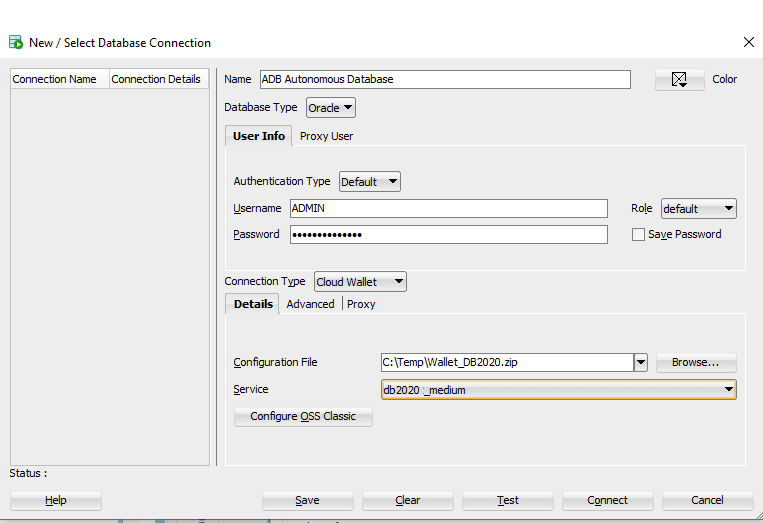
Description of the illustration adb_connect_sqldev_db20.png
Connect to Autonomous AI Database Using Oracle Database Tools
Oracle Database tools such as Database Actions, SQL Developer, SQLcl and SQL*Plus can be used with the Autonomous AI Database.
The following topics provide step-by-step instructions for connecting to Autonomous AI Database using Oracle Database tools:
-
Database Actions: Connect to Autonomous AI Database with Oracle Database Actions
-
Oracle SQL Developer: Connect to Autonomous AI Database with Oracle SQL Developer
-
Oracle SQLcl: Connect to Autonomous AI Database with Oracle SQLcl
Connect with Microsoft .NET, Visual Studio, and Visual Studio Code
Oracle Autonomous AI Database on Dedicated Exadata Infrastructure supports connectivity to the Microsoft .NET Framework, .NET Core, Visual Studio, and Visual Studio Code.
Oracle Data Provider for .NET (ODP.NET) provides run-time ADO.NET data access to an Autonomous AI Database. ODP.NET has the following driver types:
-
Unmanaged ODP.NET for .NET Framework applications
-
Managed ODP.NET for .NET Framework applications
-
ODP.NET Core for .NET Core applications
Oracle Developer Tools for Visual Studio provides database application design-time support in Visual Studio, including tools for managing Autonomous AI Databases in Oracle Cloud.
Oracle Developer Tools for VS Code provides database application design-time support in Visual Studio Code.
These software components are available as a free download from the following sites:
-
Managed ODP.NET and ODP.NET Core: NuGet Gallery
-
Unmanaged ODP.NET: Oracle Data Access Components Downloads
-
Oracle Developer Tools for Visual Studio Code: VS Code Marketplace
-
Oracle Developer Tools for Visual Studio: Visual Studio Marketplace
Oracle recommends using the latest provider and tools version with an Autonomous AI Database.
Set-up Instructions
Refer to Developing .NET Applications for Oracle Autonomous AI Database for instructions on how to download, install, and configure these components for use with Oracle Autonomous AI Database on Dedicated Exadata Infrastructure:
Note that these instructions show how to make TCPS (TCP with SSL) connections to your database, which requires using wallets. For databases on dedicated infrastructure, you can instead make TCP connections to the database, which does not require use of a wallet.
To learn more about using Oracle Autonomous AI Database on Dedicated Exadata Infrastructure and .NET, try the free .NET Development with Oracle Autonomous AI Database Quick Start. This lab walks you through setting up a .NET web server on Oracle Cloud Infrastructure that connects to Autonomous AI Database. Next, the lab guides developing and deploying a simple ASP.NET Core web application that uses all these components. By the end, you will have a live, working website on the Internet.
Connect to Autonomous AI Database with Scripting Languages
You can use programs in different languages, including Python, Node.js, PHP, Ruby, R, Go, and Perl to connect to Oracle Autonomous AI Database on Dedicated Exadata Infrastructure. Security is enforced using client credentials.
These scripting languages have database access APIs or drivers that use the Oracle Call Interface (OCI) libraries. The OCI libraries can be either from the full Oracle Client or from Oracle Instant Client.
Refer to the following articles for step-by-step instructions to connect to Autonomous AI Database with different scripting languages:
-
Node.js and other scripting languages: Connect with Node.js and other Scripting Languages
Connect with Oracle Cloud Infrastructure FastConnect
Oracle Cloud Infrastructure FastConnect provides an easy way for you to connect your on-premises network to Autonomous AI Database using FastConnect Public Peering. FastConnect provides higher-bandwidth options, and a more reliable and consistent networking experience compared to internet-based connections.
Use FastConnect to access services in Oracle Cloud Infrastructure without using the internet, for example, access to Object Storage, or the Oracle Cloud Infrastructure Console and APIs. Without FastConnect, the traffic destined for public IP addresses would be routed over the internet. With FastConnect, that traffic goes over your private physical connection.
For details for connecting Autonomous AI Database with Oracle Cloud Infrastructure FastConnect see FastConnect Overview.
Create and Use Custom Domain Names
You can connect to your Autonomous AI Database instance using a custom domain name (such as db.mycompany.com) by adding a CNAME record in your DNS settings.
This is done by adding a CNAME record in your DNS provider that maps your custom domain to the SCAN hostname of your Autonomous Exadata VM Cluster, enabling your domain to resolve to the correct database endpoints managed by OCI DNS.
To create a custom domain name:
- Navigate to your Autonomous Exadata VM Cluster details page in the OCI Console and copy the SCAN hostname.
- Log in to your DNS provider (for example, Cloudflare, Amazon Route 53, or GoDaddy).
- Add a new CNAME record with the following values:
- Name: Your custom domain (for example,
db.mycompany.com) - Value: The SCAN hostname copied in Step 1
- Name: Your custom domain (for example,
- Save the DNS record.