High Performance Features in Autonomous AI Database on Dedicated Exadata Infrastructure
This article describes the key performance tuning features in Autonomous AI Database on Dedicated Exadata Infrastructure.
Note that throughout this section the term “you” is broadly used to mean any user in your organization who has the responsibility for performing certain tasks. In some cases, that’s the application DBA, in others it’s the application developer.
Autonomous AI Database includes several features that automatically monitor, analyze and optimize the performance of your database. For a complete list of the SQL tuning and performance management features of Oracle Autonomous AI Database, and instructions on how to use them, see Oracle Database 19c SQL Tuning Guide or Oracle Database 26ai SQL Tuning Guide.
You can see a broad categorization for the key performance tuning features of Autonomous AI Database depicted below.
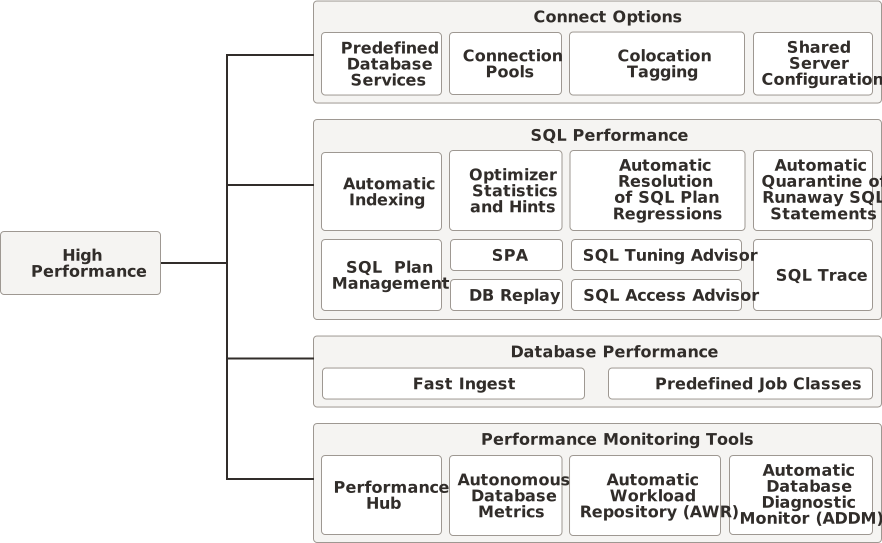
Description of the illustration hp_features.svg
Predefined Database Services
How your application connects to your database and how you code SQL calls to the database determine the overall performance of your application’s transaction processing and reporting operations.
When making connections to your Autonomous AI Database, the performance of your application’s interaction with the database depends on which database service you connect to. Autonomous AI Database provides multiple sets of database services to use when connecting to your database. These connection services are designed to support different kinds of database operations as described in Predefined Database Service Names for Autonomous AI Databases.
Tip: Ensure to review the key characteristics of the predefined database services and the table that compares the different sets of database services based on these characteristics to decide which database service is more appropriate for your application’s performance requirements.
Connection Pools
When making connections to your Autonomous AI Database, you can use connection pools to reduce the performance overhead of repeatedly creating and destroying individual connections. This is another factor that has great impact on the performance of your application’s interaction with the database.
Quite often, the use of connection pools is considered only when designing or enhancing an application to provide continuous availability. However, the use of connection pools instead of individual connections can benefit almost every transaction processing application. A connection pool provides the following benefits:
-
Reduces the number of times new connection objects are created.
-
Promotes connection object reuse.
-
Quickens the process of getting a connection.
-
Controls the amount of resources spent on maintaining connections.
-
Reduces the amount of coding effort required to manually manage connection objects.
Special-Purpose Connection Features
Oracle Net Services (previous called SQL*Net) provides a variety of connection features that improve performance in specific connection scenarios. These features are described in Oracle Database 19c Net Services Administrator’s Guide or Oracle Database 26ai Net Services Administrator’s Guide.
-
Colocation tagging is one such feature that is useful in certain transaction processing applications. If your application repeatedly makes connections to the same database service, colocation tagging permits all such connections to be directed to the same database instance, bypassing the load-balancing processing normally done on the database side of connections. For more information, see COLOCATION_TAG of Client Connectionsin Oracle Database 19c or Oracle Database 26ai.
-
Shared Server Configuration is another feature Autonomous AI Database supports for maintaining legacy applications designed without connection pooling. The shared server architecture enables the database server to allow many client processes to share very few server processes. This increases the number of users that the application can support. Using the shared server architecture for such legacy applications enables them to scale up without making any changes to the application itself.
You can enable shared server connections while provisioning an Autonomous Container Database (ACD) and this setting applies to all the databases created in it. See Create an Autonomous Container Database for instructions.
See also Oracle Database 19c Net Services Administrator’s Guide or Oracle Database 26ai Net Services Administrator’s Guide for more detailed information about shared servers, including features such as session multiplexing.
Once the Shared Server connection is enabled for your Autonomous Container Database, changing the connect string is not necessary. The default configuration is set to Dedicated.
Note: You can not disable a Shared Server for a specific Autonomous AI Database created under a Shared Server-enabled Autonomous Container Database, and you can not use a Dedicated connection for Autonomous AI Databases created under a Shared Server-enabled Autonomous Container Database.
SQL Performance Tuning Features
Great applications begin with well written SQL. Oracle Autonomous AI Database provides numerous features that enable you to build high performance applications and validate your SQL and PL/SQL code. Some of these features are listed below:
-
Automatic Indexing
-
Optimizer Statistics and Hints
-
Automatic resolution of SQL plan regressions
-
Automatic quarantine of runaway SQL statements
-
SQL Plan Management
-
SQL Tuning sets
-
SQL Trace
As you develop your application, you can quickly learn how these features are affecting the SQL code you write and so improve your code by using the SQL Worksheet provided by both Oracle Database Actions (which is built into your Autonomous AI Database) and Oracle SQL Developer (a free application you install on your development system).
SQL Tracing
When an application operation takes longer than expected, getting a trace of all the SQL statements executed as part of this operation with details such as time spent by that SQL statement in the parse, execution, and fetch phases will help you identify and resolve the cause of the performance issue. You can use SQL tracing on an Autonomous AI Database to achieve this.
SQL tracing is disabled by default in Autonomous AI Database. You must enable it to start collecting the SQL tracing data. Refer to Use SQL Tracing on Autonomous AI Database for detailed instructions to enable and use SQL Tracing.
Optimizer Statistics
Autonomous AI Database gathers optimizer statistics automatically so that you do not need to perform this task manually and this helps to ensure your statistics are current. Automatic statistics gathering is enabled in Autonomous AI Database and runs in a standard maintenance window.
Note: For more information on maintenance window times and automatic optimizer statistics collection, see Oracle Database 19c Administrator’s Guide or Oracle Database 26ai Administrator’s Guide . For more information on optimizer statistics see Oracle Database 19c SQL Tuning Guide or Oracle Database 26ai SQL Tuning Guide .
Optimizer Hints
Optimizer hints are special comments in a SQL statement that pass instructions to the optimizer. The optimizer uses hints to choose an execution plan for the statement unless prevented by some condition.
Autonomous AI Database defaults for the optimizer and PARALLEL hints differ depending on your workload:
-
Autonomous AI Lakehouse: Autonomous AI Database with Data Warehouse ignores optimizer hints and
PARALLELhints in SQL statements by default.If your application relies on hints, you can enable optimizer hints by setting the parameter
OPTIMIZER_IGNORE_HINTStoFALSEat the session or system level usingALTER SESSIONorALTER SYSTEM.For example, the following command enables hints in your session:
ALTER SESSION
  SET OPTIMIZER_IGNORE_HINTS=FALSE;
You can also enable
PARALLELhints in your SQL statements by settingOPTIMIZER_IGNORE_PARALLEL_HINTStoFALSEat the session or system level usingALTER SESSIONorALTER SYSTEM.For example, the following command enables
PARALLELhints in your session:ALTER SESSION SET OPTIMIZER_IGNORE_PARALLEL_HINTS=FALSE; -
Autonomous AI Transaction Processing: Autonomous AI Database honors optimizer hints and
PARALLELhints in SQL statements by default.You can disable optimizer hints by setting the parameter
OPTIMIZER_IGNORE_HINTStoTRUEat the session or system level usingALTER SESSIONorALTER SYSTEM.For example, the following command disables hints in your session:
ALTER SESSION
  SET OPTIMIZER_IGNORE_HINTS=TRUE;
You can also disable
PARALLELhints in your SQL statements by settingOPTIMIZER_IGNORE_PARALLEL_HINTStoTRUEat the session or system level usingALTER SESSIONorALTER SYSTEM.For example, the following command enables
PARALLELhints in your session:ALTER SESSION SET OPTIMIZER_IGNORE_PARALLEL_HINTS=TRUE;
Automatic Indexing
Automatic indexing automates the index management tasks in Autonomous AI Database. Auto indexing is disabled by default in Autonomous AI Database.
Creating indexes manually requires deep knowledge of the data model, application, and data distribution. In the past, DBAs were responsible for making choices about which indexes to create, and then sometimes the DBAs did not revise their choices or maintain indexes as the conditions changed. As a result, opportunities for improvement were lost, and use of unnecessary indexes could become a performance liability.
The automatic indexing feature in Autonomous AI Database monitors the application workload and creates and maintains indexes automatically.
Tip: For a “try it out” alternative that demonstrates these instructions, run Lab 14: Automatic Indexing in the Oracle Autonomous AI Database Dedicated for Developers and Database Users Workshop.
Enable Automatic Indexing
-
Use the
DBMS_AUTO_INDEX.CONFIGUREprocedure to enable automatic indexing. For example, executing the below statement enables automatic indexing in a database and creates any new auto indexes as visible indexes, so that they can be used in SQL statements.EXEC DBMS_AUTO_INDEX.CONFIGURE('AUTO_INDEX_MODE','IMPLEMENT'); -
Use the
DBMS_AUTO_INDEXpackage to report on the automatic task and to set automatic indexing preferences. Note: Note:When automatic indexing is enabled, index compression for auto indexes is enabled by default.
Disable Automatic Indexing
Use the DBMS_AUTO_INDEX.CONFIGURE procedure to disable automatic indexing. For example, executing the below statement disables automatic indexing in a database so that no new auto indexes are created. However, the existing auto indexes remain enabled.
EXEC DBMS_AUTO_INDEX.CONFIGURE('AUTO_INDEX_MODE','OFF');For more information see Managing Auto Indexes in Oracle Database 19c Administrator’s Guide or Oracle Database 26ai Administrator’s Guide .
Fast Ingest
Fast ingest optimizes the processing of high-frequency, single-row data inserts into a database. Fast ingest uses the large pool for buffering the inserts before writing them to disk, so as to improve data insert performance.
The intent of fast-ingest is to support applications that generate lots of informational data that has important value in the aggregate but that doesn’t necessarily require full ACID guarantees. Many applications in the Internet of Things (IoT) have a rapid “fire and forget” type workload, such as sensor data, smart meter data or even traffic cameras. For these applications, data might be collected and written to the database in high volumes for later analysis.
Fast ingest is very different from normal Oracle AI Database transaction processing where data is logged and never lost once “written” to the database (that is, committed). In order to achieve the maximum ingest throughput, the normal Oracle transaction mechanisms are bypassed, and it is the responsibility of the application to check to see that all data was indeed written to the database. Special APIs have been added that can be called to check if the data has been written to the database.
For an overview of fast ingest and the steps involved in using this feature, refer to Using Fast Ingest in Oracle Database 19c Performance Tuning Guide or Oracle Database 26ai Performance Tuning Guide .
To use fast ingest with your Autonomous AI Database, you must:
-
Enable the Optimizer to Use Hints: Set the
optimizer_ignore_hintsparameter toFALSEat the session or system level, as appropriate.Depending on your Autonomous AI Database workload type, by default
optimizer_ignore_hintsmay be set toFALSEat the system level. See Optimizer Statistics for more information. -
Create a Table for Fast Ingest: Refer to Oracle Database 19c Performance Tuning Guide or Oracle Database 26ai Performance Tuning Guide for the limitations for tables to be eligible for Fast Ingest (tables with the specified characteristics cannot use fast ingest).
Predefined Job Classes with Oracle Scheduler
Autonomous AI Database includes predefined job_class values to use with Oracle Scheduler. These job classes let you group jobs that share common characteristics and behavior into larger entities so that you can prioritize among these classes by controlling the resources allocated to each class.
With predefined job classes, you can ensure that your critical jobs have priority and enough resources to complete. For example, for a critical project to load a data warehouse, you can combine all the data warehousing jobs into one class and prioritize it over other jobs by allocating a high percentage of the available resources. You can also assign relative priorities to the jobs within a job class.
The predefined job_class values, TPURGENT, TP, HIGH, MEDIUM and LOW map to the corresponding consumer groups. These job classes allow you to specify the consumer group a job runs in with DBMS_SCHEDULER.CREATE_JOB.
The DBMS_SCHEDULER.CREATE_JOB procedure supports PLSQL_BLOCK and STORED_PROCEDURE job types for the job_type parameter in Autonomous AI Database.
For example: use the following to create a single regular job to run in HIGH consumer group:
BEGIN
   DBMS_SCHEDULER.CREATE_JOB (
     job_name => 'update_sales',
     job_type => 'STORED_PROCEDURE',
     job_action => 'OPS.SALES_PKG.UPDATE_SALES_SUMMARY',
     start_date => '28-APR-19 07.00.00 PM Australia/Sydney',
     repeat_interval => 'FREQ=DAILY;INTERVAL=2',
     end_date => '20-NOV-19 07.00.00 PM Australia/Sydney',
     auto_drop => FALSE,
     job_class => 'HIGH',
     comments => 'My new job');
END;
/
Notes for Oracle Scheduler:
-
To use
DBMS_SCHEDULER.CREATE_JOBadditional grants for specific roles or privileges might be required. TheADMINuser and users withDWROLEhave the requiredCREATE SESSIONandCREATE JOBprivileges. If a user does not haveDWROLEthen grants are required forCREATE SESSIONandCREATE JOBprivileges. -
The
instance_idjob attribute is ignored for Oracle Scheduler jobs running on Autonomous AI Database.
See Scheduling Jobs with Oracle Scheduler in Oracle Database 19c or Oracle Database 26ai for more information on Oracle Scheduler and DBMS_SCHEDULER.CREATE_JOB.
See SET_ATTRIBUTE Procedure in Oracle Database 19c or Oracle Database 26ai for information on job attributes.
Performance Monitoring and Tuning Tools
Several situations such as changing workloads, resource limitations on application and database servers, or simply network bottlenecks can give rise to application performance issues. Oracle provides a wide range of tools to help you monitor performance, diagnose performance issues, and tune your application or the database to resolve the issue. Some of them are listed below:
| Tool | Details |
|---|---|
| Performance Hub | A readily available feature-rich tool that is available in the Oracle Cloud Infrastructure (OCI) console. Performance Hub also comes in-built with Oracle Database Actions and Oracle Enterprise Manager. See Monitor Database Performance with Performance Hub for more details. |
| Autonomous AI Database Metrics | The Autonomous AI Database Metrics help you measure useful quantitative data, such as CPU and storage utilization, the number of successful and failed database log in and connection attempts, database operations, SQL queries, and transactions, and so on. You can use metrics data to diagnose and troubleshoot problems with your Autonomous AI Database resources. See Monitor Databases with Autonomous AI Database Metrics for more information such as it prerequisites, usage, and the list of metrics available for Autonomous AI Database on Dedicated Exadata Infrastructure. |
| Automatic Workload Repository (AWR) and Automatic Database Diagnostic Monitor (ADDM) | Two other commonly used tools are the Automatic Workload Repository (AWR) and the Automatic Database Diagnostic Monitor (ADDM). AWR stores performance related statistics for an Oracle database, and ADDM is a diagnostic tool that analyzes the AWR data on a regular basis, locates root causes of any performance problems, provides recommendations for correcting the problems, and identifies non-problem areas of the system. Because AWR is a repository of historical performance data, ADDM can analyze performance issues after the event, often saving time and resources in reproducing a problem. For instructions on using these tools, as well as detailed information about database performance monitoring and tuning, see Oracle Database 19c Performance Tuning Guide or Oracle Database 26ai Performance Tuning Guide. AWR and ADDM are also available from Performance Hub. See Monitor Database Performance with Performance Hub for more details. For a quick introduction to database performance monitoring and tuning, see Oracle Database 19c 2 Day + Performance Tuning Guide or Oracle Database 26ai 2 Day + Performance Tuning Guide. |