Security Features in Autonomous AI Database on Dedicated Exadata Infrastructure
This article describes the key security features in Autonomous AI Database on Dedicated Exadata Infrastructure.
Note that throughout this section the term “you” is broadly used to mean any administrator in your organization who has the responsibility for performing certain tasks. In some cases, that’s the fleet administrator, in others it’s the database administrator.
Along with the standard security features of the Oracle AI Database such as privilege analysis, network encryption, centrally managed users, secure application roles, transparent sensitive data protection, and others, a Dedicated Autonomous AI Database adds Database Vault, Data Safe, and other advanced security features at no additional cost.
You can see the building blocks for the key security features of a Dedicated Autonomous AI Database depicted below.
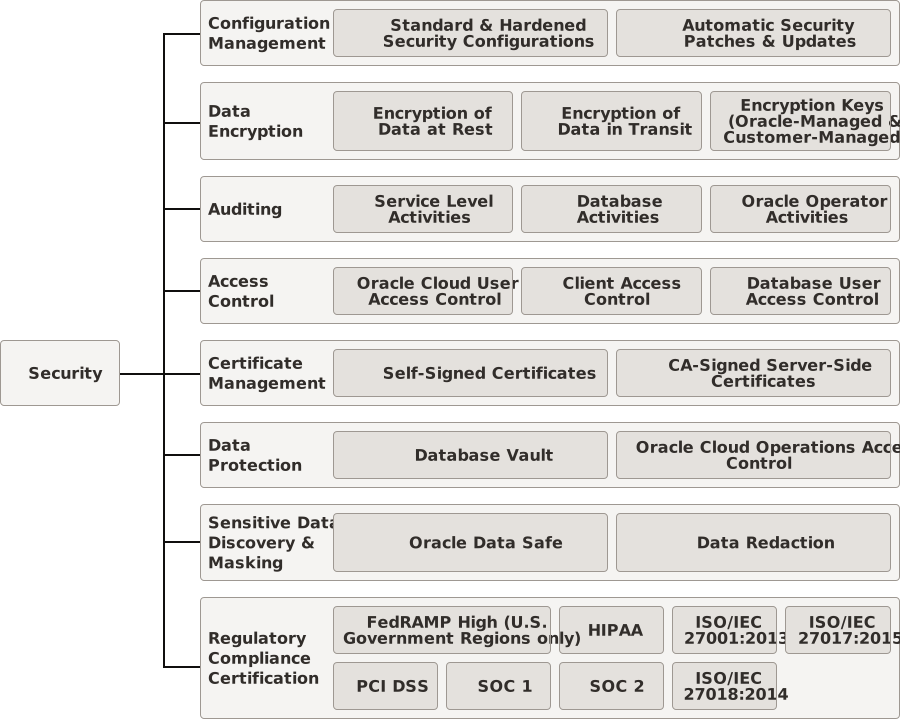
Description of the illustration adbd-security-features.svg
Configuration Management
Built on Oracle Cloud Infrastructure, Autonomous AI Database provides standard, hardened security configurations so you and your team don’t need to spend huge amounts of time and money managing configurations across your Autonomous AI Database fleet. All service accounts such as SYS and System are rotated every 90 days. Refer to Configuration Management in Autonomous AI Database to explore further.
Security patches and updates are done automatically, so you don’t need to worry about keeping security up to date. These capabilities protect your highly sensitive databases and data from costly and potentially disastrous security vulnerabilities and breaches. Refer to Service Maintenance of Dedicated Autonomous AI Database for more details.
Data Encryption
Autonomous AI Database stores all data in encrypted format in the Oracle Database. Only authenticated users and applications can access the data when they connect to the database.
Autonomous AI Database uses always-on encryption that protects data at rest and in transit. All data stored in and network communication with Oracle Cloud is encrypted by default. Encryption cannot be turned off.
Refer to Data Encryption in Dedicated Autonomous AI Database for more details about data encryption and master encryption keys.
Auditing
Oracle Autonomous AI Database on Dedicated Exadata Infrastructure provides robust auditing capabilities that enable you to track who did what on the service and on specific databases. Comprehensive log data allows you to audit and monitor actions on your resources, which helps you to meet your audit requirements while reducing security and operational risk.
Refer to Auditing Capabilities in Dedicated Autonomous AI Database for more details.
Access Control
When configuring the Dedicated Exadata Infrastructure feature, you need to ensure that your cloud users have access to use and create only the appropriate kinds of cloud resources to perform their job duties. Additionally, you need to ensure that only authorized personnel and applications have access to the Autonomous AI Databases created on the dedicated infrastructure. Otherwise, you run the risk of “runaway” consumption of your dedicated infrastructure resources or inappropriate access to mission-critical data.
Access control in Autonomous AI Database includes OCI Identity and Access Management (IAM), client network controls, database authentication and authorization, and Oracle API Access Control for approval-based governance of sensitive management operations. Refer to Access Control Within Dedicated Autonomous AI Database for more details.
Certificate Management
When a client attempts to connect to an Autonomous AI Database through a TCPS (Secure TCP) database connection service, Oracle Autonomous AI Database on Dedicated Exadata Infrastructure uses standard TLS 1.2 and TLS 1.3 certificate-based authentication to authenticate the connection. However, TLS 1.3 is only supported on Oracle AI Database 26ai or later. Regardless of whether the client attempts to connect through a TCPS or TCP database connection service, the client’s access to the database is restricted by the access rights of the database user the client uses to connect.
Oracle Managed Self-signed Certificate
By default, Autonomous AI Database uses self-signed certificates. A self-signed certificate is a security certificate that is system generated.
Certificate generation
Oracle managed self-signed certificates are automatically generated while provisioning an Autonomous Exadata VM Cluster (AVMC) and apply to all the databases created in that AVMC.
Certificate management
Self-signed certificates are generated and associated with an AVMC automatically. However, you must download Autonomous AI Database client wallet before connecting to your databases. With self-signed certificates, connecting to databases without a wallet is not an option. Refer to Download Client Credentials for instructions on downloading a wallet for your database.
Depending on the requirement, either of the following certificate types are associated with your AVMC:
-
Database SSL certificate: SSL certificate for database client connections.
-
ORDS SSL certificate: SSL certificate for Oracle APEX AI Application Generator (APEX) applications.
Bring Your Own Certificate (BYOC)
Bring Your Own Certificate (BYOC) lets you use your CA-signed server-side certificate with your Autonomous AI Databases.
Certificate generation
To bring your own certificate, you must first create the certificate using the Oracle Cloud Infrastructure (OCI) Certificate Service as demonstrated in Creating a Certificate. These certificates must be signed and must be in the PEM format, that is, their file extension must be .pem, .cer, or .crt only.
Certificate installation
After creating the CA-signed server-side certificate, you must install it with your AVMC so that any databases created in it can use this certificate for secure connections. Associating your BYOC certificate with an AVMC is facilitated from the Manage Certificates dialog on the OCI console. On this dialog, choose the Bring your own certificate, and select the certificate that you would have created earlier from the select list. Optionally, you can also specify a CA certificate with certificate authority and CA bundle. However, If you are selecting a CA bundle for an ORDS SSL certificate, the bundle must only contain certificates which are part of the certificate chain. Refer to Manage Security Certificates for an Autonomous Exadata VM Cluster Resource for step-by-step instructions.
Certificate management
You can connect to Autonomous AI Databases associated with a CA-signed server-side with or without an Autonomous AI Database client wallet.
-
To connect to your database using a database wallet, you must first download the client credentials from the database Details page using the OCI console. Refer to Download Client Credentials for instructions.
-
To connect to your database without a client wallet, you must ensure that:
-
One-way TLS connections are enabled at the AVMC level. This is a setting defined using the Listener parameter in Advanced options while provisioning the AVMC. Refer to Create an Autonomous Exadata VM Cluster for guidance.
-
The CA-signed server-side certificate is signed by a well known public CA so that it is trusted by the client operation system by default.
-
Certificate rotation
To meet your organization’s security compliance needs, you can rotate the CA-signed server-side certificates using the Oracle Cloud Infrastructure (OCI) console or API. Refer to Manage Security Certificates for an Autonomous Exadata VM Cluster Resource for step-by-step instructions. This is called certificate rotation.
For newly provisioned Autonomous Exadata VM Cluster (AVMC) resources, if Oracle-managed self-signed SSL certificates are used, they are valid for 13 months from the date of creation. If they are not rotated before expiration, Oracle automatically rotates the certificates and generates new wallets.
If customer-managed SSL certificates are used while provisioning AVMC resources, you are responsible for monitoring their validity and rotating them before they expire. If a certificate expires, the databases on the AVMC will not be reachable through TLS ports until you provide and configure a valid replacement certificate.
In the case of database SSL certificates (Oracle-managed or customer-managed), certificate rotation does not invalidate the existing certificate immediately.
Within two weeks from the certificate rotation, you can connect to your Autonomous AI Database using the client wallet you downloaded before or after the certificate rotation.
After two weeks from the certificate rotation:
-
The database wallet downloaded before the certificate rotation is invalidated and cannot be used to connect to your Autonomous AI Database.
-
The database wallet downloaded within two weeks from the certificate rotation remains active and can be used to connect to your Autonomous AI Database.
-
Any new database wallet downloaded after two weeks from the certificate rotation can be used to connect to your databasesAutonomous AI Database.
Note: If you are migrating from Oracle-managed self-signed certificates to Customer-managed ( BYOK) SSL certificates or vice-versa, the two weeks buffer for invalidating the existing certificate is not applicable and the existing certificate is invalidated immediately..
Let’s discuss this with an example:
Consider an SSL certificate, say C1, is due to expire and you have rotated this certificate on the 1st of February. For two weeks from Feb 1st, that until Feb 14th, the old certificate (C1) is still available to use. You can either continue using the old certificate (C1) or download a new database wallet for the rotated certificate (C2) for your database connections. After two weeks from Feb 1st, that is, from Feb 14th onwards, the old certificate (C1) gets invalidated and cannot be used for database connections. You can continue using the database wallet that you downloaded post certificate rotation (C2) during these two weeks. You can also download a new database wallet and start using it for your database connections after two weeks from rotation.
You can also rotate a database SSL certificate within two weeks from its most recent rotation. In this scenario, the old certificate (about to get invalidated due to the first rotation) gets disabled immediately. The next certificate (resulting from the first rotation) remains active, and a third certificate (resulting from the second rotation) will be waiting for activation for two weeks from the second rotation. Any database wallet downloaded before the first rotation gets invalidated soon after the second rotation. You can continue connecting to the database with any database wallet downloaded after the first rotation until two weeks from the second rotation. After the completion of two weeks from the second rotation, you can only connect to your databases using a client wallet downloaded after the second rotation, that is, a wallet that was downloaded within two weeks from the second rotation or later.
In the example above, if you rotate the same certificate (C1) again within two weeks from Feb 1st, the certificate undergoes double rotation. In this case, the old certificate (certificate before the first rotation, that is, C1) gets invalidated immediately. The certificate resulting from the first rotation (C2) remains active and a third certificate resulting from the second rotation, say C3, will be waiting for activation for two weeks from the second rotation. After two weeks from the second rotation, the certificate resulting from the first rotation (C2) also gets invalidated and any database wallets downloaded before the second rotation cannot be used for database connections. You can continue using the database wallet that you downloaded post certificate rotation (C3) during these two weeks. You can also download a new database wallet and start using it for your database connections after two weeks from the second rotation.
In the case of ORDS SSL certificates, all the existing application connections would be lost with the certificate rotation and you are advised to restart ORDS. The two week buffer period, does not apply when you rotate an ORDS SSL certificate.
Certificate Events
The following events are published for security certificate management:
| Event | Generated when |
|---|---|
| sslcertificateexpiry.reminder | An Autonomous Exadata VM Cluster determines that a wallet is due to expire in less than six (6) weeks. This event is reported at most once per week. This event is triggered when there is a connection that uses the wallet that is due to expire. |
| sslcertificate.expired | The SSL Certificate expires. All the Autonomous AI Database wallets related to this Autonomous Exadata VM Cluster will expire. |
| sslcertificaterotation.reminder | An SSL certificate is older than 365 days and recommends the customer to rotate the certificate. After an SSL certificate crosses 365 days, this reminder is once per week until it is rotated. |
| sslcertificate.rotated | The SSL certificate is rotated either manually (using the Oracle Cloud Infrastructure console or API) or automatically on its expiry. |
Tip: Subscribe to these events using the OCI Notifications Service to receive them whenever they are published. Refer to Creating a Subscription for further details.
Refer to Events for Autonomous AI Database on Dedicated Exadata Infrastructure for a comprehensive list of Autonomous AI Database events.
Data Protection
Data protection is a critical aspect of data security in any database. Privileged database accounts are one of the most commonly used pathways for gaining access to sensitive applications data in the database. While privileged users such as ADMIN or Oracle operators need broad and unrestricted access to facilitate database maintenance, the same access also creates a point of attack for gaining access to large amounts of data.
Autonomous AI Database lets you implement Privileged Access Management (PAM)using:
-
Oracle Database Vault comes preconfigured and ready to use in Autonomous AI Databases. You can use its powerful security controls to restrict access to application data by privileged database users, reducing the risk of insider and outside threats and addressing common compliance requirements.
You can deploy controls to block privileged account access to application data and control sensitive operations inside the database. You can configure trusted paths to add additional security controls to authorized data access and database changes. Through the run-time analysis of privileges and roles, you can increase the security of existing applications by implementing least privileges and reducing the attack profile of your database accounts. Database Vault secures existing database environments transparently, eliminating costly and time consuming application changes.
Oracle AI Database Vault predominantly addresses the following database security concerns:
-
Administrative privileged account access to application data: Although the database administrator is the most powerful and trusted user, this administrator does not need access to application data residing within the database.
Oracle AI Database Vault realms around application schemas, sensitive tables, and stored procedures provide controls to prevent privileged accounts from being exploited by intruders and insiders to access sensitive application data. Refer to How Oracle AI Database Vault Protects Privileged User Accounts in Oracle Database 19c Administrator’s Guide or Oracle Database 26ai Administrator’s Guide for more details.
-
Separation of duties for application data access: Oracle AI Database Vault separation of duty controls can be customized and organizations with limited resources can assign multiple Oracle AI Database Vault responsibilities to the same administrator, but using separate accounts for each separation-of-duty role to minimize damage to the database if any one account is stolen and leveraged. Refer to How Oracle AI Database Vault Addresses Database Consolidation Concerns in Oracle Database 19c Administrator’s Guide or Oracle Database 26ai Administrator’s Guide for more details.
Before using Database Vault, review What to Expect After You Enable Oracle AI Database Vault in Oracle Database 19c Administrator’s Guide or Oracle Database 26ai Administrator’s Guide to understand the impact of configuring and enabling Database Vault.
For information about how to configure and enable Database Vault in your Autonomous AI Database, see Use Oracle AI Database Vault to Manage Database User Privileges.
Tip: To try out the process of setting up Database Vault, run Lab 1: Protect Data With Database Vault in Oracle Autonomous AI Database Dedicated for Security Administrators Workshop.
-
-
PAM is also used to help secure data for customer-authorized use and to help protect data from unauthorized access, which includes preventing access to customer data by Oracle Cloud Operations and support staff members. Oracle Operations Access Control ensures the user accounts that Oracle Cloud operations and support staff use to monitor and analyze the performance cannot access data in Autonomous AI Databases. See Privileged Access Management for more information.
Sensitive Data Discovery and Data Masking
Identifying sensitive data (such as credit card number, SSN) and masking or redacting them as needed enhances data protection and overall data security.
-
Oracle Autonomous AI Database on Dedicated Exadata Infrastructure supports integration with Oracle Data Safe service to help you assess and secure your databases. Oracle Data Safe helps you understand the sensitivity of your data, evaluate risks to data, mask sensitive data, implement and monitor security controls, assess user security, monitor user activity, and address data security compliance requirements in your databases.
It provides the following set of features in a single, easy-to-use management console:
-
Security Assessment helps you assess the security of your database configuration.
-
User Assessment helps you assess the security of your database users and identify high risk users.
-
Data Discovery helps you find sensitive data in your database. Data Masking provides a way for you to mask sensitive data so that the data is safe for non-production purposes.
-
Activity Auditing lets you audit user activity on your database so you can monitor database usage and be alerted of unusual database activities.
For more information about using Data Safe, see Oracle Data Safe Overview in Using Oracle Data Safe.
To use Oracle Data Safe to identify and protect sensitive and regulated data of your Autonomous AI Database, you must register your database with Data Safe. After registering your database with Data Safe, you can go to the Data Safe console directly from the Details page of your Autonomous AI Database. For more information about registering your database, see Register or Deregister a Dedicated Autonomous AI Database with Data Safe.
-
-
When a query issued by an application at run-time returns a result set with sensitive information such as credit card numbers or personal IDs, Oracle Data Redaction can help you mask the sensitive details before returning the result-set to the application. You can implement policies for data redaction using the
**DBMS_REDACT**PL/SQL Package. Refer to DBMS_REDACT in Oracle Database 19c PL/SQL Packages and Types Reference or Oracle Database 26ai PL/SQL Packages and Types Reference.
Regulatory Compliance Certification
Autonomous AI Database on Dedicated Exadata Infrastructure meets a broad set of international and industry-specific compliance standards, including:
-
FedRAMP High - Federal Risk and Authorization Management Program (U.S. Government Regions only)
-
HIPAA - Health Insurance Portability and Accountability Act
-
ISO/IEC 27001:2013 - International Organization for Standardization 27001
-
ISO/IEC 27017:2015 - Code of Practice for Information Security Controls Based on ISO/IEC 27002 for Cloud Services
-
ISO/IEC 27018:2014 - Code of Practice for Protection of Personally Identifiable Information (PII) In Public Clouds Acting as PII Processors
-
PCI DSS - Payment Card Industry Data Security Standard is a set of requirements intended to ensure that all companies that process, store, or transmit credit card information maintain a secure environment
-
SOC 1 - System and Organization Controls 1
-
SOC 2 - System and Organization Controls 2
-
SOC 3 - System and Organization Controls 3
-
C5 - Cloud Computing Compliance Controls Catalog
-
CSA STAR - Cloud Security Alliance Security, Trust, Assurance, and Risk
For more information and a complete list of certifications, see Oracle Cloud Compliance. See Compliance documents to download copies of the certification documents.