Run Natural Language Query on Table Hyperlinks Using Select AI
You can run natural language query on Table Hyperlink data using the Select AI making it easier to analyze and interact with your database.
Select AI supports conversation context maintenance. It provides short-term session memory for quick chats and long-term named conversations for ongoing, multi-session workflows, so you do not need to re-explain context.
See Select AI Conversations for more information.
This section explains Oracle’s Select AI integrated with the Table Hyperlinks supported by AI providers to generate and run SQL from natural language prompts via AI Assistant Chat with the LLM.
Prerequisites
To utilize the natural language query, you must have:
- An OpenAI, Cohere, Azure OpenAI, or an OCI Generative AI account with credits.
-
Access to the
DBMS_CLOUD_AIpackage to create an AI profile using the CREATE_PROFILE Procedure. You must have theEXECUTEprivilege onDBMS_CLOUD_AIto run this procedure.Note:
You must set up your AI profile using the natural language query feature. Refer to Use Select AI to Generate SQL from Natural Language Prompts for more information.
- Enable the AI Assistant for Table Hyperlinks using the CREATE_URL Procedure and UPDATE_URL Procedure of the
DBMS_DATA_ACCESSpackage. For information about enabling the AI Assistant using theai_profile_nameparameter, refer to the procedures in the DBMS_DATA_ACCESS package.
After you have created a Table Hyperlink using Create, Manage, and Monitor Table Hyperlinks, you can access data with it from a browser and view the data in a tabular format or chart view.
To view data in table format, append the ?view=table query parameter to any Table Hyperlink URL. For example, from a browser enter a Table Hyperlink URL with ?view=table appended:
https://dataaccess.adb-stable.us-ashburn-1.oraclecloudapps.com/adb/p/OR5G-WOCbEoJIxPWXA0iK6BFzn_GRq-WoS-W3lvEGIrDN5iLz0R1tSOrVKlhmRI3OIfYURezjcQ/data?view=table
Note:
- You can view the Table Hyperlink only if the Table Assistant has the AI profile set.
- The AI Assistant is not available for Table Hyperlinks created using
SQL_STATEMENTor for Table Hyperlink groups. It is supported only for Table Hyperlinks created usingSCHEMA_OBJECTandSCHEMA_OBJECT_NAME.
You can view the AI Assistant on the Table Hyperlinks page:
- Click Ask AI to ask questions related to the data in the Table Hyperlink.
-
Ask the Oracle Autonomous AI Database a question related to employee data, such as:
Who are the highest paid employees?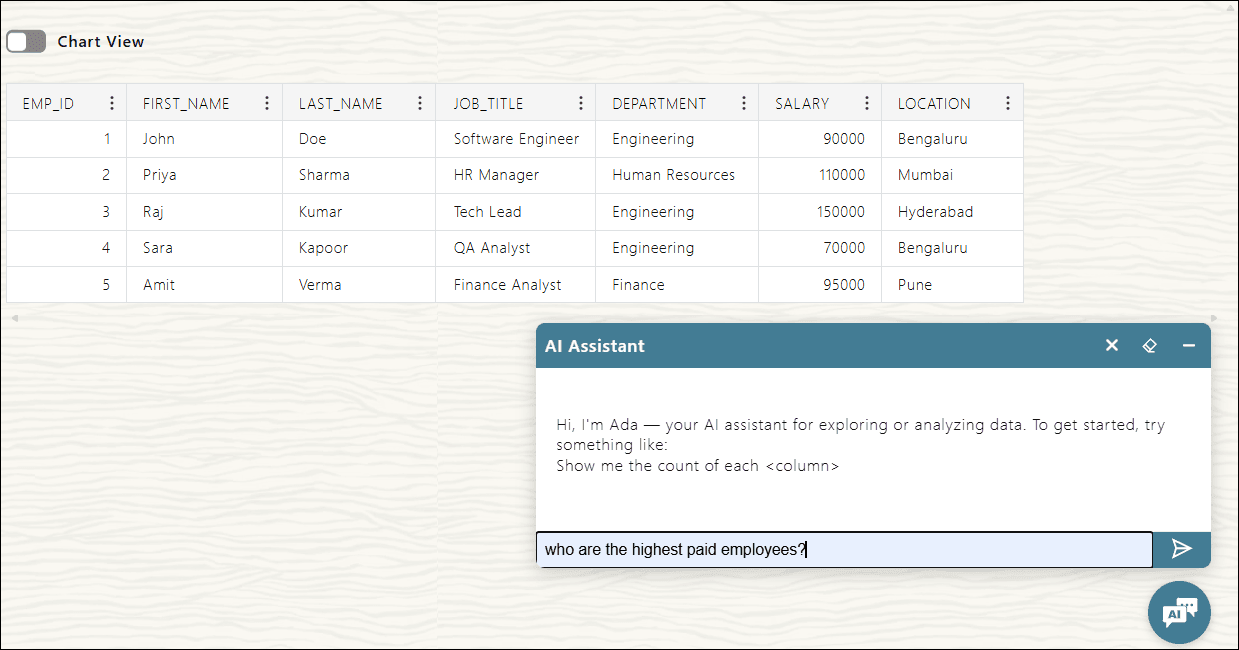
Description of the illustration ai-assistant-question.png
Click Send.
-
Selecting Send generates a response in the Ask AI Assistant and displays the query results with the highest-paid employees listed in descending order.
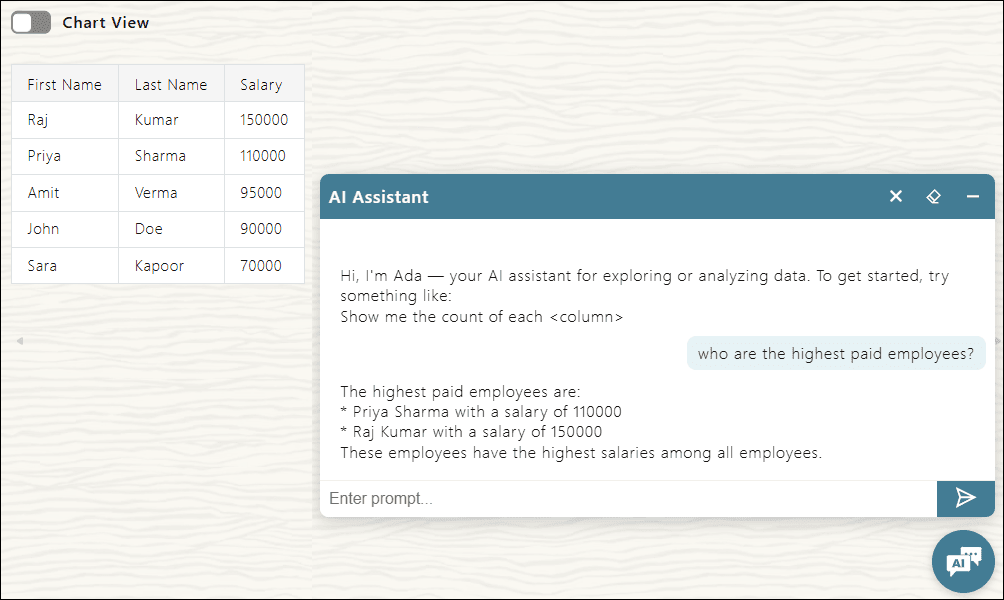
AI Assistant Navigation Options
The following navigation options present in the header of the AI Assistant provide quick access to the following actions:

Description of the illustration ai-assistant-options.png
| Option | Action |
|---|---|
| 1) Minimize | This option reduces the chat window without ending the session. You can hide the chat from view but retain the conversation history and context for easy access later. |
| 2) Clear Chat History | This option deletes the record of the current conversation from the interface. |
| 3) End conversation | This option terminates the current chat session permanently. |