Configure Spatiotemporal for Non-Live Moving Objects Dataset
Perform the following steps to configure spatiotemporal for a dataset containing non-live data on moving objects. The instructions assume that such a dataset is already existing in your database schema.
-
Navigate to the Datasets page.
-
Right-click on the required spatiotemporal dataset and click Properties.
The Dataset Properties dialog opens.
-
Click the Spatiotemporal tab.
The following dialog is displayed:
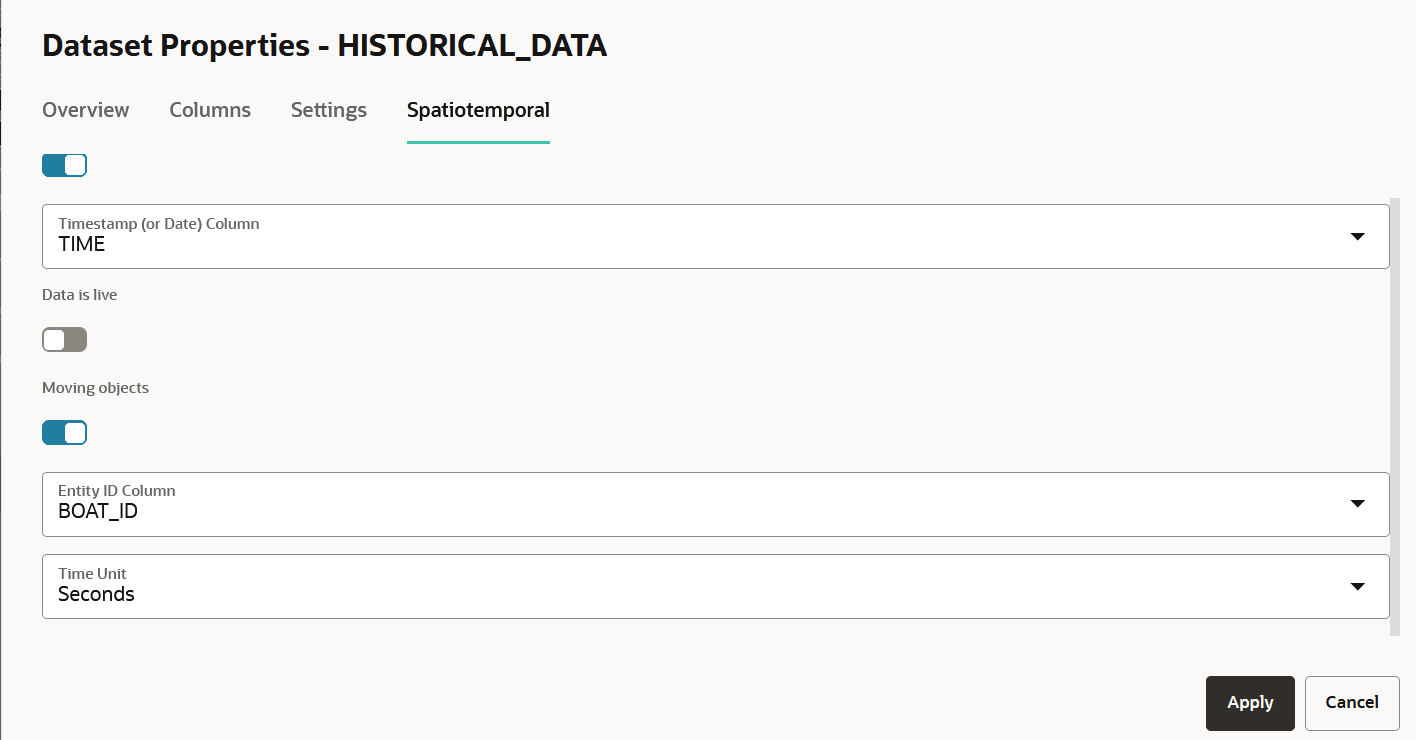
Description of the illustration spatio_temporal_historical-data.png
-
Switch
ONEnable Spatiotemporal. -
Select the Timestamp (or Date) Column.
-
Both date-type and timestamp-type columns are supported.
-
If using a timestamp-type column, then note that Spatial Studio supports only UTC (Coordinated Universal Time) or GMT (Greenwich Mean Time) time zone for visualizing moving objects.
-
-
Switch
OFFData is live. -
Switch
ONMoving objects. -
Select the Entity ID Column that identifies a set of unique entities.
The Entity ID Column is not a unique column as each entity can have many recordings of its locations in the same table.
-
Select the Time Unit.
-
Click Apply.
Your dataset is now enabled for spatiotemporal data visualization.
Related Topics