Upload a Map Symbol
You can upload custom map symbols (or icons) and also 3D models (in .glb format), which you can use in a Map or 3D scene visualization.
Also, note the following:
-
All uploaded symbols are assigned a globally unique ID. The application always references the symbol using its unique ID, and not by its name. The name of the symbol is used only for display purposes in the application.
-
When a regular user (non-administrator) uploads a map symbol, the symbol is visible and accessible only for that specific user and does not become public.
-
When an administrator uploads a map symbol, the symbol is accessible in a read-only manner to everyone in the organization. The symbol will show up in the symbol list of any regular Spatial Studio user along with their own symbols.
-
Regular users can Rename and Delete only their own custom map symbols.
-
If two different users upload an image file with the same name, then the symbols do not get overwritten as each symbol is referenced by its unique ID.
-
When an owner attempts to delete a custom map symbol, Spatial Studio performs a referential check to ensure that the particular symbol is not used in any map visualization.
-
The Copy symbol ID option can be used when the user wants to explicitly assign and apply different custom symbols to different groups of data, in which case the symbol ID needs to be stored in the source data table in its own column.
The following steps enable you to add a custom map symbol in Spatial Studio.
-
Navigate to the Console page.
-
Click Map symbols under Settings.
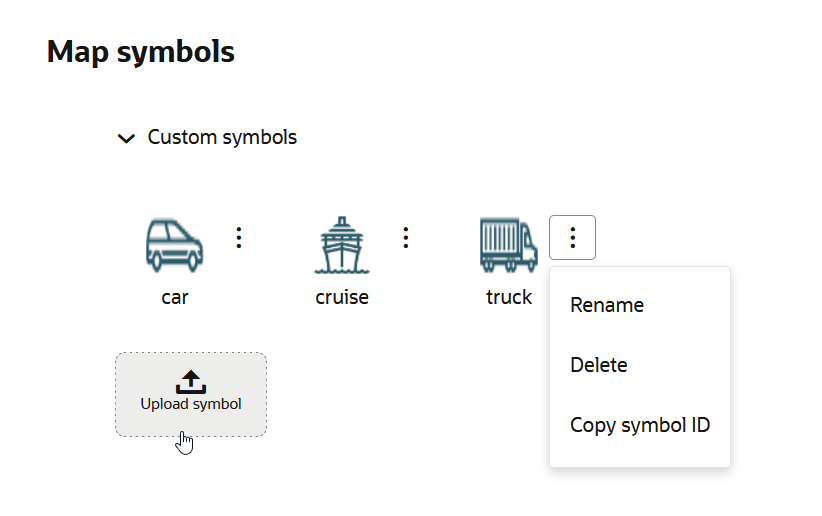
The Map symbols slider opens as shown.
-
Click the Custom symbols collapse icon and click Upload symbol.
-
Select the required image file in your system for the upload.
It is important to note the following:
-
Only
.png,.gif,.jpg, and.glbfile formats are supported. -
Each file cannot exceed 2 MB in size.
-
-
Optionally, change the Symbol name.
-
Click
 to add the custom map symbol.
Once it is uploaded, you can style your data points on a map visualization using the new symbol. See Apply Custom Map Symbols to a Map Layer for more information.