Visualize GeoRaster Data on a Map
Oracle Spatial Studio allows you to visualize GeoRaster data stored in spatial GeoRaster type in Oracle Database. Geo-referenced raster data, including satellite imagery, aerial photos from drones, and gridded data, is very useful for mapping applications. It can be directly analyzed, or layered with vector data as a background map for additional context. See Spatial GeoRaster Developer’s Guide for more information on GeoRaster data.
You can visualize georaster data on a map using the following steps.
The instructions assume that the GeoRaster dataset is already added to the project in the Active Project page. To create a GeoRaster dataset, see Create a GeoRaster Dataset for more information.
-
Click the Visualizations tab on the left pane in the Active Project page.
This lists the various visualization options.
-
Click and drag Map from the list to the visualization window on the right to create a map visualization.
A default base map is displayed with no data visualization layers.
-
Click the Data tab on the left pane in the Active Project page.
This lists all the Datasets that are loaded for the project.
-
Click and drag the desired GeoRaster dataset from the list to the map view on the right.
A GeoRaster layer is created on the map as shown:
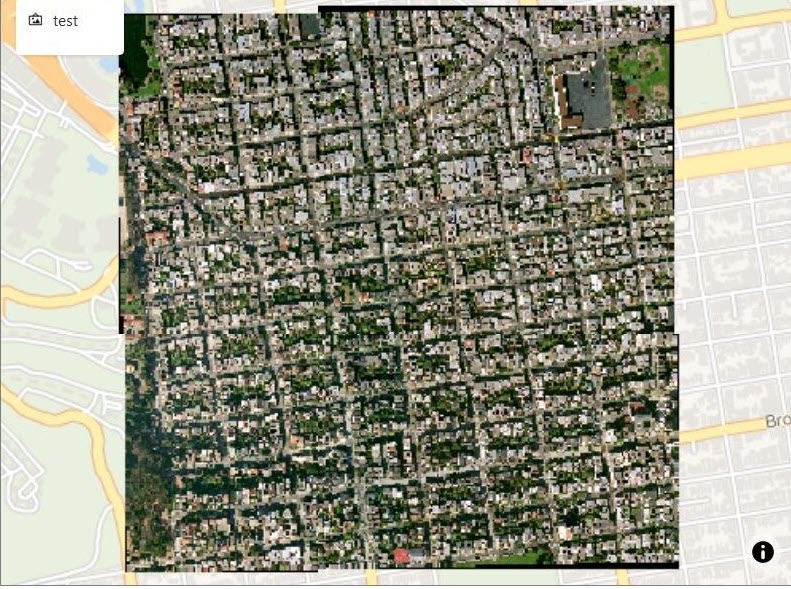
Tip: You can enhance your visual display by modifying your Layer Settings using the Style tab and Raster tab.
Spatial Studio also supports visualization of 3D terrains on a map using GeoRaster Digital Elevation Model (DEM) data. See Apply Style for a GeoRaster Layer for more information.