OCI GoldenGate connectivity
Discover how OCI GoldenGate connects with other services and technologies.
Connecting to your deployment
Oracle Cloud Infrastructure (OCI) GoldenGate deployments are located in a secure area in OCI outside of your tenancy and its network isn’t connected to your network. When you create a deployment, you must select a private subnet where a private endpoint with a private IP is created for the deployment. You can access the GoldenGate deployment through this private IP over the TCP port 443.
By default, all network connectivity to OCI GoldenGate is encrypted with TLS when you connect with the deployment’s Console URL. The domain name of the Console URL is registered in the selected VCN’s DNS resolver to the deployment’s private IP.
Optionally, you can enable public access to your GoldenGate deployment. You must select a public subnet in the same VCN as the deployment’s private endpoint and OCI GoldenGate creates a Flexible Load Balancer with a public IP in the selected subnet. For details, see Create a deployment.
You can access an OCI GoldenGate deployment through its deployment console. Connectivity to the deployment console is done over HTTPS through port 443. OCI GoldenGate connects to Oracle Databases using the default ports 1521 or 1522, and MySQL databases using default port 3306. For Big Data targets, OCI GoldenGate connects using port 443.
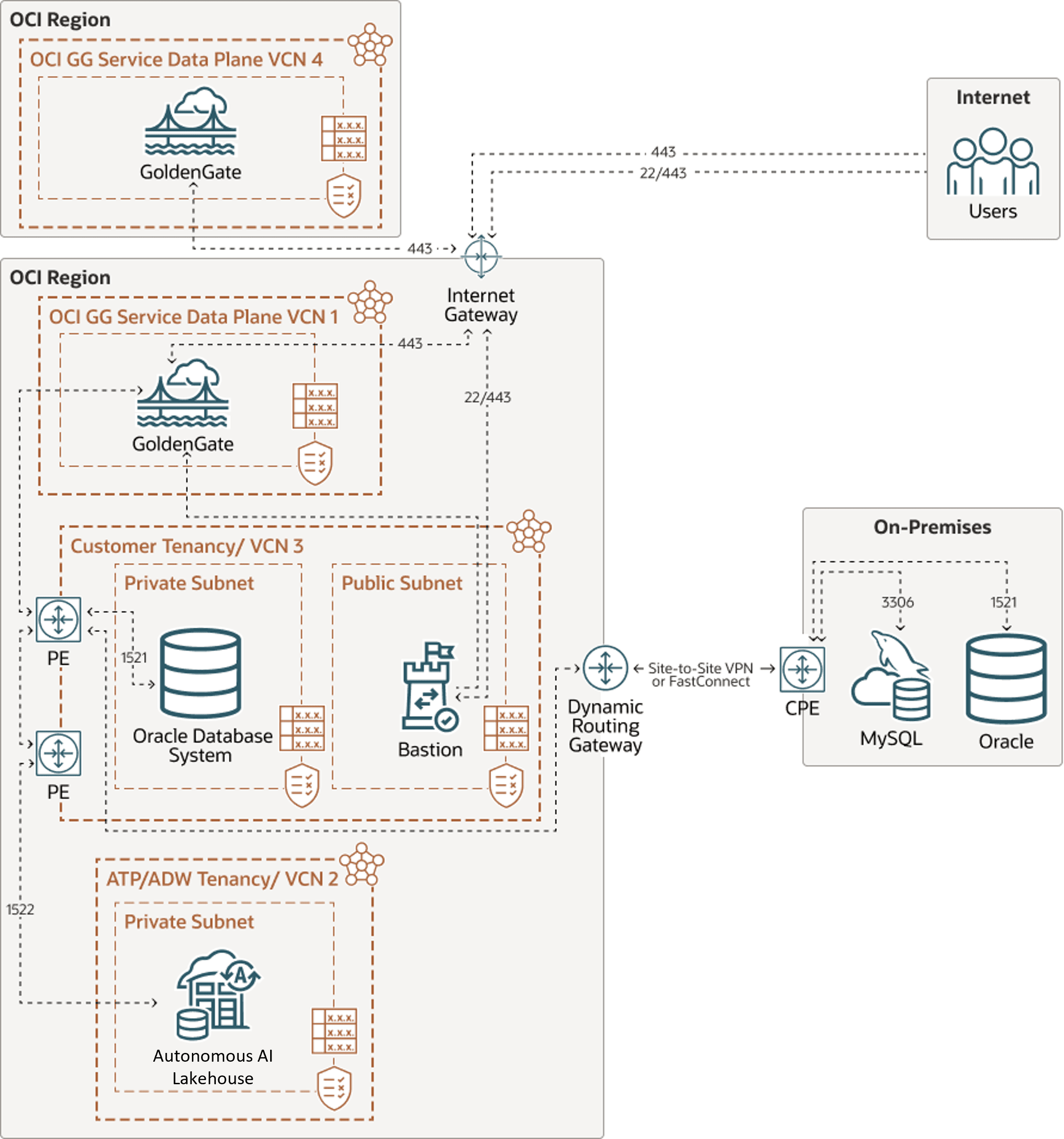
Description of the illustration ggs-network-diagram.png
Connecting to your source and targets
When you create connections, you must specify a Traffic Routing Method. Your choices are:
-
Shared endpoint
-
This is the default mode. The connection uses the assigned deployment's private endpoint to connect to the data source or target.
-
The connection's traffic originates from the assigned deployment's Ingress IPs. Ensure that you have the appropriate network policies in place to create and assign the connection to a deployment.
-
Use Security Rules and VCN Routing rules to ensure network connectivity from the Ingress IPs to the data source or target.
-
Network Security Groups (NSGs) assigned to the deployment also apply to the connection's traffic. Learn more about NSGs.
-
All shared connections assigned to the same deployment share the same network bandwidth.
-
-
Dedicated endpoint:
-
The connection has its own dedicated private endpoint in the selected subnet with its own Ingress IPs. The traffic of this connection originates from these two IP addresses.
-
The connection's subnet can be in a different VCN from the deployment's subnet.
-
Multiple deployments can use the same dedicated connection. If multiple deployments use the same dedicated connection, they share the network bandwidth of the connection's private endpoint.
-
Connecting to public data sources and targets
GoldenGate’s traffic always traverses through your VCN regardless of the connection’s routing method, or the location of the data source or target. If you want to connect to public databases, ensure that you:
-
Configure a NAT Gateway to enable network devices without a public IP to connect to the internet. Connections don't have a public IP and their Ingress IPs are always in your VCN's address space. Learn more about NAT Gateways.
-
Add Routing rules that route traffic towards the internet through the NAT Gateway. By default, public subnets in OCI route internet traffic through an Internet Gateway, while private subnets route it through a NAT Gateway. This is why you must select a private subnet for your deployment, to enable connecting to public targets.
The traffic of your connection will originate from the NAT Gateway’s public IP address. If you want to enable network access control on the source or target database, you must enable connectivity from this IP address.
Some public OCI services like Autonomous AI Database and OCI Streaming can be accessed through both a NAT Gateway and a Service Gateway. When both are available in a VCN, the more specific route is used, which is the NAT Gateway. If the NAT Gateway is used, the Access Control List (ACL) of the target database must enable connections from the VCN (see Access Control List restrictions and notes).
Network considerations
The network requirements for Oracle GoldenGate are as follows:
-
Extract: Performance may be impacted if latency is greater than 80 milliseconds (ms). For Integrated Extract, only the changes to the tables that are being captured are sent to the Extract process itself.
-
Replicat: Performance may be impacted if the latency between the OCI GoldenGate and the target is greater than 5ms.
-
For Oracle GoldenGate to Oracle GoldenGate communication: If you're capturing 100% of the data, then the trail files grow at 30-40% of the generated redo log volume. This means that Oracle GoldenGate sends 30-40% of the generated redo log volume across the network. If the network isn't able to scale to this volume, you can enable compression on the trail file data sent across the network. This compression can typically achieve 8:1 compression ratio or better. You can also modify the TCP window socket size and buffers as well.
Connectivity examples
Example: Replication from Oracle on-premise into Autonomous AI Lakehouse
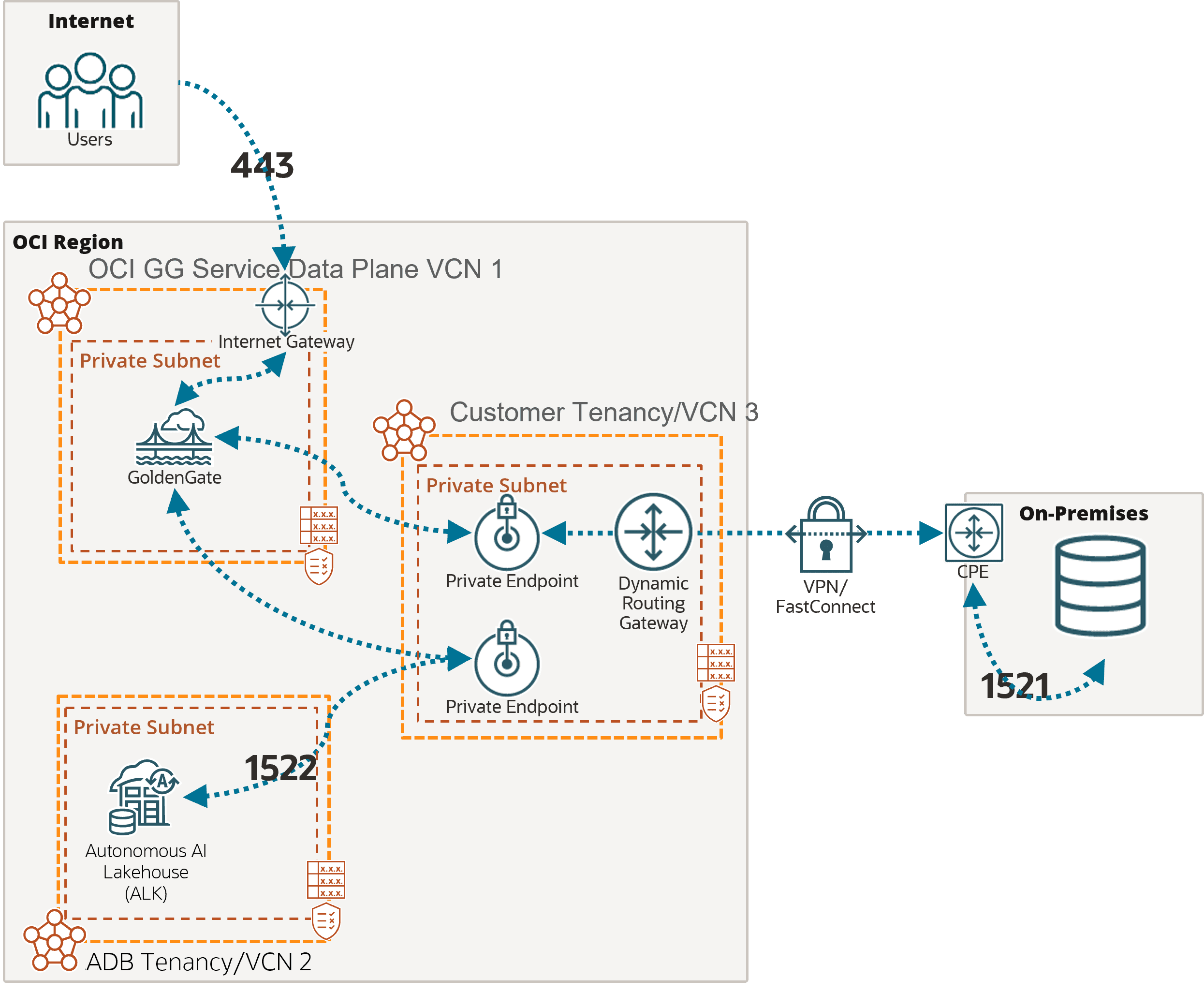
Description of the illustration network-onprem-adw.png
In this example, the OCI GoldenGate deployment is accessible over the public internet using port 443.
As mentioned above, you must add the appropriate subnet security rules to allow connectivity from the Ingress IPs addresses listed in the Connection Details page into the database node’s private IP. Any FQDN provided must be resolvable within the selected subnet.
To connect to Autonomous AI Lakehouse (ALK), OCI GoldenGate also creates a private endpoint over port 1522, unless you selected ‘Secure access from everywhere.’
Example: Replication from Autonomous AI Transaction Processing into Autonomous AI Lakehouse
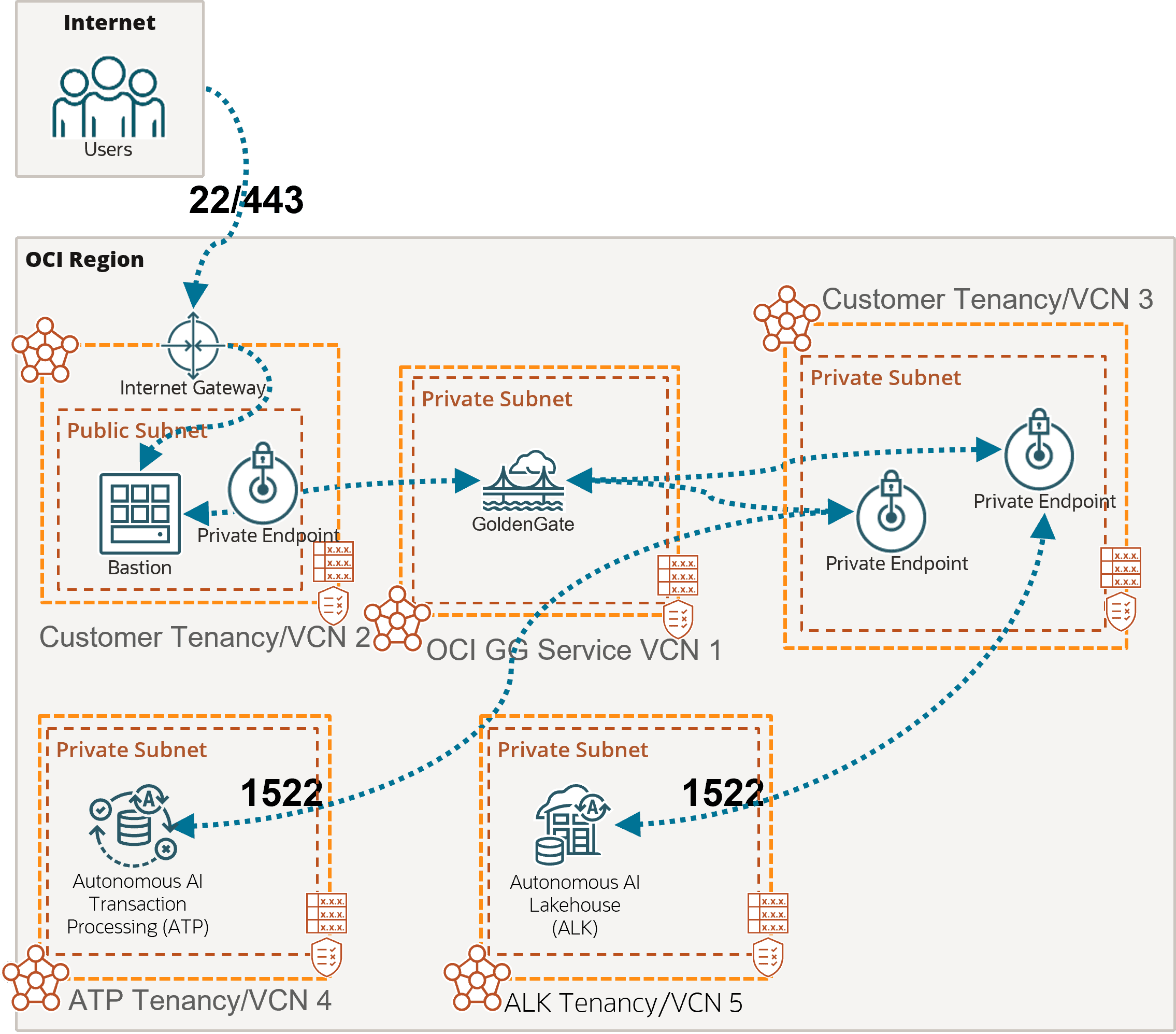
Description of the illustration network-atp-adw.png
In this example, the OCI GoldenGate deployment is only accessible using a private endpoint from within the OCI network, or through a bastion host that secures access to OCI resources. See Connect to Oracle Cloud Infrastructure GoldenGate using a private IP for more details.
To connect to Autonomous AI Transaction Processing (ATP) and Autonomous AI Lakehouse (ALK), OCI GoldenGate creates private endpoints over port 1522, unless you selected ‘Secure access from everywhere.’
If you select the Autonomous AI Database when creating the connection, then the private endpoint gets created automatically. Otherwise, you can enter your Autonomous AI Database configuration manually, and select ‘Shared endpoint’ to reuse the deployment’s private endpoint created in the subnet selected during the deployment creation. Appropriate subnet security rules and DNS resolution configuration is your responsibility within this subnet.
Example: Replication from Azure SQL Managed Instance into Autonomous AI Transaction Processing
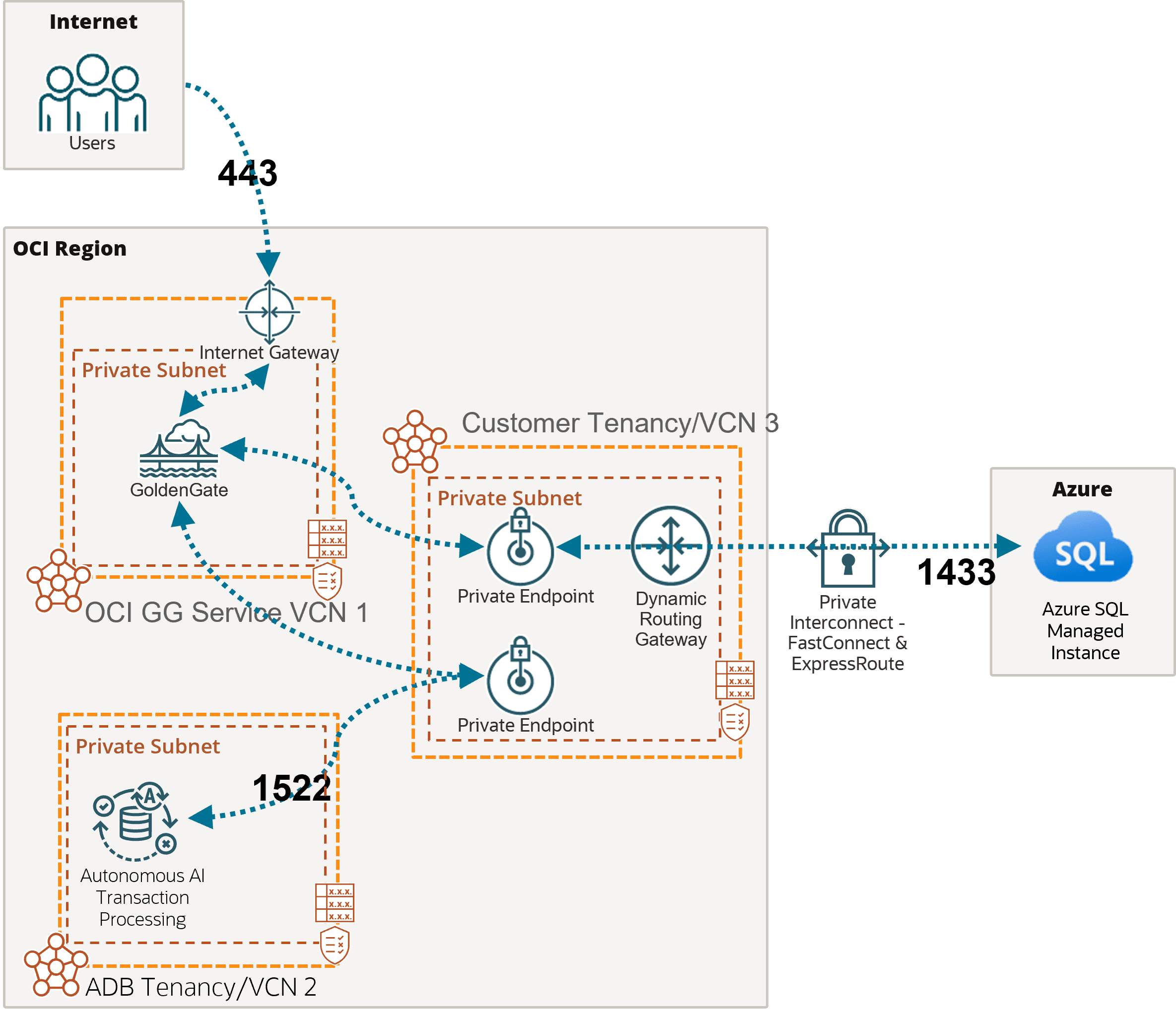
Description of the illustration network-azuresql-atp.png
In this example, the OCI GoldenGate deployment is accessible over the public internet using port 443.
As mentioned earlier, you must add the appropriate subnet security rules to allow connectivity from the Ingress IPs addresses listed on the Connection details page into the database node’s private IP. Any FQDN provided must be resolvable within the selected subnet.
In this example, network traffic goes through a private interconnection between OCI and Azure with FastConnect and ExpressRoute. Port 1433 is used for private connections. Connections to Azure SQL Managed Instance over the public internet typically uses port 3342.
To connect to Autonomous AI Transaction Processing (ATP), OCI GoldenGate creates a private endpoint over port 1522, unless you selected ‘Secure access from everywhere.’