Add the Oracle E-Business Suite Adapter as an Invoke Connection for Submitting a Concurrent Program
After adding the Oracle E-Business Suite Adapter as an invoke connection (RA_Interface_lines) to invoke the RA_INTERFACE_LINES_ALL REST service, you can add the second invoke connection in the flow to invoke the SUBMIT_CP_RAXMTR REST service to submit the RAXMTR (Autoinvoice Master Program) concurrent program.
Perform the following steps to add the Oracle E-Business Suite Adapter as an invoke (target) connection for concurrent program submission:
-
In the "EBS OIT Demo" integration page, drag and drop the "EBSDemo" connection from the Invokes toolbar on the right to the integration, right after the "RA_Interface_lines" activity you just created in Step 2.

Description of the illustration ebsdemo_diagram.gifThe Configure Oracle E-Business Suite Adapter Endpoint wizard appears.
-
In the Basic Info page, enter the following information for your endpoint:
-
What do you want to call your endpoint? - Enter "Submit_RAXMTR".
-
What does this endpoint do? - Enter "Submit the concurrent program for RAXMTR".
Click Next.
-
-
In the Web Services page, specify the following information for your target connection:
-
Product Family: Select "Financial Receivables Suite" from the drop-down list.
-
Product: Select "Receivables".
-
Interface Type: Select "Open Interface" from the list.
-
API: Select "AR Autoinvoice".
The corresponding API internal name (RAXMTR) and description are automatically populated.
Click Next.
-
-
In the Operations page, select a desired method name contained in the API (RAXMTR) for this invoke (target) connection. In this example, select "SUBMIT_CP_RAXMTR".
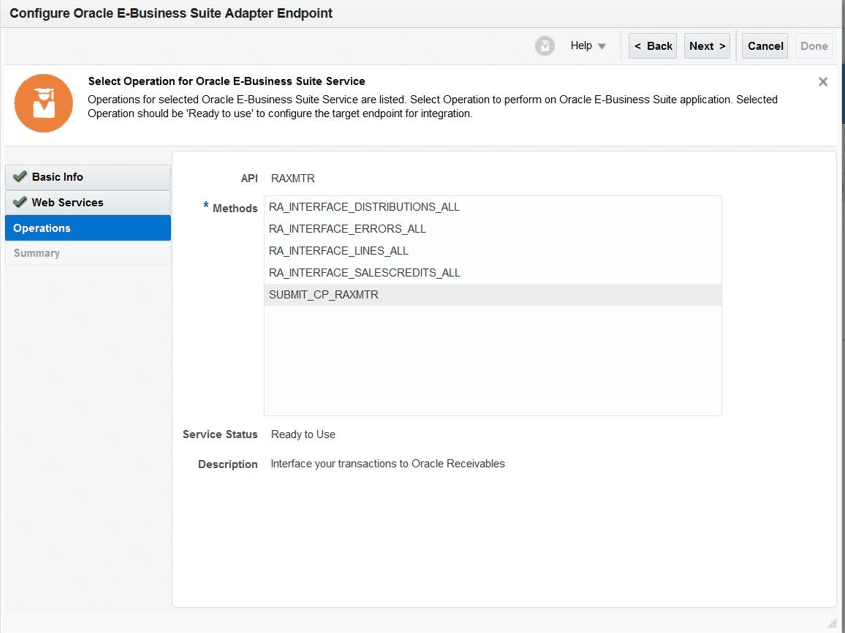
Description of the illustration operations_submit_cp_raxmtr.gifClick Next.
-
The Summary page displays all the selected interface details. This information includes the selected "SUBMIT_CP_RAXMTR" operation contained in the "RAXMTR" REST service from the Financial Receivables Suite product family and Receivables product. This page also displays the default interaction pattern "Synchronize" for the selected service.
The Oracle E-Business Suite Adapter Target Endpoint configuration is successfully created.
Click Done.
-
Click Save to save your work.