Oracle NoSQL Database Cloud Service Subscription
Learn how to manage Oracle NoSQL Database Cloud Service subscriptions and it’s users.
This article has the following topics:
Service Limits
Oracle NoSQL Database Cloud Service has various default limits. Whenever you create an Oracle NoSQL Database Cloud Service table, the system ensures that your requests are within the bounds of the specified limit. When creating On Demand capacity tables, the On Demand Capacity max limits will be used during the validation.
Oracle Cloud tenancies are typically active in more than one region. You can view this as a single large tenancy, however, the Oracle NoSQL Database Cloud Service takes the combination of tenancy OCID and region location to establish some of the limits (region-level limits). Additionally, it has limits at the table level. For detailed list of service limits, see Oracle NoSQL Database Cloud Service Limits.
You can view the existing limits for Hosted Environments, Read Units, Write Units, and Table size for your region from the Governance & Administration > Limits, quotas and usage in Oracle Cloud Infrastructure Console as shown below. This example shows the values for the Ashburn region. You see the service limit, the current usage, and the current availability for each of the limits. Note that the availability can be affected by quota policies on either this compartment or its parent compartment.
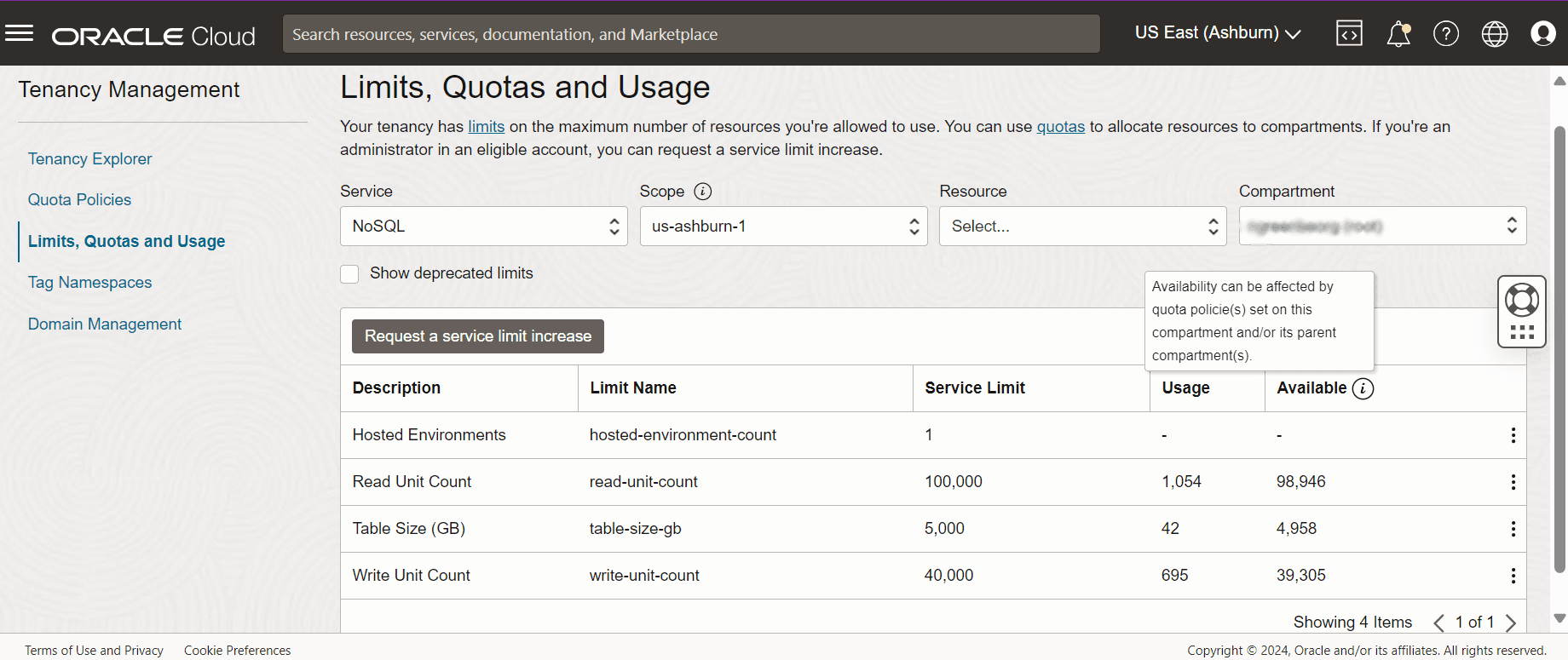
Description of the illustration limit-quotas-usage.png
You can increase the service limits by submitting a request from the Limits, quotas, and usage page in Oracle Cloud Infrastructure Console as follows. This creates a CAM ticket.
-
Click the Request a service limit increase button. This opens the Request limit increase page.
-
Enter a request name and reason for request. Click Next and click Add under Requested items. Select NoSQL from the Service drop-down. Click Next.
-
Select the limit name from the Limit name drop-down.
-
Update the value of the limit.
-
Click Save.
-
Click Next. Review the details of the request, and then click Submit.
Example: Service limit update request for increasing the read units from 100000 to 110000 in the Ashburn region.
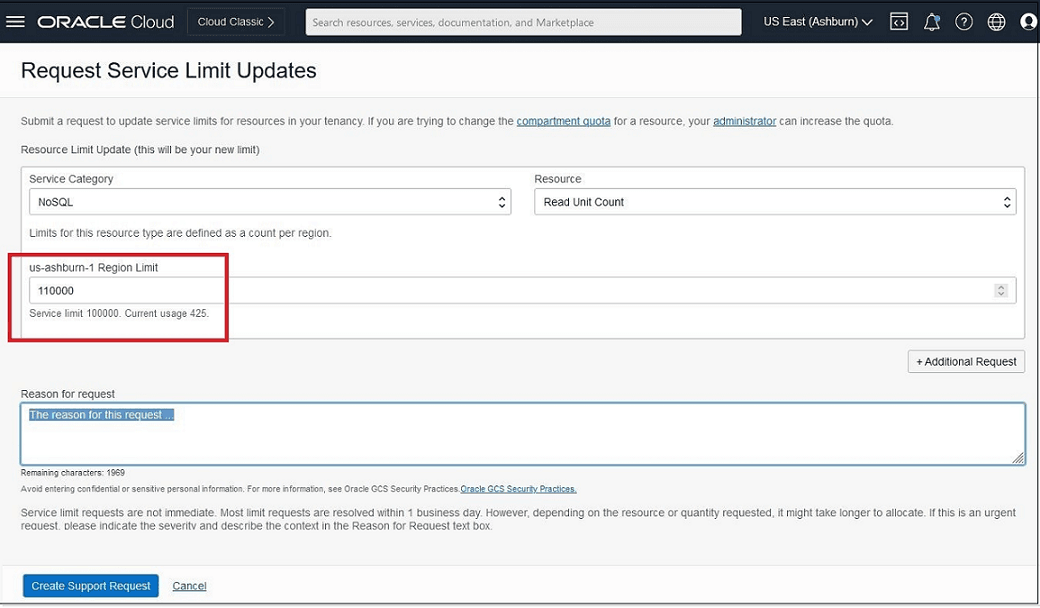
Description of the illustration req_ser_limit_upd.png
If the name of the limit that you want to update is not listed, select any limit name and retain its existing value. Add a note in the Reason for request dialog box, stating the limit you want to increase and the required value. You can then submit the request by clicking the Submit button.
For more details on service limits, see About Service Limits and Usage in Oracle Cloud Infrastructure Documentation.
Requesting a Dedicated Hosted Environment
Learn how to raise a service ticket to request a dedicated hosted environment.
Oracle NoSQL Database hosted environment offers a NoSQL environment that is dedicated to your tenancy. With a dedicated environment, you have the option to define encryption keys used for data encryption. For more details, see Introduction to Customer-Managed Encryption keys.
To request a dedicated hosted environment:
- Sign in to your Oracle NoSQL Database Cloud Service.
- Type Limits, quotas and usage in the Search bar at the top and go to the Limits, quotas and usage page. Ensure that you have selected the correct region in the upper right. This should be the region where you want the hosted environment.
- Click the Request a service limit increase button.
- Click Add under Requested Items and select service NoSQL. Click Next and select Hosted Environments.
- Enter the number of host environments you require.
- In the Reason for Request text box:
-
To request a default endpoint, add this text: “Requesting a new Hosted Environment”. The default endpoint name will be
<tenancyName>.nosql.<REGION>.oci.oraclecloud.com.To request a different endpoint, add this text: “Requesting endpoint prefix: <alternativePrefix>”. This will result in
<alternativePrefix>.nosql.<REGION>.oci.oraclecloud.com. -
To place a request for enabling encryption key in your dedicated environment for CMEKs, add this text: “Requesting to enable CMEKs”.
-
-
Click Save.
- Review your request and click Submit.
Note: The hosted environment will be provisioned and available to you in approximately 10 business days, depending on the availability of hardware, after placing the service request. Once the hosted environment is ready, a comment with the text Your request has been fulfilled will be updated in the service request. You can poll the service request to check if you have received this comment regarding the provisioning of the hosted environment.
Service Quotas
You can use quotas to determine how other users allocate Oracle NoSQL Database Cloud Service resources across compartments in Oracle Cloud Infrastructure. A compartment is a collection of related resources, such as instances, virtual cloud networks, and block volumes, that can be accessed only by certain groups that have been given permission by an administrator. Whenever you create an Oracle NoSQL Database Cloud Service table or scale up the provisioned throughput or storage, the system ensures that your requests are within the bounds of the quota for that compartment.
This table lists the Oracle NoSQL Database Cloud Service quotas that you can reference.
| Name | Scope | Description |
|---|---|---|
| hosted-environment-count | Regional | Hosted Environments |
| read-unit-count | Regional | Region Unit Count |
| write-unit-count | Regional | Write Unit Count |
| table-size-gb | Regional | Table Size (GB) |
You can set quotas using the Console or API. You can execute quota statements from the Quota Policies page under the Governance option in Oracle Cloud Infrastructure Console.
Example Quota Statements for Oracle NoSQL Database Cloud Service
-
Example 1: Limit the number of Oracle NoSQL Database Cloud Service read units that users can allocate to tables they create in my_compartment to 20,000.
set nosql quota read-unit-count to 20000 in compartment my_compartmentIf you do not specify any region, then the quota will be set to the entire tenancy, which means it applies to all regions. However, you can set a specific quota to one region alone by applying a filter condition in the
setclause and specifying the name of one particular region as shown below. -
Example 2: Limit the number of Oracle NoSQL Database Cloud Service read units that users can allocate to tables they create in the region us-phoenix-1 to 10,000.
set nosql quota read-unit-count to 10000
in compartment my_compartment where request.region = us-phoenix-1
In this example, Only the Phoenix region will have a read unit count quota of 10000.
-
Example 3: Limit the number of Oracle NoSQL Database Cloud Service write units that users can allocate to tables they create in my_compartment to 5,000.
set nosql quota write-unit-count to 5000 in compartment my_compartment -
Example 4: Limit the maximum storage space of Oracle NoSQL Database Cloud Service that users can allocate to tables they create in my_compartment to 1,000 GB.
set nosql quota table-size-gb to 1000 in compartment my_compartment
See About Compartment Quotas in Oracle Cloud Infrastructure Documentation.
Service Events
Actions that you perform on Oracle NoSQL Database Cloud Service tables emit events.
You can define rules that trigger a specific action when an event occurs. For example, you might define a rule that sends a notification to administrators when someone drops a table. See Overview of Events and Get Started with Events in Oracle Cloud Infrastructure Documentation.
This table lists the Oracle NoSQL Database Cloud Service events that you can reference.
| Friendly Name | Event Type |
|---|---|
| Alter Table Begin | |
| Alter Table End | |
| Change Table Compartment Begin | |
| Change Table Compartment End | |
| Create Index Begin | |
| Create Index End | |
| Create Table Begin | |
| Create Table End | |
| Add Replica Begin | |
| Add Replica End | |
| Drop Index Begin | |
| Drop Index End | |
| Drop Table Begin | |
| Drop Table End | |
| Drop Replica Begin | |
| Drop Replica End | |
Example
This example shows information associated with the event Create Table Begin:
{
  "cloudEventsVersion": "0.1",
  "contentType": "application/json",
  "source": "nosql",
  "eventID": "*<unique_ID>*",
  "eventType": "com.oraclecloud.nosql.createtable.begin",
  "eventTypeVersion": "*<version>*",
  "eventTime": "2019-12-30T00:52:01.343Z",
  "data": {
    "additionalDetails": {},
    "availabilityDomain": "*<availability_domain>*",
    "compartmentId": "ocid1.compartment.oc1..*<unique_ID>*",
    "compartmentName": "my_compartment",
    "freeformTags": {
    "key":"value"
     },
    "resourceId": "ocid1.nosqltable.oc1..*<unique_ID>*",
    "resourceName": "my_nosql_table"
  },
  "extensions": {
    "compartmentId": "ocid1.compartment.oc1..*<unique_ID>*"
  }
}
Service Metrics
Learn about the metrics emitted by the metric namespace oci_nosql (Oracle NoSQL Database Cloud Service).
Metrics for Oracle NoSQL Database Cloud Service include the following dimensions:
-
RESOURCEID
The OCID of the NoSQL Table in the Oracle NoSQL Database Cloud Service.
Note: OCID is an Oracle-assigned unique ID that is included as part of the resource’s information in both the console and API.
-
TABLENAME
The name of the NoSQL table in the Oracle NoSQL Database Cloud Service.
-
REPLICA
The name of the region that receives the table update from another region.
Oracle NoSQL Database Cloud Service sends metrics to the Oracle Cloud Infrastructure Monitoring Service. You can view or create alarms on these metrics using the Oracle Cloud Infrastructure Console SDKs or CLI. See OCI SDKs and CLI in Oracle Cloud Infrastructure Documentation.
Available Metrics
| Metric | Metric Display Name | Unit | Description | Dimensions |
|---|---|---|---|---|
ReadUnits |
Read units | Units | The number of read units consumed during this period. | resourceId tableName |
WriteUnits |
Write units | Units | The number of write units consumed during this period. | resourceId tableName |
StorageGB |
Storage GB | GB | The maximum amount of storage consumed by the table. As this information is generated hourly, you may see values that are out of date in between the refresh points. | resourceId tableName |
ReadThrottleCount |
Read throttle count | Count | The number of read throttling exceptions on this table in the time period. | resourceId tableName |
WriteThrottleCount |
Write throttle count | Count | The number of write throttling exceptions on this table in the time period. | resourceId tableName |
StorageThrottleCount |
Storage throttle count | Count | The number of storage throttling exceptions on this table in the time period. | resourceId tableName |
MaxShardSizeUsagePercent |
Maximum shard usage percent | Percentage | The ratio of the space used in the shard over the total space allocated to the shard. This is specific to a table and will be the highest value across all shards. | resourceId tableName |
Replica Lag |
Replica lag | Millisecond | A time lag in replicating the data changes of a Global Active table from a sender region to a receiver region. | resourceId tableName replica |
Data Regions and Associated Service Endpoints
Learn about the data regions supported for Oracle NoSQL Database Cloud Service and access region-specific service endpoints.
Data Regions
To start with Oracle NoSQL Database Cloud Service, you must create an account (either for free trial or to purchase provisioning). Along with other details, the account application requires you to choose the default data region.
If your application is running under your tenancy on an OCI host in the same region, you should configure your VCN to route all NDCS traffic through the Service Gateway. See Access to Oracle Services: Service Gateway for more details.
Service Endpoints Associated with Data Regions
A service endpoint is the regional network access point to the Oracle NoSQL Database Cloud Service. The general format of a region endpoint is https://nosql.{region}.oci.oraclecloud.com.
For example, the service endpoint for the Ashburn Oracle NoSQL Database Cloud Service region identifier in North America region is https://nosql.us-ashburn-1.oci.oraclecloud.com. Different data regions have different {region} components of their URLs.
This table lists the service endpoints for all the data regions which are supported by Oracle NoSQL Database Cloud Service. See Service Availability for the latest information about the regions that support Oracle NoSQL Database Cloud Service.
| Data Region | Region Identifier | Service Endpoint |
|---|---|---|
| North America | ca-montreal-1 | https://nosql.ca-montreal-1.oci.oraclecloud.com |
| North America | ca-toronto-1 | https://nosql.ca-toronto-1.oci.oraclecloud.com |
| North America | us-ashburn-1 | https://nosql.us-ashburn-1.oci.oraclecloud.com |
| North America | us-chicago-1 | https://nosql.us-chicago-1.oci.oraclecloud.com |
| North America | us-phoenix-1 | https://nosql.us-phoenix-1.oci.oraclecloud.com |
| North America | us-sanjose-1 | https://nosql.us-sanjose-1.oci.oraclecloud.com |
| North America | us-dallas-1 | https://nosql.us-dallas-1.oci.oraclecloud.com |
| North America | us-abilene-1 | https://nosql.us-abilene-1.oci.oraclecloud.com |
| North America | us-boardman-1 | https://nosql.us-boardman-1.oci.oraclecloud.com |
| North America | us-desmoines-1 | https://nosql.us-desmoines-1.oci.oraclecloud.com |
| North America | us-quincy-1 | https://nosql.us-quincy-1.oci.oraclecloud.com |
| North America | us-shawnee-1 | https://nosql.us-shawnee-1.oci.oraclecloud.com |
| EMEA | af-johannesburg-1 | https://nosql.af-johannesburg-1.oci.oraclecloud.com |
| EMEA | eu-amsterdam-1 | https://nosql.eu-amsterdam-1.oci.oraclecloud.com |
| EMEA | eu-frankfurt-1 | https://nosql.eu-frankfurt-1.oci.oraclecloud.com |
| EMEA | eu-jovanovic-1 | https://nosql.eu-jovanovic-1.oci.oraclecloud.com |
| EMEA | eu-madrid-1 | https://nosql.eu-madrid-1.oci.oraclecloud.com |
| EMEA | eu-marseille-1 | https://nosql.eu-marseille-1.oci.oraclecloud.com |
| EMEA | eu-milan-1 | https://nosql.eu-milan-1.oci.oraclecloud.com |
| EMEA | eu-paris-1 | https://nosql.eu-paris-1.oci.oraclecloud.com |
| EMEA | eu-stockholm-1 | https://nosql.eu-stockholm-1.oci.oraclecloud.com |
| EMEA | eu-zurich-1 | https://nosql.eu-zurich-1.oci.oraclecloud.com |
| EMEA | il-jerusalem-1 | https://nosql.il-jerusalem-1.oci.oraclecloud.com |
| EMEA | me-abudhabi-1 | https://nosql.me-abudhabi-1.oci.oraclecloud.com |
| EMEA | me-dubai-1 | https://nosql.me-dubai-1.oci.oraclecloud.com |
| EMEA | me-jeddah-1 | https://nosql.me-jeddah-1.oci.oraclecloud.com |
| EMEA | me-riyadh-1 | https://nosql.me-riyadh-1.oci.oraclecloud.com |
| EMEA | uk-cardiff-1 | https://nosql.uk-cardiff-1.oci.oraclecloud.com |
| EMEA | uk-london-1 | https://nosql.uk-london-1.oci.oraclecloud.com |
| EMEA | eu-dublin-3 | https://nosql.eu-dublin-3.oci.oraclecloud.com |
| APAC | ap-chuncheon-1 | https://nosql.ap-chuncheon-1.oci.oraclecloud.com |
| APAC | ap-hyderabad-1 | https://nosql.ap-hyderabad-1.oci.oraclecloud.com |
| APAC | ap-melbourne-1 | https://nosql.ap-melbourne-1.oci.oraclecloud.com |
| APAC | ap-mumbai-1 | https://nosql.ap-mumbai-1.oci.oraclecloud.com |
| APAC | ap-osaka-1 | https://nosql.ap-osaka-1.oci.oraclecloud.com |
| APAC | ap-seoul-1 | https://nosql.ap-seoul-1.oci.oraclecloud.com |
| APAC | ap-singapore-1 | https://nosql.ap-singapore-1.oci.oraclecloud.com |
| APAC | ap-singapore-2 | https://nosql.ap-singapore-2.oci.oraclecloud.com |
| APAC | ap-sydney-1 | https://nosql.ap-sydney-1.oci.oraclecloud.com |
| APAC | ap-tokyo-1 | https://nosql.ap-tokyo-1.oci.oraclecloud.com |
| APAC | ap-batam-1 | https://nosql.ap-batam-1.oci.oraclecloud.com |
| APAC | ap-kulai-1 | https://nosql.ap-kulai-1.oci.oraclecloud.com |
| LAD | mx-queretaro-1 | https://nosql.mx-queretaro-1.oci.oraclecloud.com |
| LAD | mx-monterrey-1 | https://nosql.mx-monterrey-1.oci.oraclecloud.com |
| LAD | sa-bogota-1 | https://nosql.sa-bogota-1.oci.oraclecloud.com |
| LAD | sa-santiago-1 | https://nosql.sa-santiago-1.oci.oraclecloud.com |
| LAD | sa-saopaulo-1 | https://nosql.sa-saopaulo-1.oci.oraclecloud.com |
| LAD | sa-valparaiso-1 | https://nosql.sa-valparaiso-1.oci.oraclecloud.com |
| LAD | sa-vinhedo-1 | https://nosql.sa-vinhedo-1.oci.oraclecloud.com |