Plan your service
Take some time to plan your Oracle NoSQL Database Cloud Service service before you create it. Think about the questions outlined here and decide what you want to do, before you start.
This article has the following topics:
Developer Overview
Get a high-level overview of the service architecture and select an SDK/Driver that will meet your application development needs.
NDCS Developer tasks
Oracle NoSQL Database Cloud Service (NDCS) is a fully HA service. It is designed for highly demanding applications that require low latency response times, a flexible data model, and elastic scaling for dynamic workloads. As a fully managed service, Oracle handles all the administrative tasks such as software upgrades, security patches, hardware failures, and patching.
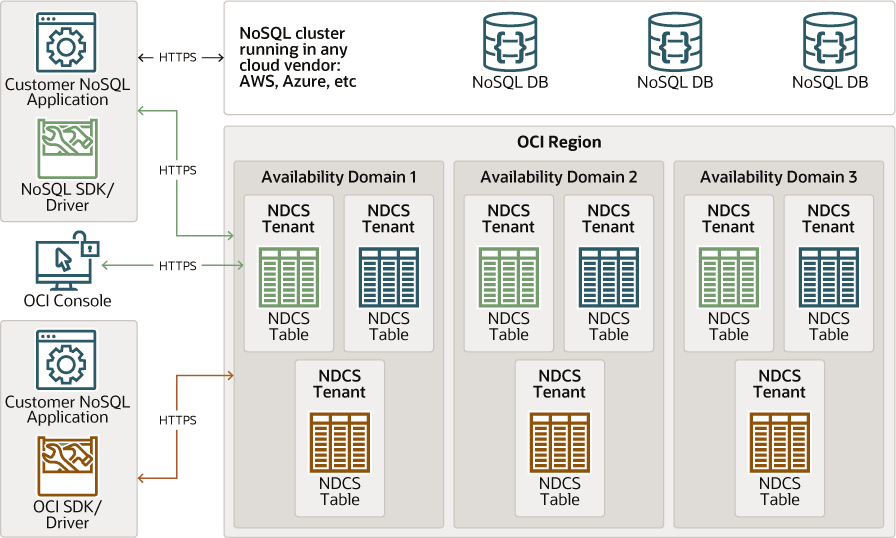
Description of the illustration developer_overview.png
NoSQL Database SDKs/Drivers - These SDKs are licensed under Universal Permissive License (UPL) and can be used on either the NoSQL Cloud Service or the on-premise database. These are full featured SDKs and offer a rich set of functionality. These drivers can also be used in applications executing against Oracle NoSQL clusters running in other vendors cloud.
You can refer to the table below for links to the SDKs, API guides, and examples:
-
SDK (GitHub) - Provides details on how to install, connect and get started with the SDK
-
API Guide - Provides the packages, classes, methods, and interfaces available in the SDK
-
Examples - Provides code samples that you can try out
OCI Console - Offers ability to create tables quickly, modify tables, delete tables, load data, create indexes quickly, delete indexes, basic queries, alter table capacities and view metrics.
OCI SDKs/Drivers - Oracle Cloud Infrastructure provides a number of Software Development Kits (SDKs) to facilitate development of custom solutions. These are typically licensed under UPL.
Difference between NoSQL Database SDKs/Drivers and OCI SDKs/Drivers:
OCI SDKs are REST-based. They are easy to use but have limited functionality. The NoSQL Database SDKs on the other hand, offer a rich set of functionality. It is recommended that you use NoSQL Database SDKs as they offer the following benefits over OCI SDKs.
-
NoSQL Database SDKs can be used in applications connecting to the cloud service, on-premises data stores, and the NoSQL Cloud Simulator.
-
NoSQL Database SDKs offer a much richer development experience. They support more SQL features that are not supported via REST.
-
You can use third-party implementations like Jakarta NoSQL or Eclipse TopLink with NoSQL Database SDKs.
References:
Oracle NoSQL Database Cloud Service Limits
Oracle NoSQL Database Cloud Service has various default limits. Whenever you create an Oracle NoSQL Database Cloud Service table, the system ensures that your requests are within the bounds of the specified limit. Some limits are imposed at the table level and some are imposed at the region level.
To learn more about Service Limits, their scope and how to increase your service limits by submitting a request, see Service Limits. Listed below are the current limits that apply to Oracle NoSQL Database Cloud Service.
| Limit | Scope | Description | Value in a non-hosted environment | Value in a hosted environment |
|---|---|---|---|---|
| Maximum table storage size | Table | Maximum total storage size per tenant. The total space used for one or more tables cannot exceed this value. | 5 TB | 17.5TB |
| Table Names | Table | Maximum number of characters, allowed characters, and initial character for table names. | Table names can have a maximum of 256 characters. All names must begin with a letter (a-z, A-Z). Subsequent characters can be letters (a-z, A-Z), digits (0-9), or underscore. | Same as a non-hosted environment |
| Provisioned Capacity - Maximum read and write throughput | Table | Maximum read and write throughput while provisioning a table. | 40,000 read units and 20,000 write units per table. | Up to 420,000 read units and 280,000 write units total for all tables in the hosted environment |
| On-Demand Capacity - Maximum read and write throughput | Table | Maximum read and write throughput while using On Demand Capacity to provision tables. | 10,000 read units and 5,000 write units per table. | Not allowed/needed in a hosted environment |
| On-Demand capacity - Number of tables | Region | Number of tables with On Demand Capacity. | 3 | Not allowed/needed in a hosted environment |
| Change the provisioning mode | Table | Change the provisioning mode for the table from Provisioned to On Demand or vice-versa. | Can be changed only once per day. | N/A |
| Maximum number of tables | Region | The maximum number of tables. | 30 | This can be customized using the Request Service Limits Update |
| Maximum number of columns. | Table | The maximum number columns. | 50 | This can be customized using the Request Service Limits Update |
| Maximum number of table schema updates | Table | The maximum number of table schema updates. | 100 | This can be customized using the Request Service Limits Update |
| Maximum number of indexes | Table | The maximum number of indexes. | 5 | This can be customized using the Request Service Limits Update |
| Maximum number of changes for throughput and storage limits | Table | The maximum number of changes for throughput and storage limits. | Oracle allows:
|
This can be customized using the Request Service Limits Update |
| Index Names | Index | The maximum number of characters, allowed characters, and initial character. | Index names can have a maximum of 64 characters. All names must begin with a letter (a-z, A-Z). Subsequent characters can be letters (a-z, A-Z), digits (0-9), or underscore. | This can be customized using the Request Service Limits Update |
Maximum number of individual operations per WriteMultiple request |
Request | The maximum number of individual operations per WriteMultiple request. |
50 | Same as a non-hosted environment. This can also be increased using the Request Service Limits Update |
Maximum data size for WriteMultiple request. |
Request | The maximum data size for WriteMultiple request. |
25 MB | Same as a non-hosted environment. This can also be increased using the Request Service Limits Update |
| Columns Names | Column | The maximum number of characters, allowed characters, and initial character. | Field names can have a maximum of 64 characters. All names must begin with a letter (a-z, A-Z). Subsequent characters can be letters (a-z, A-Z), digits (0-9), or underscore. | Same as a non-hosted environment. |
| Maximum secondary index key size | Index | Maximum index key size. | 64 bytes | This can be customized using the Request Service Limits Update |
| Maximum primary index key size | Index | Maximum primary key size. | 64 bytes | This can be customized using the Request Service Limits Update |
| Maximum row size | Row | Maximum row size. | 512 KB | This can be customized using the Request Service Limits Update |
| Maximum query string length. | Query | Maximum query string length. | 10 KB | This can be customized using the Request Service Limits Update |
| Maximum supported rate of DDL operations. | Region | Maximum supported rate of DDL operations. | 4 per minute | This can be customized using the Request Service Limits Update |
| Maximum values for throughput and data storage resources. | Region | Maximum values for throughput and data storage resources. | Per region, Oracle allows:
Oracle allows a maximum storage size of 5-TB per-tenant. The region can have a single table with storage size of 5 TB, in which case the region is not able to create another table. Or have multiple tables and ensure that the data within all these tables is within the maximum storage size of 5 TB. |
420,000 write units, 280,000 read units, 17.5 TB storage |
Estimating Capacity
Learn how to estimate throughput and storage capacities for your Oracle NoSQL Database Cloud Service.
Basics Behind the Calculation
Before you learn how to estimate throughput and storage for the service, let’s review the throughput and storage unit definitions.
-
Write Unit (WU): One Write Unit is defined as throughput for up to 1 kilobyte (KB) of data per second. A write operation is any Oracle NoSQL Database Cloud Service API call that results in insertion, update, or deletion of a record. A NoSQL table has a write limit value which specifies the number of write units that may be used each second. Index updates also consume write units.
For example, a record size of less than 1 KB requires one WU for a write operation. A record size of 1.5 KB requires two WUs for the write operation.
-
Read Unit (RU): One Read Unit is defined as throughput for up to 1 KB of data per second for an eventually consistent read operation. Your NoSQL table has a read limit value which specifies the number of read units that may be used each second.
For example, a record size of less than 1 KB requires one RU for an eventually consistent read operation. A record size of 1.5 KB requires two RUs for an eventually consistent read operation and four RUs for an absolutely consistent read operation.
-
Storage Capacity: One storage unit is a single gigabyte (GB) of data storage.
-
Absolute Consistency: The data returned is expected to be the most recently written data to the database.
-
Eventual Consistency: The data returned may not be the most recently written data to the database; if no new updates are made to the data, eventually all accesses to that data return the latest updated value.
Note: Oracle NoSQL Database Cloud Service automatically manages the read and write capacities to meet the needs of dynamic workloads when using On-Demand Capacity. It is recommended to validate that the capacity needs do not exceed the On Demand Capacity limits. See Oracle NoSQL Database Cloud Service Limits for more details.
Factors that Impact the Capacity Unit
Before you provision the capacity units, it is important to consider the following factors that impact the read, write, and storage capacities.
-
Record size: As the record size increases, the number of capacity units consumed to write or read data also increases.
-
Data consistency: Absolute consistency reads are twice the cost of eventual consistency reads.
-
Secondary Indexes: In a table, when an existing record is modified (added, updated, or deleted), updating secondary indexes consume Write Units. The total provisioned throughput cost for a write operation is the sum of write units consumed by writing to the table and updating the local secondary indexes.
-
Data modeling choice: With schema-less JSON, each document is self-describing which adds metadata overhead to the overall size of the record. With fixed schema tables, the overhead for each record is exactly 1 byte.
-
Query pattern: The cost of a query operation depends on the number of rows retrieved, number of predicates, the size of the source data, projections, and the presence of indexes. The least expensive queries specify a shard key or index key (with an associated index) to allow the system to take advantage of primary and secondary indexes. An application can try different queries and examine the consumed throughput to help tune the operations.
Real World Example: How to Estimate your Application Workload
Consider an E-commerce application example to learn how to estimate reads and writes per second. In this example, Oracle NoSQL Database Cloud Service is used to store the product catalog information of the application.
-
Identify the data model (JSON or fixed-table), record size, and key size for the application.
Assume that the E-commerce application follows the JSON data model and the developer has created a simple table with two columns. A record identifier (primary key) and a JSON document for the product features and attributes. The JSON document, which is under 1 KB (0.8 KB) is as follows:
{
  "additionalFeatures": "Front Facing 1.3MP Camera",
  "os": "Macintosh OS X 10.7",
  "battery": {
    "type": "Lithium Ion (Li-Ion) (7000 mAH)",
    "standbytime" : "24 hours" },
  "camera": {
    "features": ["Flash","Video"],
    "primary": "5.0 megapixels" },
  "connectivity": {
    "bluetooth": "Bluetooth 2.1",
    "cell": "T-mobile HSPA+ @ 2100/1900/AWS/850 MHz",
    "gps": true,
    "infrared": false,
    "wifi": "802.11 b/g" },
  "description": "Apple iBook is the best in class computer
            for your professional and personal work.",
  "display": {
    "screenResolution": "WVGA (1280 x 968)",
    "screenSize": "13.0 inches" },
  "hardware": {
    "accelerometer": true,
    "audioJack": "3.5mm",
    "cpu": "Intel i7 2.5 GHz",
    "fmRadio": false,
    "physicalKeyboard": false,
    "usb": "USB 3.0" },
  "id": "appleproduct_1",
  "images": ["img/apple-laptop.jpg"],
  "name": "Myshop.com : Apple iBook",
  "sizeAndWeight": {
    "dimensions": [
      "300 mm (w)",
      "300 mm (h)",
      "12.4 mm (d)" ],
    "weight": "1250.0 grams" },
  "storage": {
    "hdd": "750GB",
    "ram": "8GB" }
}
Assume that the application has 100,000 such records and the primary key is about 20 bytes in size. Also, assume that there are queries that would read records using secondary index. For example, to find all the records that have screen size of 13 inches. So, an index is created on the
screenSizefield.The information in summarized as follows:
Tables Rows per Table Columns per Table Key Size in Bytes Value Size in Bytes (sum of all columns) Indexes Index Key Size in Bytes 1 100000 2 20 1 KB 1 20 -
Identify the list of operations (typically CRUD operations and Index reads) on the table and at what rate (per second) they are expected.
Operation Number of Operations (per second) Example Create Records. 3 To create a product. Read records using the primary key. 200 To read product details using the product ID. Read records using the secondary index. 1 To fetch all products that have a screen size of 13 inches. Update or add an attribute to a record. 5 To update the product description of a camera
or
To add information about the weight of a camera.
Delete record. 5 To delete an existing product. -
Identify the read and write consumption in KB.
Operation Assumptions (If any) Formula Read Consumption (KB) Write Consumption (KB) Notes/Explanation Create Records. Assume that the records are created without performing any condition checks (if they exist). Record size (rounded to next KB) + 1 KB(index) * (number of indexes)0 1 KB + 1 KB (1 ) = 2 KB Record size is 1 KB ( 0.8 KB for JSON column and 20 bytes for key column) and there is one index of size 1 KB.
A create operation incurs a read unit cost if you execute the put commands with some options. Since you need to guarantee that you are reading the most current version of the row, absolute consistent reads are used. In such cases you use the multiplier 2 in the read unit formula. Here are the different options of determining read unit costs:
- If Option.IfAbsent or Option.IfPresent is used, then Read Consumption = 2
- If setReturnRow is used, then Read Consumption = 2 * Record size
- If Option.IfAbsent and setReturnRow is used, then Read Consumption = 2 * Record size
Read records using the primary key. Record size round up to KBRecord size = 1 KB 0 Record size is 1 KB Read records using the secondary index. Assume that 100 records are returned. record_size * number_of_records_matched11KB *100 = 100KB
100 KB + 10 KB = 110 KB
0 There is no charge for secondary index. The record size is 1 KB. For 100 records it is 100 KB.
Additional 10 KB accounts for variable overhead that may occur depending on the number of batches returned and the size limit set for the query.
The overhead is the cost of reading last key in a batch. This is a variable that depends on the maxReadKB and record size. The overhead is up to (numBatches - 1) * key read cost(1KB).
Update existing records Assume that the updated record size is the same as the old record size (1 KB). Read consumption = record_size * 2Write consumption = original_record_size + new_record_size + 1 KB (index) * (number of writes)1 KB * 2 1 KB + 1 KB + 1KB(1) *(2) = 4 KB When rows are updated using a query(SQL statement), then both read and write units are consumed. Depending on the update it may need to read the primary key, secondary key, or even the record itself. Absolute consistent reads are needed to guarantee we are reading the most recent record. Absolute consistency reads are twice the cost of eventual consistency reads. That is the reason for multiplying by 2 in the formula.
Read Consumption: No charge for index and Record size is 1 KB. If executing using the option setReturnRow, then Read Consumption = 2 * Record size
Write Consumption: The original and new record size is 1 KB and 1KB for one index.
Delete record Read consumption = 1 KB (index) * 2Write consumption = record_size + 1KB (index) * (number_of_indexes)1 KB (1) *2 = 2 KB 1 KB + 1 KB(1) * (1) = 2 KB A delete incurs both read and write unit costs. Since you have to guarantee you are looking at the most current version of the row, absolute consistent reads are used, that is the reason to use the 2 multiplier in the read unit formula.
If executing using the option setReturnRow, Read Consumption = 2 * Record size. Otherwise, Read Consumption= 1KB for one index
Write Consumption: Record size is 1 KB and 1KB for index. No of index is 1.
Using steps 2 and 3, determine read and write units for the application workload.
Operations Rate of Operations Reads per Second Writes per Second Create records 3 0 6 Read records using the primary Key 300 300 0 Read records using the secondary index 10 1100 0 Update existing record 5 10 20 Delete record 1 2 2 Total Read Units: 1412
Total Write Units:28
Therefore, the E-commerce application is estimated to have a workload of 1412 reads per second and 28 writes per second. Download the Capacity Estimator
Note: The preceding calculations assume eventually consistent read requests. For an absolute consistency read request, the operation consumes double the capacity units. Therefore, the read capacity units would be 4844 Read Units.
Estimating Your Monthly Cost
Learn how to estimate the monthly cost of your Oracle Cloud subscription.
When you are ready to order your Oracle Cloud service, Oracle provides you with a cost estimator to figure out your monthly usage and costs before you commit to a subscription model or an amount.
The Cost Estimator automatically calculates your monthly cost based on your input of read units, write units, and storage. But for you to understand how to calculate the read and write units for your application, follow these steps:
-
Step 1: Navigate to the Estimating Capacity topic. Estimate your application workload by using the example and formulas described in this topic.
Download and use the Capacity Estimator from Oracle Technology Network to estimate write units, read units, and the storage capacity for your application based on the application workload and database operations criteria.
-
Step 2: Access the Cost Estimator on the Oracle Cloud website. Select the Data Management checkbox. Scroll through to locate Oracle NoSQL Database Cloud, and select Add to add an entry for Oracle NoSQL Database Cloud under the Configuration Options. Expand NoSQL Database to find the different Utilization and configuration options. Input values for the Utilization and Configuration parameters to estimate the cost for Oracle NoSQL Database Cloud Service usage from your Oracle Cloud Pay-As-You-Go and Monthly Flex subscriptions.
-
Step 3: Access the Cost Estimator on the Oracle Cloud website. In the Dropdown, select Data Management. You see various options displayed under Data Management. Scroll through to locate Oracle NoSQL Database Cloud. Click Add to add an entry for Oracle NoSQL Database Cloud under the Configuration Options.
-
Step 4: Expand Database - NoSQL to find the different Utilization and configuration options. You have two options under Configuration. You could start with an “Always Free” option (Available only in Phoenix Region), or you could provision your instance with your desired configuration.
- Step 4a: If you want an Always Free option, under Configuration expand Oracle NoSQL Database Cloud - Read, Oracle NoSQL Database Cloud Service - Storage, and Oracle NoSQL Database Cloud Service - Write and change the Read, Storage and Write capacity as 0. Then your total cost estimate is shown as 0 and you can proceed with the Always Free option.
-
Step 5: Alternatively, if you want to provision higher read, write, and storage capacity than what is available in Always Free, you can do so by entering the configuration values under Database-NoSQL.
-
Step 5a: Under Utilization, do not modify the default values as Oracle NoSQL Database Cloud Service does not use any of these values.
-
Step 5b: Under Configuration, add the number of Read Units, Write Units, and Storage Capacity that you estimated in the previous step. The cost is estimated based on your input values and shown on the page.
-
Note: If you are using the autoscale feature, an invoice will be generated end-of-the-month for the actual consumption of read and write units in real-time. So you may wish to collect your own audit logs in the application to verify end-of-the-month billing. It would be recommended to log the consumed read and write units that are returned by the NoSQL Database Cloud service with every API call. You could use this data to correlate with end-of-the-month invoicing data from the Oracle Cloud metering and billing system.
For a detailed understanding of the different pricing models available, see NoSQL Database Cloud Service Pricing.
Cost/Billing for Global Active Tables
The cost/billing for a Global Active table has two components. The first component is the pricing model that is followed for singleton tables, which takes into account the read units per month, write units per month, and Gigabyte (GB) storage capacity per month. The second component is for the replicated writes for each regional table replica for the Global Active table. Incoming replicated writes are charged based on writes consumed.