The Embedded Browser
Oracle Visual Builder Add-in for Excel uses the Microsoft WebView2 control as an embedded web browser to display web pages from inside Microsoft Excel. WebView2 is based on Edge/Chromium.
The embedded web browser is used to display the log-in web page when authenticating using Oracle Fusion Applications Token Relay or OAuth 2.0 Authorization Code Flow. See Authentication Options.
Your default web browser setting in Windows Settings has no effect on the add-in.
The WebView2 Control
Microsoft Edge WebView2 is an embedded web browser based on Edge/Chromium. In order for Oracle Visual Builder Add-in for Excel to use WebView2, the WebView2 runtime must be installed on each computer where the add-in runs.
Installation
Download the Microsoft Edge WebView2 runtime.
Note: The WebView2 runtime may already be present on your computer if you have Microsoft 365 Apps installed. See Microsoft Edge WebView2 and Microsoft 365 Apps.
Technical Notes
- When installing the WebView2 runtime, choose one of the “evergreen” installers. Do not choose the “Fixed Version” option.
- During the login sequence, using the WebView2 browser’s Refresh function can cause issues, particularly if it is performed early in the login sequence. Users should avoid using Refresh.
- If you encounter a problem with the log-in web page, please contact the page owner. Such pages are outside the scope of the add-in. Let the page owner know that the page needs to be compatible with Edge/Chromium. Refer to Differences between Microsoft Edge and WebView2 on the Microsoft web site for more information.
- When the add-in uses the WebView2 browser control, the browser’s SmartScreen feature is disabled. See the Microsoft Defender SmartScreen Frequently Asked Questions for more information.
-
The WebView2 browser control uses a user data folder on the local computer to store browser data, such as cookies, permissions, and cached resources. This folder can be found under
%LocalAppData%\Oracle\Visual Builder. For example,C:\Users\username\AppData\Local\Oracle\Visual Builder\EBWebView.To clear the browser cache for the WebView2 browser control, refer to Clear the Embedded Browser Cache.
See also Manage user data folders in the Microsoft Edge documentation.
- When the add-in uses the WebView2 browser control, it enables some Microsoft capabilities relating to single sign-on (SSO) with Azure Active Directory, such as the
AllowSingleSignOnUsingOSPrimaryAccountproperty. See the AllowSingleSignOnUsingOSPrimaryAccount property in the Microsoft API Reference.
Clear the Embedded Browser Cache
If required, you can clear the cache for the embedded browser to get rid of all browser data including profile data such as history, bookmarks, and cookies. You may want to try clearing the browser cache if, for example, you are having an issue with a login page.
To clear the cache for the embedded browser, choose Clear Browser Cache from the Advanced menu.
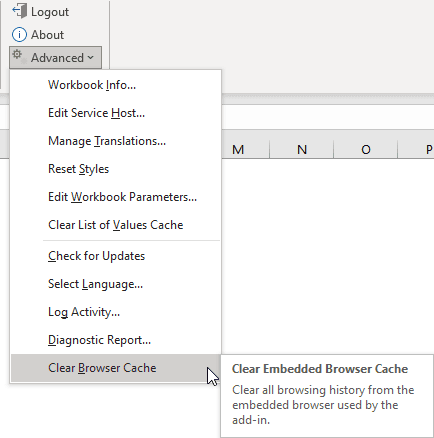
Description of the illustration clear-browser-cache.png
Note: You can also clear this cache by simply deleting the
EBWebViewfolder at%localappdata%\Oracle\Visual Builder\EBWebView. The browser recreates the folder when the add-in next accesses the browser.