Manage Catalogs and Business Objects
When you create a layout, you provide the service metadata document for the REST service which Oracle Visual Builder Add-in for Excel uses to generate the Business Object catalog for your workbook. If required, you can use the available editors to modify the catalog in a variety of ways to enhance the overall user experience. For example, you can use the Business Object Field Editor to add help text to business object fields.
When you edit the details of business objects in your workbook, you’re only telling the add-in how the service operates, you are not telling the service what it should do. Service behavior cannot be changed from the workbook. So any changes you make to the catalog in the workbook must be compatible with the service.
To view the editors progressively, start by clicking Manage Catalogs from the Oracle Visual Builder tab. This opens the Manage Business Object Catalogs editor. From here, you can choose a catalog and open the Business Object Catalog Editor, and so on.
You can also open the business object and business object field editors from the Layout Designer. Both options (using Manage Catalogs and the Layout Designer) are shown here:
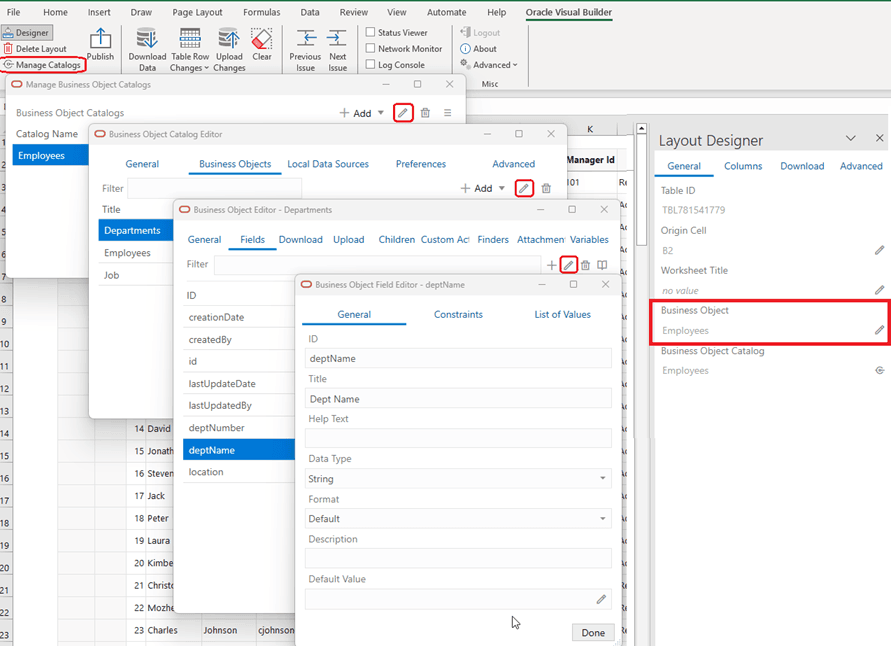
Description of the illustration excel-service-editors-combined.png
Use these editors to perform tasks such as these:
- Manage Business Object Catalogs: Import, open, and refresh a catalog
- Business Object Catalog Editor: Configure the host and base paths for a catalog, as well as configure the business objects in the catalog. You can also configure more advanced settings such as authentication, GZIP, the REST API Framework, and total row count requests for download progress.
- Business Object Editor: Override the base path of the object, manage metadata path information, configure pagination, and configure row finders. You can also find Download and Upload tabs for configuring download and upload operations.
- Business Object Field Editor: Edit field titles, change when a field is editable, and configure Help text. You can also configure the list of values for a field.
Note: When reading through the topics in this section, you’ll come across many terms such as OpenAPI, REST service, and path. Before you begin, refer to Key Concepts, Components, and Terms to familiarize yourself with some of these terms.