Manage Layout Capabilities
Each layout in Oracle Visual Builder Add-in for Excel enables you to perform various standard and custom actions in an Excel workbook, so long as the operation is supported by your service. You can enable or disable these supported capabilities to control their availability in a layout.
- In the Excel ribbon, click Designer to open a workbook’s Layout Designer.
-
Click Advanced to see the layout’s capabilities. Here’s an example of a Form-over-Table layout, indicating form capabilities and table capabilities:
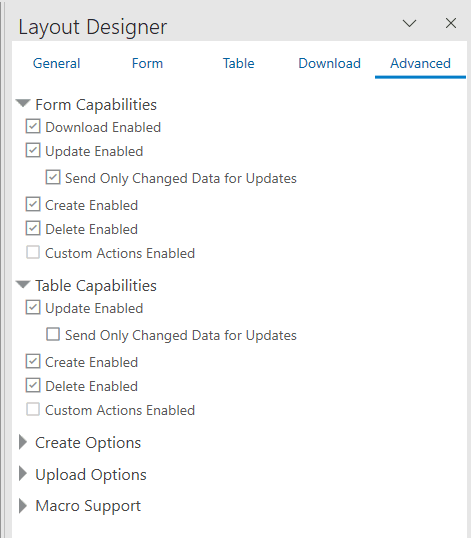
Description of the illustration layout-capabilities1.png
Note: See the Download tab for the layout’s download options.
-
Select or deselect options as required. If the business object doesn’t support an action, it won’t be available for selection (like Delete Enabled under Table Capabilities as shown in this image). See REST Operations for more information about the REST support required for these options.
For a dependent Table layout, Create Enabled may also be unavailable when the layout needs a column from its immediate parent layout to support row creation. If the checkbox is cleared and disabled with a warning help icon, add an appropriate parent column to the layout. See Add Columns from the Parent Layout to Support Row Creation.