Add a Call Function Action
You add a Call Function action to call a function defined for the current page, flow, or application. Functions for a page, flow and application are created using their JavaScript editor.
For API information about this action, see Call Function in the Oracle Visual Builder Studio Page Model Reference.
To use a Call Function action:
-
Add the action in one of three ways, as explained at the end of Built-In Actions.
-
In the Properties pane, select an existing function from the Function Name list, or click Create to create a new function. You can select or create a function that is defined for the current page, flow, or application.
-
If you want to view or modify the function’s code, click Go to Module Function to go to the JavaScript editor to do so.
-
If the function requires input parameters, they’ll be listed under the Parameters section of the Properties pane. For each input parameter, hover over the far-right side of the parameter and click
 to choose the variable that holds the value, or click
 to create an expression for the value. If you need to create a variable, use the appropriate Create link in the Variables dialogue to create it at the appropriate scope level.
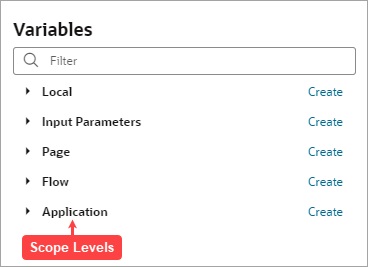
Description of the illustration jsac-create-variable-assigner.jpg
Here’s an example of a Call Function action, with its input parameter,
arg1, needing specification:
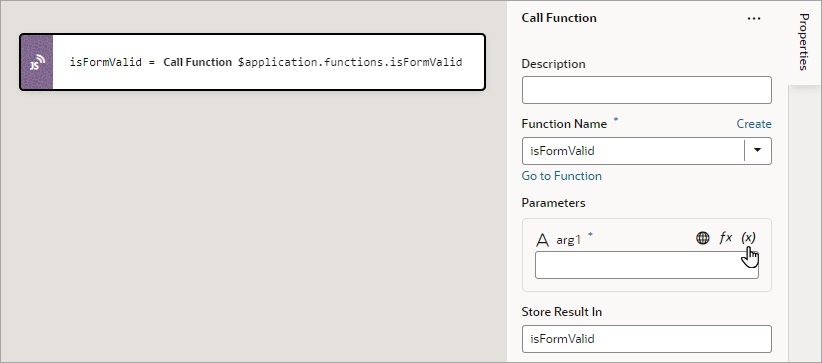
Description of the illustration jsac-call-function-action-example1.jpg
If a value is returned by the action, it is assigned to the auto-generated variable shown by the Store Result In property.