How Do I Use YAML to Create or Configure a Job?
You can use YAML for creating a new job or configuring an existing one:
- Clone the Git repository with the YAML file to your computer or to the location where you want to host it.
-
Create a file with the job’s YAML configuration.
- Save the file with the
.ymlextension in the.ci-builddirectory at the root of the cloned Git repository:.ci-build/my_yaml_job.yml -
Validate the local YAML file. See How Do I Validate a Job or Pipeline Configuration?.
Resolve any errors.
- Commit and push the file to the project’s Git repository.
-
Open the Project Home
 page and, in the Recent Activities Feed, verify that the YAML file’ and job were created.
If there are any validation issues with the YAML file, a notification with a View Error link is displayed. Click the View Error link to review the error messages. Then update the YAML file and commit it again.
- Click the job’s name to open it in the Builds page.
You can create the job configuration file using the code editor on the Git page too: 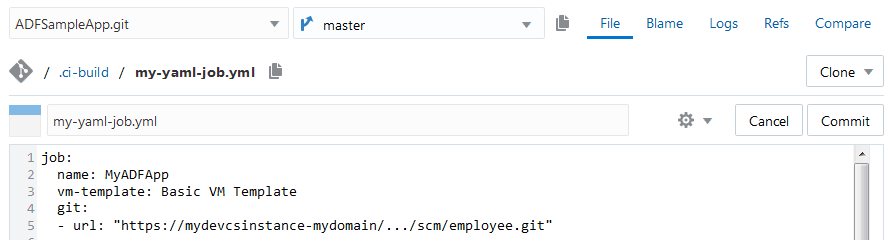
If you create the YAML file this way, you won’t be able to validate it without committing it first. Commit the file and check the Recent Activities Feed on the Project Home page for any errors.
What Is the Format for a YAML Job Configuration?
In a YAML job configuration, any field with a value of "" accepts a string value that is empty by default. "" is not a valid value for some fields, such as name, vm-template, and url.
When you configure a job, fields such as name, description, vm-template, and auto must precede groups like git, params, and steps.
Here’s a job’s YAML configuration format with the default values:
job:
name: ""
description: ""
vm-template: "" # required
auto: false # deprecated - true implies branch: master; otherwise, set branch explicitly
auto:
branch: mybranch # deprecated
# See Auto specification section below
auto: mybranch # automatically build a single branch on commit
auto: "*" # automatically build any branch on commit
auto:
include: # array of branches or branch patterns to include, for example
- "*" # automatically build any branch on commit
except: # array of exceptions (optional)
- "" # except these branches
auto:
exclude: # array of branches or branch patterns to exclude
- "" # default exclude nothing (include everything)
except: # array of exceptions (optional)
- "" # but including these branches
from-job: "" # create job as copy of another job; ignored after creation
for-merge-request: false
allow-concurrent: false # if true, concurrent builds will be allowed if necessary
disabled: false # if true, job will not build
#
# disabled=true/false can be specified for every item in the job below
# e.g., for git, param, steps, etc. items
# for brevity, not shown below in every item
git:
- url: "" # required
branch: "master" # branch: * is treated specially; see the Auto build section above
repo-name: "origin"
local-git-dir: ""
refspec: ""
included-regions: "" # deprecated - see trigger-when, file-pattern, and exceptions
excluded-regions: "" # deprecated - see trigger-when, file-pattern, and exceptions
trigger-when: INCLUDE # one of INCLUDE or EXCLUDE
file-pattern: "" # default is "*/" for INCLUDE or "" for EXCLUDE
exceptions: "" # exceptions to INCLUDE or EXCLUDE file-pattern
excluded-users: ""
merge-branch: ""
config-user-name: ""
config-user-email: ""
merge-from-repo: false
merge-repo-url: ""
checkout-revision: ""
prune-remote-branches: false
skip-internal-tag: true
clean-after-checkout: false
update-submodules: false
use-commit-author: false
wipeout-workspace: false
build-on-commit: false
shallow-clone: false # Added 24.07.0. Optional, default false. Defines if the git will use shallow cloning or not in which case the clone-depth will be used
clone-depth: 0 # Added 24.07.0. Optional, default 0. The depth of the clone for that git if the shallow-clone is set to true
# When build-on-commit: true, the "auto" branch can be specified as follows:
include: # A list of branches to include
- "" # Branch name, wildcard like "" or regular expressions like /.*/ are allowed
except: # Except do not include the branches in this list
- "/^patchset_/" # Branch name, example regular expression shown
# Or
exclude: # A list of branches to exclude (all branches not excluded are included)
- "/^patchset_/" # Branch name, example regular expression shown
except: # Except do not exclude the branches in this list
- patchset_21_07_0 # Branch name, example literal branch name shown
params:
# boolean, choice, and string parameters can be specified as string values of the form - NAME=VALUE
# the VALUE of a boolean parameter must be true or false, e.g., - BUILD_ALL=true
# the VALUE of a choice parameter is a comma-separated list, e.g., - PRIORITY=NORMAL,HIGH,LOW
# the VALUE of a string parameter is anything else, e.g., - URL=https://github.com
# Alternatively, parameters can be specified as objects:
- boolean:
name: "" # required
value: true # required
description: ""
- choice:
name: "" # required
description: ""
choices: [] # array of string value choices; at least one required
- merge-request:
params:
- GIT_REPO_BRANCH="" # required
- GIT_REPO_URL="" # required
- MERGE_REQ_ID=""
- password:
name: "" # required
# one of password or private-key is required
# recommended to use named password/private key reference like "{NAME}
#"
password: "" # required, or
private-key: "" # required
required: false # if not present required is false. If required is set to true then when the user will
# do a build now operation, he will have to have a value for that field. The user
# will not be able to submit the build with an empty value.
description: ""
- string:
name: "" # required
value: "" # required
required: false # if not present required is false. If required is set to true then when the user will
# do a build now operation, he will have to have a value for that field. The user
# will not be able to submit the build with an empty value.
description: ""
before:
- add-param: # Add a parameter after git before rest of build
parameter-name: "" # required - name of added parameter
file-path: "" # required - file that contains value of parameter
sensitive: false # true if sensitive, e.g., password or private key
- add-params: # Add one or more parameters as above (cannot be used to add password parameters)
file-path: "" # required - file that contains one or more lines of the format NAME=value
- copy-artifacts:
from-job: ""
build-number: 1 # requires which-build: SPECIFIC_BUILD
artifacts-to-copy: ""
target-dir: ""
which-build: "LAST_SUCCESSFUL" # other choices: LAST_KEEP_FOR_EVER, UPSTREAM_BUILD, SPECIFIC_BUILD, PERMALINK, PARAMETER
last-successful-fallback: false
permalink: "LAST_SUCCESSFUL" # other choices: LAST, LAST_SUCCESSFUL, LAST_FAILED, LAST_UNSTABLE, LAST_UNSUCCESSFUL
# other choices require which-build: PERMALINK
param-name: "BUILD_SELECTOR" # requires which-build: PARAMETER
flatten-dirs: false
optional: false
- npm-registry-setup:
use-current-project-registry: true # true to use current project's Built-in NPM registry otherwise, specify
# one of registry-url or connection
connection: "" # required if use-current-project-registry is false and registry-url is empty
username: "" # required if registry at registry-url requires authentication
password: "" # required if username is specified
registry-url: "" # required if use-current-project-registry is false and connection is empty
custom-npmrc: "" # optional path to a custom .npmrc from the workspace
- oracle-maven:
connection: "" # required if otn-login or otn-password is empty
otn-login: "" # required if connection is empty
otn-password: "" # required if connection is empty
server-id: ""
settings-xml: ""
- ssh:
config:
private-key: "" # optional if ssh-tunnel: password specified
public-key: ""
passphrase: ""
server-public-key: "" # leave empty to skip host verification
setup-ssh: true. # true if setup files in ~/.ssh for cmd line tools
ssh-tunnel: false
username: "" # required if ssh-tunnel true
password: "" # optional if ssh-tunnel true and private-key specified
local-port: 0 # required if ssh-tunnel true
remote-host-name: "localhost" # optional if ssh-tunnel true
remote-port: 0 # required if ssh-tunnel true
ssh-host-name: "" # required if ssh-tunnel true (name or IP)
- sonarqube-setup:
sonar-server: "" # required Server Name as configured in Builds admin
- xvfb:
display-number: "0"
screen-offset: "0"
screen-dimensions: "1024x768x24"
timeout-in-seconds: 0
more-options: "-nolisten inet6 +extension RANDR -fp /usr/share/X11/fonts/misc"
log-output: true
shutdown-xvfb-after: true
steps:
- cancel-configuration-set:
configuration-set-id: "" # required
environment-name: "" # required
service-name: "" # required
username: # required
password: # required
- ant:
build-file: ""
targets: ""
properties: ""
java-options: ""
- application-ext-deployment:
environment-name: "" # required, scopes the service-name
service-name: "" # required, the service instance name in the environment
auth-type: "OAUTH" # optional, defaults to 'BASIC'
username: "" # required if auth-type is 'BASIC'
password: "" # required if auth-type is 'BASIC'
build-artifact: "" # required
- application-ext-packaging:
build-artifact: "extension.vx" # optional, defaults to 'extension.vx'
version: ""
- application-ext-delete:
extension-id: # required
extension-version: # required
environment-name: # required
service-name: # required
auth-type: "OAUTH" # optional, defaults to 'BASIC'
username: "" # required if auth-type is 'BASIC'
password: "" # required if auth-type is 'BASIC'
- application-ext-audit:
environment-name: # required
service-instance: # required
username: # required
password: # required
extension-id: # required
extension-version: # required
options: | # optional, defaults to 'audit.outputfile=auditoutput.json', each option on its own line
audit.outputfile=auditoutput.json
- application-ext-test:
karma-browser: "FirefoxHeadless" # optional, defaults to 'FirefoxHeadless'
karma-log-level: "INFO" # optional, defaults to 'INFO'
mocha-timeout: 0 # optional, defaults to 0
- apply-configuration-set:
configuration-set-id: "" # required
environment-name: "" # required
service-name: "" # required
username: # required
password: # required
- bmccli:
private-key: ""
user-ocid: "" # required
fingerprint: "" # required
tenancy: "" # required
passphrase: ""
region: "us-phoenix-1" # current valid regions are: us-phoenix-1, us-ashburn-1, eu-frankfurt-1, uk-london-1
# more may be added - check OCI configuration
- docker-certificate:
registry-host: "" # required
certificate: "" # required
- docker-build: # docker commands require vm-template with software bundle 'Docker'
source: "DOCKERFILE" # other choices: DOCKERTEXT, URL
path: "" # docker file directory in workspace
docker-file: "" # Name of docker file; if empty use Dockerfile
options: ""
image:
registry-host: ""
registry-id: ""
image-name: "" # required
version-tag: ""
docker-text: "" # required if source: DOCKERTEXT otherwise not allowed
context-root-url: "" # required if source: URL otherwise not allowed
- docker-image:
options: ""
image:
registry-host: ""
registry-id: ""
image-name: ""
version-tag: ""
- docker-load:
input-file: "" # required
- docker-login:
registry-host: ""
username: "" # required
password: "" # required
- docker-pull:
options: ""
timeout: null # timeout pull request, in minutes
image:
registry-host: "" # required
registry-id: ""
image-name: "" # required
version-tag: ""
- docker-push:
options: ""
image:
registry-host: "" # required
registry-id: ""
image-name: "" # required
version-tag: ""
- docker-rmi:
remove: "NEW" # other options: ONE, ALL
options: ""
image: # only if remove: ONE
registry-host: "" # required
registry-id: ""
image-name: "" # required
version-tag: ""
- docker-save:
output-file: # required
image:
registry-host: "" # if omitted Docker Hub is assumed
registry-id: ""
image-name: "" # required
version-tag: ""
- docker-tag:
source-image:
registry-host: "" # required
registry-id: ""
image-name: "" # required
version-tag: ""
target-image:
registry-host: "" # required
registry-id: ""
image-name: "" # required
version-tag: ""
- docker-version:
options: ""
- export-configuration-set:
sandbox-name: "" # required
description: ""
id-parameter-name: "CONFIGURATION_SET_ID" # optional, defaults to 'CONFIGURATION_SET_ID'
include-all-modules: false
optional-modules: "" # Comma-separated list of (zero or more) Optional Module names or codes,
# eg. "CRM,BI". Default is empty string meaning no module
move-all-changes: false
skip-target-check: false
environment-name: "" # required
service-name: "" # required
username: # required
password: # required
- fn-build:
build-args: ""
work-dir: ""
use-docker-cache: true
verbose-output: false
registry-host: ""
username: ""
- fn-bump:
work-dir: ""
bump: "--patch" # other choices: "--major", "--minor"
- fn-deploy:
deploy-to-app: "" # required
build-args: ""
work-dir: ""
deploy-all: false
verbose-output: false
use-docker-cache: true
no-version-bump: true
do-not-push: true
registry-host: ""
username: ""
api-url: "" # required
- fn-oci:
compartment-id: "" # required
provider: ""
# Note: the passphrase field is no longer required nor allowed
- fn-push:
work-dir: ""
verbose: false
registry-host: ""
username: ""
- fn-version: {}
- gradle:
use-wrapper: false
wrapper-gradle-version: "" # ignored unless use-wrapper: true
make-executable: false # ignored unless use-wrapper: true, then default true
# must set make-executable: true if wrapper doesn't already exist
# corresponds to Create 'gradlew' wrapper
from-root-build-script-dir: false # ignored unless use-wrapper: true
root-build-script: "" # ignored unless from-root-build-script-dir: true; script directory
tasks: "clean build"
build-file: "build.gradle"
switches: ""
use-workspace-as-home: false
description: ""
use-sonar: false # if true sonarqube-setup must be configured
- import-configuration-set:
configuration-set-id: "" # required
ignore-unpublished-sandboxes: false
environment-name: "" # required
service-name: "" # required
username: # required
password: # required
- maven:
goals: "clean install"
pom-file: "pom.xml"
private-repo: false
private-temp-dir: false
offline: false
show-errors: false
recursive: true
profiles: ""
properties: ""
verbosity: NORMAL # other choices: DEBUG, QUIET
checksum: NORMAL # other choices: STRICT, LAX
snapshot: NORMAL # other choices: FORCE, SUPPRESS
projects: ""
resume-from: ""
fail-mode: NORMAL # other choices: AT_END, FAST, NEVER
make-mode: NONE # other choices: DEPENDENCIES, DEPENDENTS, BOTH
threading: ""
jvm-options: ""
use-sonar: false # if true, sonarqube-setup must be configured
- nodejs:
source: SCRIPT # other choice: FILE
file: "" # only if source: FILE
script: "" # only if source: SCRIPT
- oic-activate-integration:
environment-name: "" # required, identifies the environment containing the OIC instance
service-name: "" # required, the OIC instance for the operation
auth-type: "OAUTH" # optional, defaults to 'BASIC'
username: "" # required if auth-type is 'BASIC'
password: "" # required if auth-type is 'BASIC'
identifier: "" # required, the uppercase integration identifier
version: "" # required, the integration version
deactivate: true # when replacing the integration, deactivate it first if it is active
oracle-recommends-flag: true # see https://docs.oracle.com/en/cloud/paas/integration-cloud/integrations-user/activate-and-deactivate-integrations.html
record-enabled-flag: false
tracing-enabled-flag: false
payload-tracing-enabled-flag: false
- oic-delete-integration:
environment-name: "" # required, identifies the environment containing the OIC instance
service-name: "" # required, the OIC instance for the operation
auth-type: "OAUTH" # optional, defaults to 'BASIC'
username: "" # required if auth-type is 'BASIC'
password: "" # required if auth-type is 'BASIC'
identifier: "" # required, the uppercase integration identifier
version: "" # required, the integration version
- oic-delete-lookup:
environment-name: "" # required, identifies the environment containing the OIC instance
service-name: "" # required, the OIC instance for the operation
auth-type: "OAUTH" # optional, defaults to 'BASIC'
username: "" # required if auth-type is 'BASIC'
password: "" # required if auth-type is 'BASIC'
lookup-name: "" # required, the name of the lookup to delete
- oic-delete-package:
environment-name: "" # required, identifies the environment containing the OIC instance
service-name: "" # required, the OIC instance for the operation
auth-type: "OAUTH" # optional, defaults to 'BASIC'
username: "" # required if auth-type is 'BASIC'
password: "" # required if auth-type is 'BASIC'
package-name: "" # required, the name of the package to delete
deactivate-integrations: false # if true, automatically deactivate integrations before deleting package
- oic-delete-project:
environment-name: "" # required, identifies the environment containing the OIC instance
service-name: "" # required, the OIC instance for the operation
auth-type: "OAUTH" # optional, defaults to 'BASIC'
username: "" # required if auth-type is 'BASIC'
password: "" # required if auth-type is 'BASIC'
project-id: "" # required, the id of the OIC project to delete
- oic-export-integration:
environment-name: "" # required, identifies the environment containing the OIC instance
service-name: "" # required, the OIC instance for the operation
auth-type: "OAUTH" # optional, defaults to 'BASIC'
username: "" # required if auth-type is 'BASIC'
password: "" # required if auth-type is 'BASIC'
identifier: "" # required, the uppercase integration identifier
version: "" # required, the integration version
include-recording-flag: false
- oic-export-lookup:
environment-name: "" # required, identifies the environment containing the OIC instance
service-name: "" # required, the OIC instance for the operation
auth-type: "OAUTH" # optional, defaults to 'BASIC'
username: "" # required if auth-type is 'BASIC'
password: "" # required if auth-type is 'BASIC'
lookup-name: "" # required, the name of the lookup to export
- oic-export-package:
environment-name: "" # required, identifies the environment containing the OIC instance
service-name: "" # required, the OIC instance for the operation
auth-type: "OAUTH" # optional, defaults to 'BASIC'
username: "" # required if auth-type is 'BASIC'
password: "" # required if auth-type is 'BASIC'
package-name: "" # required, the name of the package to export
include-recording-flag: false
- oic-export-project:
environment-name: "" # required, identifies the environment containing the OIC instance
service-name: "" # required, the OIC instance for the operation
auth-type: "OAUTH" # optional, defaults to 'BASIC'
username: "" # required if auth-type is 'BASIC'
password: "" # required if auth-type is 'BASIC'
project-id: "" # required, the id of the OIC project to export
- oic-import-integration:
environment-name: "" # required, identifies the environment containing the OIC instance
service-name: "" # required, the OIC instance for the operation
auth-type: "OAUTH" # optional, defaults to 'BASIC'
username: "" # required if auth-type is 'BASIC'
password: "" # required if auth-type is 'BASIC'
integration-archive: "" # required, the filename of the integration archive file (<IDENTIFIER>_<VERSION>.iar)
import-method: "ADD" # other choices: REPLACE, AUTOMATIC
deactivate: true # when replacing the integration, deactivate it first if it is active
include-recording-flag: true # include asserter recordings (if any)
activate: false # see https://docs.oracle.com/en/cloud/paas/integration-cloud/integrations-user/activate-and-deactivate-integrations.html
oracle-recommends-flag: true
record-enabled-flag: false
tracing-enabled-flag: false
payload-tracing-enabled-flag: false
- oic-import-lookup:
environment-name: "" # required, identifies the environment containing the OIC instance
service-name: "" # required, the OIC instance for the operation
auth-type: "OAUTH" # optional, defaults to 'BASIC'
username: "" # required if auth-type is 'BASIC'
password: "" # required if auth-type is 'BASIC'
lookup-archive: "" # required, the filename of the lookup archive file (<lookupname>.csv)
import-method: "ADD" # other choices: REPLACE, AUTOMATIC
- oic-import-package:
environment-name: "" # required, identifies the environment containing the OIC instance
service-name: "" # required, the OIC instance for the operation
auth-type: "OAUTH" # optional, defaults to 'BASIC'
username: "" # required if auth-type is 'BASIC'
password: "" # required if auth-type is 'BASIC'
package-archive: "" # required, the filename of the package archive file (<packagename>.par)
import-method: "ADD" # other choices: REPLACE, AUTOMATIC
deactivate-integrations: true # when replacing the package, deactivate any of its active integrations first
reactivate-integrations: true # after replacing the package, reactivate any integrations that were deactivated by the deactivate-integrations option
include-recording-flag: true # include asserter recordings (if any)
- oic-import-project:
environment-name: "" # required, identifies the environment containing the OIC instance
service-name: "" # required, the OIC instance for the operation
auth-type: "OAUTH" # optional, defaults to 'BASIC'
username: "" # required if auth-type is 'BASIC'
password: "" # required if auth-type is 'BASIC'
project-archive: "" # required, the filename of the project archive file (<projectid>.car)
- oic-update-connection:
environment-name: "" # required, identifies the environment containing the OIC instance
service-name: "" # required, the OIC instance for the operation
auth-type: "OAUTH" # optional, defaults to 'BASIC'
username: "" # required if auth-type is 'BASIC'
password: "" # required if auth-type is 'BASIC'
identifier: "" # required, the identifier of the connection to update
json-file: "" # required if json-text not specified, the filename of the json file containing connection properties to update
json-text: "" # required if json-file not specified, the inline json text containing connection properties to update
- oic-upload-connection-property-attachment:
environment-name: "" # required, identifies the environment containing the OIC instance
service-name: "" # required, the OIC instance for the operation
auth-type: "OAUTH" # optional, defaults to 'BASIC'
username: "" # required if auth-type is 'BASIC'
password: "" # required if auth-type is 'BASIC'
identifier: "" # required, the identifier of the connection to update
property-name: "" # required, the name of the property to attach the upload file to
file-path: "" # required, specifies the zip file or WSDL file to upload
service-wsdl: "" # required if file-path is a zip file, specifies file path of WSDL file within the zip
- oracle-deployment: # deprecated; use application-ext-deployment, visual-app-deployment
environment-name: "" # required, scopes the service-name
service-name: "" # required, the service instance type determines the deployment type
auth-type: "OAUTH" # optional, defaults to 'BASIC'
username: "" # required if Visual Application
# required if Application Extension deployment and auth-type is 'BASIC'
password: "" # required if Visual Application
# required if Application Extension deployment and auth-type is 'BASIC'
application-version: "" # optional if Visual Application (defaults from visual-application.json), else n/a
application-profile: "" # optional if Visual Application, else n/a
include-application-version-in-url: true # required if Visual Application, other choice: false
data-management: "KEEP_EXISTING_ENVIRONMENT_DATA" # required if Visual Application, other choice: "USE_CLEAN_DATABASE"
sources: "" # optional if Visual Application (defaults to build/sources.zip), else unused
build-artifact: "" # optional if Visual Application (defaults to build/built-assets.zip), else unused
# required if Application Extension
- psmcli:
username: "" # required
password: "" # required
identity-domain: "" # required
region: US # other choice: EMEA
output-format: JSON # other choice: HTML
- restore-configuration-set:
configuration-set-id: "" # required
environment-name: "" # required
service-name: "" # required
username: # required
password: # required
- shell:
script: ""
xtrace: true
verbose: false # both verbose and xtrace cannot be true
use-sonar: false # if true sonarqube-setup must be configured
- sqlcl:
username: ""
password: ""
credentials-file: ""
connect-string: ""
source: SQLFILE # other choice: SQLTEXT
sql-file: "" # only if source: SQLFILE
sql-text: "" # only if source: SQLTEXT
role: DEFAULT # other choices: SYSDBA, SYSBACKUP, SYSDG, SYSKM, SYSASM
restriction-level: DEFAULT # other choices: LEVEL_1, LEVEL_2, LEVEL_3, LEVEL_4
- vbappops-export-data:
environment-name: # required
service-instance: # required
auth-type: "OAUTH" # optional, defaults to 'BASIC'
username: "" # required if auth-type is 'BASIC'
password: "" # required if auth-type is 'BASIC'
vb-project-id: # required
vb-project-version: # required
app-data-file: # required
- vbappops-import-data:
environment-name: # required
service-instance: # required
auth-type: "OAUTH" # optional, defaults to 'BASIC'
username: "" # required if auth-type is 'BASIC'
password: "" # required if auth-type is 'BASIC'
vb-project-id: # required
vb-project-version: # required
app-data-file: # required
- vbappops-lock-app:
environment-name: # required
service-instance: # required
auth-type: "OAUTH" # optional, defaults to 'BASIC'
username: "" # required if auth-type is 'BASIC'
password: "" # required if auth-type is 'BASIC'
vb-project-id: # required
vb-project-version: # required
- vbappops-unlock-app:
environment-name: # required
service-instance: # required
auth-type: "OAUTH" # optional, defaults to 'BASIC'
username: "" # required if auth-type is 'BASIC'
password: "" # required if auth-type is 'BASIC'
vb-project-id: # required
vb-project-version: # required
- vbappops-undeploy-app:
environment-name: # required
service-instance: # required
auth-type: "OAUTH" # optional, defaults to 'BASIC'
username: "" # required if auth-type is 'BASIC'
password: "" # required if auth-type is 'BASIC'
vb-project-id: # required
vb-project-version: # required
- vbappops-rollback-app:
environment-name: # required
service-instance: # required
auth-type: "OAUTH" # optional, defaults to 'BASIC'
username: "" # required if auth-type is 'BASIC'
password: "" # required if auth-type is 'BASIC'
vb-project-id: # required
vb-project-version: # required
- visual-app-deployment:
environment-name: "" # required, scopes the service-name
service-name: "" # required, the service instance name in the environment
auth-type: "OAUTH" # optional, defaults to 'BASIC'
username: "" # required if auth-type is 'BASIC'
password: "" # required if auth-type is 'BASIC'
application-version: "" # optional (defaults from visual-application.json)
application-profile: "" # optional
include-application-version-in-url: true # required, other choice: false
data-management: "KEEP_EXISTING_ENVIRONMENT_DATA" # required, other choice: "USE_CLEAN_DATABASE"
sources: "" # optional (defaults to build/sources.zip)
build-artifact: "" # optional (defaults to build/built-assets.zip)
- visual-app-packaging:
sources: "build/sources.zip" # optional, defaults to 'build/sources.zip'
build-artifact: "build/built-assets.zip" # optional, defaults to 'build/built-assets.zip'
optimize: true # boolean
- visual-app-audit:
environment-name: # required
service-instance: # required
username: # required
password: # required
app-url-root: # required
app-version: # required
options: | # optional, defaults to 'audit.outputfile=auditoutput.json', each option on its own line
audit.outputfile=auditoutput.json
- visual-app-test:
karma-browser: "FirefoxHeadless" # optional, defaults to 'FirefoxHeadless'
karma-log-level: "INFO" # optional, defaults to 'INFO'
mocha-timeout: 0 # optional, defaults to 0
after:
- artifacts:
include: "" # required
exclude: ""
maven-artifacts: false
include-pom: false # ignored unless maven-artifacts: true
- export-param: # Add a parameter after git before rest of build
parameter-name: "" # required - name of added parameter
file-path: "" # required - file that contains value of parameter
sensitive: false # true if sensitive, e.g., password or private key
- export-params: # Add one or more parameters as above (cannot be used to add password parameters)
file-path: "" # required - file that contains one or more lines of the format NAME=value
- git-push:
push-on-success: false
merge-results: false
tag-to-push: ""
create-new-tag: false
tag-remote-name: "origin"
branch-to-push: ""
branch-remote-name: "origin"
local-git-dir: ""
- javadoc:
javadoc-dir: "target/site/apidocs"
retain-for-each-build: false
- junit:
include-junit-xml: "*/surefire-reports/.xml"
exclude-junit-xml: ""
keep-long-stdio: false
organize-by-parent: false
fail-build-on-test-fail: false
archive-media: true
- sonarqube: # sonarqube-setup must be configured
replace-build-status: true # Apply SonarQube quality gate status as build status
archive-analysis-files: false
settings:
- abort-after:
hours: 0
minutes: 0
fail-build: false
- build-retry:
build-retry-count: 5
git-retry-count: 5
- discard-old:
days-to-keep-build: 0
builds-to-keep: 100
days-to-keep-artifacts: 0
artifacts-to-keep: 20
- git-poll:
cron-pattern: "0/30 * * * * #Every 30 minutes"
- log-size:
max: 50 # megabytes
- logger-timestamp:
timestamp: true
- periodic-build:
cron-pattern: "0/30 * * * * #Every 30 minutes"
- quiet-period:
seconds: 0
- versions:
version-map:
Java: "17" # For templates the configurable options (with defaults wrapped in '*' chars) are
# Java: 8, 11, 17, 8 (GraalVM)
# For the Built-in (Free) executors, the options are
# Java: 8, 11, or 17
# nodejs: 0.12 or 10
# python3: 3.5, or 3.6
# soa: 12.1.3, or 12.2.1.1
YAML Pipeline configuration for 25.01.0
pipeline:
name: "" # pipeline name - if omitted, name is constructed from repository and file name
description: "" # pipeline description
auto-start: true # automatically start pipeline if any job in pipeline is run
# if false, pipeline will start only if manually started
# or a trigger action item is activated
auto-start: # implied true
triggers-only: false # if true, autostart only for jobs that have no preceding jobs
allow-external-builds: true # jobs in pipeline can run independently while pipeline is running
disabled: false # if true, pipeline will not run
periodic-trigger: "" # cron pattern with 5 elements (minute, hour, day, month, year)
# the pipeline is started (beginning with the Start item) periodically
triggers: # define trigger action items of periodic, poll, or commit types
# there may be one or more of each type
- periodic: # define trigger action item of periodic type; build pipeline every so often
name: "" # required, trigger name - must be unique trigger name; may not be "Start"
cron-pattern: "" # required, cron pattern specifying Minute Hour Day Month Year, e.g., "? 0 * * *"
- poll: # define trigger action item of poll type; poll repository every so often
name: "" # required, trigger name - must be unique trigger name; may not be "Start"
cron-pattern: "" # required, cron pattern as above
url: "" # required, git repository URL
branch: "" # required, git repository branch - trigger activated if changes detected in branch
exclude-users: "" # user identifier of committer to ignore
# if more than one user, use multi-line text, one user per line
trigger-when: INCLUDE # activate only if change to files in file-pattern; alternative EXCLUDE
# if EXCLUDE, activate only for change to files not in file-pattern
file-pattern: "" # file(s) to INCLUDE/EXCLUDE; may be ant or wildcard-style file/folder pattern
# if more than one pattern, use multi-line text, one pattern per line
# for example...
exceptions: "" # exceptions to file-pattern above
# if more than one exception file pattern, use multi-line text, one pattern per line
#
# Example of multi-line pattern - note that these lines can't have comments, as they would be part of text
file-pattern: |
README*
*.sql
- commit: # define trigger action item of commit type; automatically run pipeline on commit
name: "" # required, trigger name - must be unique trigger name; may not be "Start"
url: "" # required, git repository URL for local project repository
branch: "" # git repository branch name
# required: must specify branch or include/exclude/except branch patterns
include: "" # branch patterns to include; branch name, wildcard or regex
# if more than one pattern, use multi-line text, one pattern per line
exclude: "" # branch patterns to ignore; specify either include or exclude, not both
# if more than one pattern, use multi-line text, one pattern per line
except: "" # branch pattern exceptions to include or exclude above
# if more than one pattern, use multi-line text, one pattern per line
exclude-users: "" # user identifier of committer to ignore
# if more than one user, use multi-line text, one user per line
trigger-when: INCLUDE # activate only if change to files in file-pattern; alternative EXCLUDE
# if EXCLUDE, activate only for change to files not in file-pattern
file-pattern: "" # file(s) to INCLUDE/EXCLUDE; may be ant or wildcard-style file/folder pattern
# if more than one pattern, use multi-line text, one pattern per line
exceptions: "" # exceptions to file-pattern above
# if more than one exception file pattern, use multi-line text, one pattern per line
start: # required begins an array of job names, or parallel, sequential, or on groups
- JobName # this job runs first, and so on (start is a sequential group)
# Groups:
- parallel: # items in group run in parallel
- sequential: # items in group run sequentially
- on succeed,fail,test-fail: # items in group run sequentially if preceding job result matches condition
# can specify one or more of conditions:
# succeed (success), fail (failure), or test-fail (post-fail)
# Examples:
- parallel: # jobs A, B and C run in parallel, job D runs after they all finish
- A
- B
- C
- D
- on succeed: # if job D succeeds, E builds, otherwise F builds
- E
- on fail, test-fail:
- F
#
start: # Jobs that trigger pipelines can be specified.
- trigger: # A trigger section appears before the job(s) it triggers
- JobA # trigger is a "parallel" second - JobA and JobB are independent
- JobB
- JobName # This job runs first. It can be started when the pipeline is run, or if
# either of the trigger jobs JobA or JobB is built successfully.
# Triggers assume that auto-start is true.
start:
- A
- parallel:
- B
- sequential: # A trigger cannot appear in a parallel section
- trigger: # The jobs triggered are the next in sequence
- Trigger1
- C
- trigger: # But can appear anywhere in a sequential section
- Trigger2
- D
- trigger: # A trigger at the end of the start section is an independent graph
- sequential: # not connected to anything that precedes it.
- X
- Y
- Z
#
# on sections can "join" - like an if/then/else followed by something else
start:
- A
- on fail:
- F # If A fails, build F
- on test-fail:
- T # If the tests for A fail, build T
- on succeed:
- <continue> # If A succeeds, fall through to whatever follows the on conditions for A
- B # B is built if A, F, or T succeed
#
# A job run in parallel (or conditionally) can end the chain
start:
- A
- parallel: # Run B, C, and D in parallel
- B
- C
- end:
- D # There is no arrow from D
- E # E is run if B and C succeed
#
start:
- A
- on fail:
- end:
- F # If A fails, build F and end the pipeline
- on test-fail:
- T # If the tests for A fail, build T
- on succeed:
- <continue> # If A succeeds, fall through to whatever follows the on conditions for A
- B # B is built if A or T succeed
# -------------------------------------------------------------------------------
# Not all pipelines you can draw can be represented in hierarchical form as above.
# To allow a YAML definition of any pipeline graph, you can use a graph notation
# similar to the digraph representation supported by Dot/GraphViz.
# For example, the pipeline with triggers above can be written as a graph.
graph: # (Both graph: and start: cannot be used in the same pipeline.)
- JobA -> JobName # There is a link from JobA to JobName
- JobB -> JobName # There is a link from JobB to JobName
- <Start> -> JobName # There is a link from Start to JobName
# The representation <Start> distinguishes the special "Start" node that
# appears in every pipeline from a job named Start.
#
# Conditional links can be represented using the ? and a list of one or more conditions.
# For example, the partial pipeline above beginning with 'parallel' can be represented as:
graph:
- <Start> -> A
- <Start> -> B
- <Start> -> C
- A -> D
- B -> D
- C -> D
- D -> E ? succeed # If D succeeds, E is built
- D -> F ? fail, test-fail # If D fails or tests fail, F is built
# "succeed" is the default when no ? is specified.
#
# Any combination of succeed (success), fail (failure), or test-fail (post-fail)
# can be written in a comma-separated list after the question mark.
#
# Not every graph that can be specified in this way is a valid pipeline.
# For example, graphs with cycles are not allowed.
#
# "Joins" like the A, B, C converging on D above only work (D gets built)
# if all of A, B, and C succeed. If, for example, B fails, D will not be built.
# However, joins on nodes that are directly downstream from [Start] are a
# special case. If any job triggers these nodes, they will be run.
# This special case allows the triggers: section to work as expected.
# (This is not new behavior in 22.01.0.)
graph:
- <Start> -> A
- <Start> -> B
- A -> C # Links from A to C and B to C are to the same node (and job) C
- B -> C
# on the other hand...
graph:
- <Start> -> A
- <Start> -> B
- A -> C # Links from A to C and B to C$2 are to the same job C
- B -> C$2 # but to different nodes
# In other words, the job C appears in two different places in the pipeline
YAML Job Configuration Examples
Here are several examples of YAML job configurations:
| Job Configuration | YAML Code |
|---|---|
|
This configuration creates a job that runs Maven goals then archives the artifacts:
|
job:
  name: MyFirstYAMLJob
  vm-template: Basic Build Executor Template
  git:

  - url: "https://mydevcsinstance-mydomain/.../scm/employee.git"
steps:

  - maven:
      goals: clean install
      pom-file: "employees-app/pom.xml"
  after:

  - artifacts:
      include: "employees-app/target/*"
|
|
This configuration creates a job to run Docker steps that log in, build, and push an image to the OCI Registry:
|
job:
  name: MyDockerJob
  description: Job to build and push a Node.js image to OCI Registry
  vm-template: Docker and Node.js Template
  git:

  - url: "https://mydevcsinstance-mydomain/.../scm/NodeJSMicroDocker.git"
steps:

  - docker-login:
      registry-host: "https://iad.ocir.io"
      username: "myoci/ociuser"
      password: My123Password

  - docker-build:
      source: "DOCKERFILE"
      options: "--build-arg https_proxy=https://my-proxy-server:80"
      image:
         image-name: "myoci/ociuser/mynodejsimage"
         version-tag: "1.8"
         registry-host: "https://iad.ocir.io"
       path: "mydockerbuild/"

  - docker-push:
      image:
        registry-host: "https://iad.ocir.io"
        image-name: "myoci/ociuser/mynodejsimage"
        version-tag: "1.8"

  - docker-image:
        options: "--all"
|
|
This configuration creates a job that uses SQLcl to run SQL commands and a script:
|
job:
  name: RunSQLJob
  vm-template: Basic Build Executor Template
  steps:

  - sqlcl:
      username: dbuser
      password: My123Password
      connect-string: "myserver.oracle.com:1521:db1234"
      sql-text: "CD /home\nselect * from Emp"
      source: "SQLTEXT"

  - sqlcl:
      username: dbuser
      password: My123Password
      connect-string: "myserver.oracle.com:1521:db1234"
      sql-file: "sqlcl/simpleselect.sql"
      source: "SQLFILE"
|
|
This configuration creates a job that runs Maven goals and archives the artifacts:
|
job:
  name: MyADFApp
  vm-template: JDev and ADF Build Executor Template
  auto:
    branch: "patchset_1"
  git:

  - url: "https://mydevcsinstance-mydomain/.../scm/ADFApp.git"
    branch: patchset_1
    build-on-commit: true
    included-regions: "myapp/src/main/web/.*\\.java"
    excluded-regions: "myapp/src/main/web/.*\\.gif"
    clean-after-checkout: true
  before:

  - copy-artifacts:
      from-job: ADFDependecies
      artifacts-to-copy: adf-dependencies.war

  - oracle-maven:
      otn-login: "alex.admin@example.com"
      otn-password: My123Password
  steps:

  - maven:
      goals: clean install package
      pom-file: "WorkBetterFaces/pom.xml"
  after:

  - artifacts:
      include: "WorkBetterFaces/target/*.ear"
  settings:
    general:

    - discard-old:
        days-to-keep-build: 50
        builds-to-keep: 10
    software:

    - versions:
        version-map:
          Java: 17
    triggers:

    - git-poll:
        cron-pattern: "0/30 5 * 2 *"
    advanced:

    - abort-after:
        hours: 1

    - build-retry:
        build-retry-count: 5
        git-retry-count: 10
|