Create a Content Bundle
Create a snapshot of your application artifacts to save their current state. You can view the bundles that you created on the Bundles page.
- On the Bundles page, click Create.
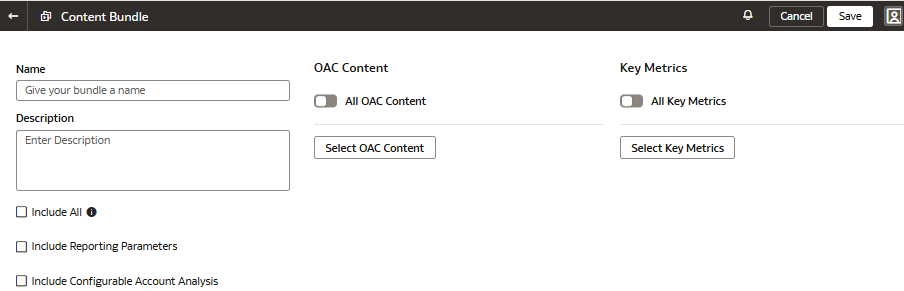
- For a content bundle, select the Include All Content check box, or select the applicable Oracle
Analytics Cloud content, workbooks, and key metrics using the corresponding toggles and buttons. You can select the Include Reporting Parameters and Include Configurable Account Analysis check boxes, if applicable.
While creating an OAC content bundle in your source instance, ensure that you select only the data sources that are also available in the target instance to avoid deployment failures in the target instance.
If there aren't any key metrics to back up in the content bundle, then you can only select the OAC Content option from the user interface.
Content bundles exclude non-catalog items such as datasets, connections, and machine learning artifacts. You must manually recreate these excluded items in the target instance. You can rebuild datasets from scratch or import using a .dva file.