Schedule Frequent Refreshes of Warehouse Tables (Preview)
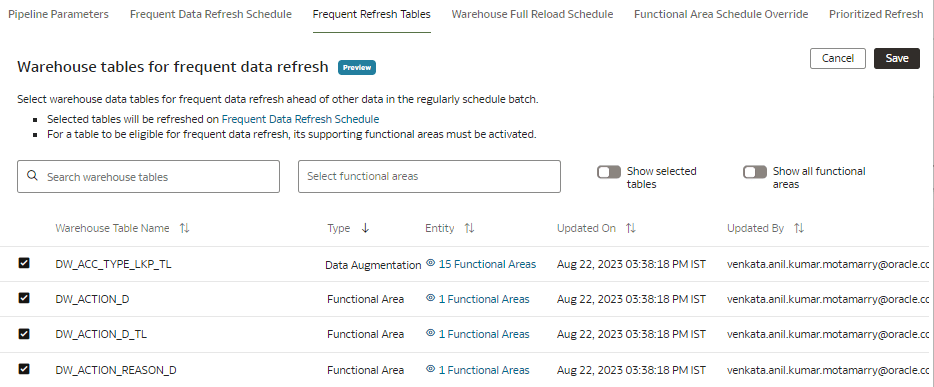
You can select warehouse data tables that are part of functional areas, descriptive flexfields custom configurations, and data augmentations for frequent data refresh ahead of other data in the regularly scheduled batch.
For a table to be eligible for a frequent data refresh, ensure that its supporting functional areas, data augmentations, and descriptive flexfields custom configurations are activated. The custom data configurations activated prior to release Platform 25.R3 won't be available automatically. You must regenerate and redeploy them to schedule for frequent refresh. After you select the warehouse tables for frequent data refresh and save your selection, the selected tables are available as "Warehouse Tables" under the Frequent Refresh tab. You can set the frequent refresh schedule for these tables in the Frequent Refresh tab. See Schedule Frequent Data Refreshes.
The Frequent Data Refresh feature available before the Platform 25.R3 release (FDR V1) is redesigned in FDR V2, offering faster data refreshes and broader functionality. Starting with Platform 25.R3 release, all new Fusion Data Intelligence instances support only FDR V2. Existing customers using FDR V1 (with subscriptions ordered before September 1, 2025) may continue using it. However, Oracle strongly recommends migrating to FDR V2 to take advantage of its improved performance and expanded features.
After the Platform 25.R4 release, you won't be able to enable and disable features related to FDR V1. Usage of FDR V2 is subject to certain data processing limits. See About Data Processing Limits. If your usage needs go beyond these limits, contact Oracle Customer Support.
Ensure that Frequent Refresh Tables is enabled in Pipeline Features under the Preview Features tab on the Enable Features page prior to scheduling frequent refreshes of the tables. See Make Preview Features Available.
- On the Pipeline Settings page, click Frequent Refresh
Tables.