Approve Protected Bundle Access Requests
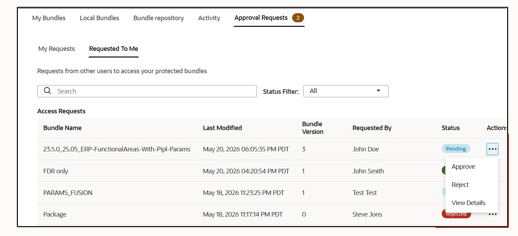
The publishers of protected bundles can review and manage access requests for their protected bundles. Publishers can view request details, filter requests by status, and take actions such as Approve, Reject, or View Details directly from the request list.
A requestor can withdraw a request if the bundle is no longer required or if the bundle was requested by mistake. In case the publisher rejected a request, the requestor can resubmit the request by providing additional details mentioning why they need to access the protected bundle. Publisher can review both new requests and resubmitted requests.
- On the Approval Requests tab, click Requested to me to view the access requests received for your protected bundles.