Deploy a Data Config Bundle

Create a backup bundle of your current data config before you proceed to deploy a Data Config bundle.

When you deploy a Data Config bundle, if the required pipeline parameters are missing in either the bundle or the target environment, the system won’t run the pipeline. Even if you select all modules (functional areas, data augmentations, custom configurations), they will stay in “Saved” state and won't be scheduled.

  1. Sign in to your service.
  2. In Oracle Fusion Data Intelligence Console, click Bundles under Application Administration.
  3. On the Bundles page, hover over the Data Config bundle that you created, and select Deploy from Actions.
  4. In Deploy Bundle, select the deployment option.
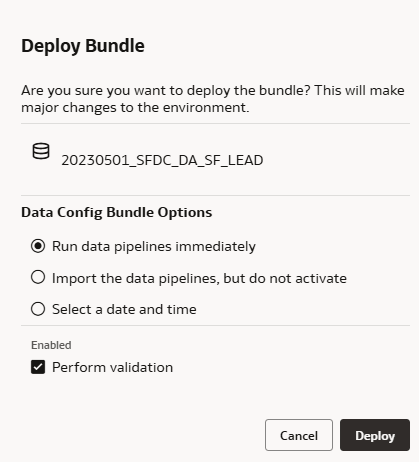
  5. Select Perform validation to validate the bundle prior to deployment and click Deploy.

    If you choose to deselect Perform validation, the bundle deployment will always show a final status of Completed, even if some components failed and were skipped during deployment. If you do deselect this option, it’s recommended you manually validate the deployment by reviewing the bundle reports.