Create a Custom Fact
Follow these steps to create a custom fact.
Implement a custom data store to address user-specific business requirements using a custom Data Augmentation Script application. This approach preserves Oracle-delivered artifacts while ensuring compatibility with future upgrades.
Consider a scenario where you require a custom fact table - W_AP_ACCOUNTING_DETAIL_F, to provide a comprehensive view of Accounts Payable (AP) accounting transactions by integrating invoice, supplier, Subledger Accounting (SLA) and General Ledger (GL) information into a single reporting dataset.
The purpose of this custom fact table is to enable finance users to perform detailed analysis, reconciliation, and auditing of AP accounting entries across the Procure-to-Pay (P2P) lifecycle. By consolidating data from multiple Oracle ERP modules into a unified dataset, the solution provides end-to-end visibility from supplier invoices and accounting distributions to SLA and GL journal entries, supporting financial reporting, period-end close, compliance, and audit requirements.
- In Oracle Fusion Data Intelligence Administration Console, click Data Configuration.
- On the Data Configuration page, select E-Business Suite in Data Source and click Data Applications.
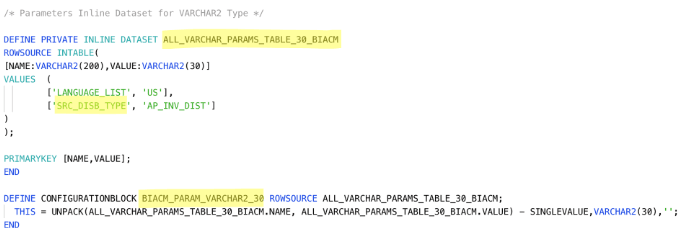
- Create a new parameter for the Source Distribution Type and reference it in the mapping instead of using a hardcoded value. Open the EBS_PARAMETERS application, add the new parameter SRC_DISB_TYPE to the ALL_VARCHAR_PARAMS_TABLE_30_BIACM dataset that has the configuration block name BIACM_PARAM_VARCHAR2_30. Build and deploy the EBS_PARAMETERS application.
- On the Data Applications page, click Create and select DA Scripts.
- On the DA Scripts page, under Source, click New, click File, select Code to create a code file.
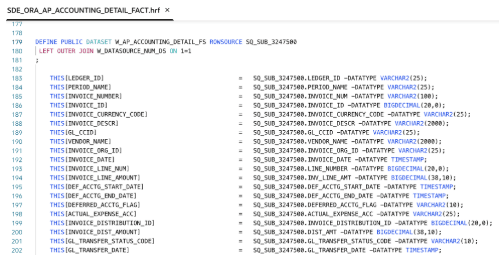
- Based on the business requirement, you can choose to create either a Fact Staging table or a Fact table. This use case creates both Fact Staging table and the corresponding Fact table to support the end-to-end pipeline process. Specify the Code file name as SDE_ORA_AP_ACCOUNTING_DETAIL_FACT.

For Staging data store, use mapping convention as SDE_ORA_%.
- For Fact staging mapping, first add the
IMPORT SOURCEentries based on the functional requirement.If the source table isn't used in any ready-to-use DA Script application, verify the Offering Name associated with the corresponding source data store. Next, check whether the same Offering name is already configured for the Oracle E-Business Suite connection. If the Offering isn't present, add the required Offering to the Oracle E-Business Suite connection and perform a Refresh Metadata operation before using the source data store in the mapping.
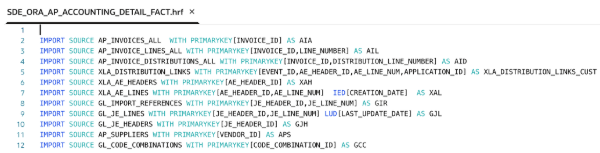
For transactional data stores such as AP_INVOICES_ALL, specify the Initial Extract Date (IED) and Last Update Date (LUD) columns based on the functional requirements to support full and incremental data extraction.
For master data stores such as GL_LEDGERS, don't specify an Initial Extract Date (IED) column. Since master records may have been created before the configured IED, using an IED filter can exclude valid records and lead to data discrepancies.
- Create intermediate or temporary datasets based on the functional requirement.
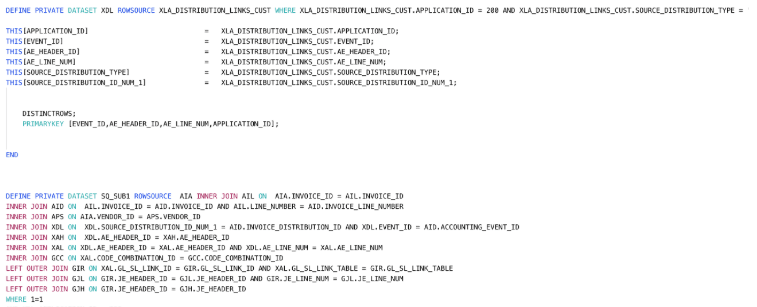
The newly added parameter is used to evaluate the value of the SOURCE_DISTRIBUTION_TYPE column in the mapping.
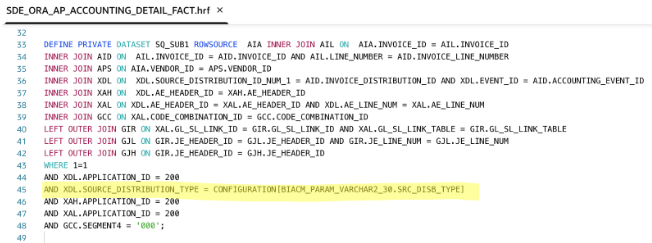
Reference the parameter in the mapping using the configuration block name and parameter name in the following format:
CONFIGURATION[BIACM_PARAM_VARCHAR2_30.SRC_DISB_TYPE]Create intermediate datasets as PRIVATE and use PUBLIC dataset for the target data store only. For Custom data stores, ensure naming convention is W_%.
- Create Custom mapping for the Fact data store. For mapping, use naming convention as SIL_AP_ACCOUNTING_DETAIL_FACT.

For Custom Facts use naming convention as W_%. You can create ALIASES for dimensions and refer the same in the downstream logic.
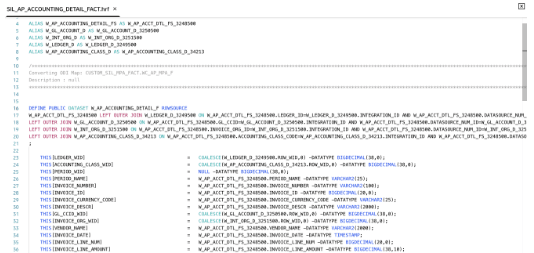
- The custom mapping uses the W_LEDGER_D, W_GL_ACCOUNT_D, W_INT_ORG_D , and W_AP_ACCOUNTING_CLASS_D datasets to populate the required dimension surrogate keys in the fact table. The W_GL_ACCOUNT_D and W_INT_ORG_D datasets are ready-to-use dimensions available as PUBLIC data stores in the EBS_COMMON DA Script application. The W_LEDGER_D and W_AP_ACCOUNTING_CLASS_D datasets are part of the same custom application.
In addition to these datasets, the custom mapping uses the W_DATASOURCE_NUM_DS dataset, that is created from the data stores available in the EBS_CONFIG application. This dataset is used to populate the
DATASOURCE_NUM_ID, ensuring that the source system is correctly identified and that the custom mapping remains consistent with the data model.For Variables, create "BiacmVariables" code file and add the required data store. The W_DATASOURCE_NUM_DS data store is already added as part of Extending Ready-to-use Dimension with Custom Attributes. Therefore, you don't need to add again.
For Dependent_Datasets, create "Dependent_datasets" code file and add W_LEDGER_D, W_GL_ACCOUNT_D, and W_INT_ORG_D data stores.
Always create Variable datasets and Dependent datasets as PRIVATE VERSIONED to get latest data from the parent application.Note:
PRIVATE datasets created in other DA Script applications aren't accessible with IMPORT MODULE, only PUBLIC datasets are accessible.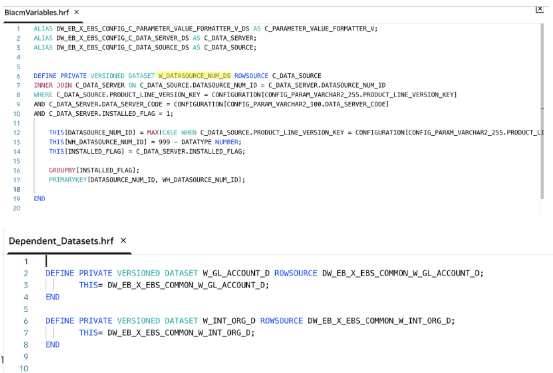
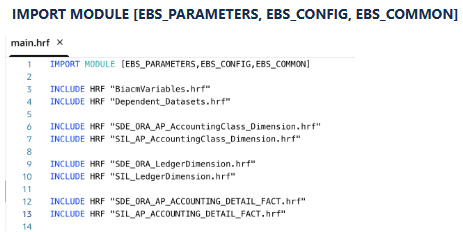
- In
main.hrf, add the hrf files.To refer the data stores from the ready-to-use DA Script application, you mus import the corresponding module. In the Custom mapping logic, this use case used data stores created in EBS_CONFIG, EBS_COMMON modules and parameters in EBS_PARAMETERS application. Hence include all of them in the IMPORT statement.
- Build the DA Script application and resolve build errors if there are any.
- Deploy the Custom DA Script application and validate the data.