Sample Simulate Concurrent Usage Output File
simulateConcurrentUsage command
creates an output file detailing each operation and iteration if the
outputFile parameter value is specified. If this parameter is not
specified, this file is not created. This file is not sent by email, but is saved on the
environment. You can download it using the downloadFile command.
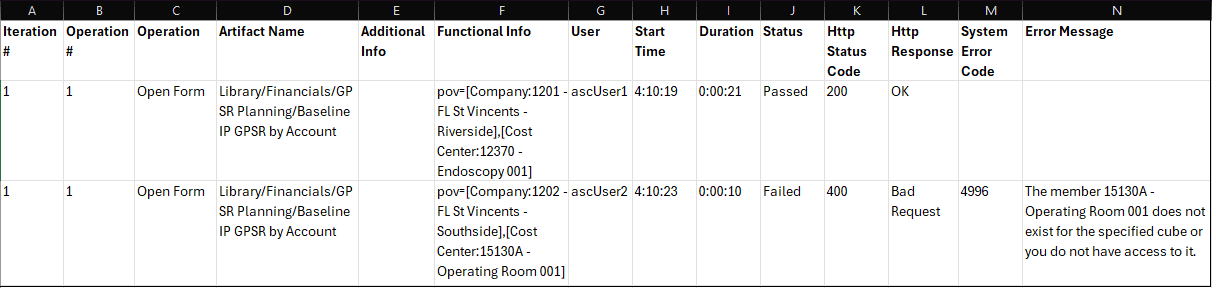
The output file identifies the following for each iteration of each operation:
| Column | Description |
|---|---|
| Iteration # | The sequence number of the iteration of operation |
| Operation # | The sequence number of the use case in
requirement.csv |
| Operation | The type of the operation as specified in
requirement.csv |
| Artifact Name# | The artifact name as specified in
requirement.csv |
| Additional Info | Additional Info as specified in
requirement.csv |
| Functional Info | Detailed information on the operation that was simulated. |
| User | The user account that was used to perform the functional operation. |
| Start Time | Time when the operation started |
| Duration | Time when the operation finished |
| Status | Status of the operation |
| Http Status Code | HTTP status code returned when the operation was executed |
| Http Response | HTTP response corresponding to the HTTP status code |
| System Error Code | If the operation failed, the error code reported by the business process, for example Planning |
| Error Message | If the operation failed, detailed error message indicating why it failed |