Sample Error Report
The simulateConcurrentUsage command generates an error report detailing each failed operation. The error report, by default, is sent with the Simulate Concurrent Usage report attached to the user who executes the command. If you specify email recipients, the report is emailed only to those email recipients.
- If the optional
reportFileparameter value is specified while running the simulateConcurrentUsage command, this error report is also saved on the environment using the file name formatValue_of_reportFile_error.csv; for example,mySimulationReport_error.csv. - If the optional
errorFileparameter value is specified while running the command, the error report is also saved on the environment with the file name as the value of theerrorFileparameter. - If both
reportFileanderrorFileparameter values are specified, both these files will display the same information for the failed operations.
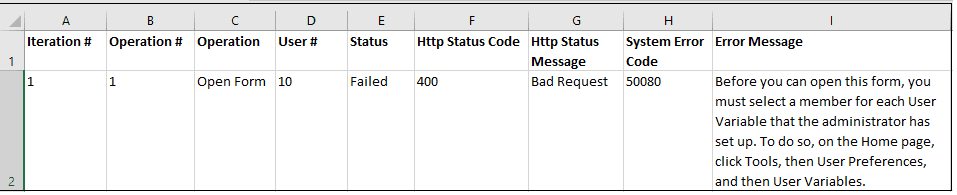
The error report identifies the following for each failed operation:
| Column | Description |
|---|---|
| Iteration # | The sequence number of the iteration of the operation |
| Operation # | The sequence number of the use case in
requirement.csv |
| Operation | The type of the operation as specified in
requirement.csv |
| User # | The number of user who executed the operation |
| Status | The status of the operation |
| Http Status Code | HTTP status code returned when the operation was executed |
| Http Status Message | HTTP message corresponding to the HTTP status code |
| System Error Code | The error code reported by the business process, for example Planning |
| Error Message | Detailed error message indicating why the operation failed |
The following sample error report shows details of a failed operation. This report displays the same information as the output file. see Sample Simulate Concurrent Usage Output File.
