Open Form Input File
This file, referenced in requirement.csv to support the opening of
forms, includes POV entries in the format: pov=[DIM 1:MEMBER 1],[DIM
2:MEMBER 2],[DIM 3:MEMBER 3],, and so on.
In this discussion, DIM 1, DIM 2, and so on are the dimension names, and MEMBER 1, MEMBER 2, and so on are their dimension member values for the POV.
A sample input file:
pov=[Account:APL_RATE_AED],[Scenario:Budget],[Years:FY20]
pov=[Account:APL_RATE_AED],[Scenario:Budget],[Years:FY19]
pov=[Account:APL_RATE_AED],[Scenario:Budget],[Years:FY18]
pov=[Account:APL_RATE_AED],[Scenario:Budget],[Years:FY17]
pov=[Account:APL_RATE_AED],[Scenario:Budget],[Years:FY16]
Note:
You must also createUserVarMemberMapping.csv if the forms you
specified in requirement.csv require user variables to be set. See
Creating the UserVarMemberMapping.csv File.
Guidelines
- If the form uses user variables, provide
povtag value in the format:pov=[USER VARIABLE 1:MEMBER 1],,and so on. - If the form uses user variables and the member name needs to be substituted
dynamically from user variable member mapping, use the substitution symbol
&as the prefix to the user variable name. Provide thepovtag value in the formatpov=[USER VARIABLE 1:&USER VARIABLE 1],,and so on. - The
povtag in input file should contain only the dimensions and user variables that are selectable. In the following example, because Forecast and Units are not selectable, you should exclude them from thepovtag; for example,pov=[Entity:Sales East Region],[Version View:Working],[ProductFamily:Computer Equipments];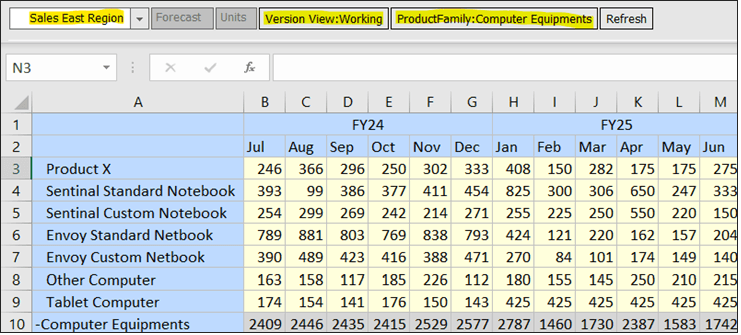
- If none of the dimension or user variable is selectable in the form, a blank pov
tag (for example,
pov=[];) is required.