Configuring the Secondary Audience
These steps must be completed for each Oracle Fusion Cloud Enterprise Performance Management service that is configured in the confidential application:
- Sign in to the IAM Interface as a Service Administrator of the Cloud EPM service that you added to the confidential application. Use an account from the identity domain where the Cloud EPM application is provisioned. See: Accessing the IAM Interface.
- Select the identity domain to view the domains details page.
- Navigate to the Oracle Cloud Services tab.
- Click the Cloud EPM service that you configured in the confidential application.
- Configure the Secondary Audience:
- On the OAuth configuration tab, click Edit OAuth configuration.
- Enable Add secondary audience.
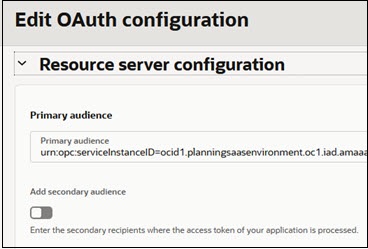
- Click Add.
- Enter the base URL of the Cloud EPM service.
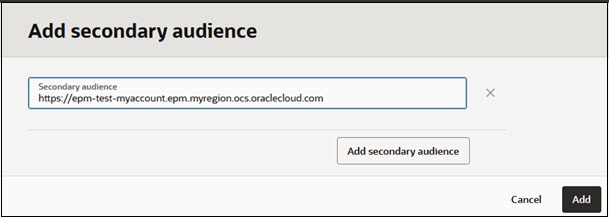
- Click Add secondary audience.
- If the confidential application has the Refresh Token grant type enabled, enable Allow token refresh.
- Click Save.
- Click Submit.