Configuring Encryption Keys
Configure a customer-managed key for one test and one production environment in every region in every tenancy.
For example, if you have two tenancies and each tenancy has four prod and four test environments distributed across two different regions, configure 8 encryption keys - one key on one test environment in each region in each tenancy and one key on one production environment in each region in each tenancy.
Prerequisites
To use customer-managed encryption keys, create the required policies. See Creating Policies for BYOK Access.
Configuring Encryption Keys
To configure encryption keys for your environments:
- From the Navigation menu, select My Applications, then click Oracle Enterprise Performance Management.
- Select the Environment from the list.
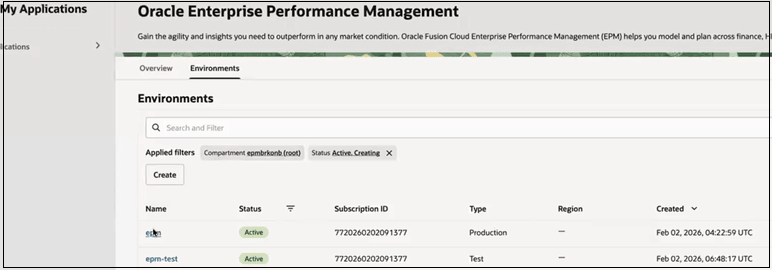
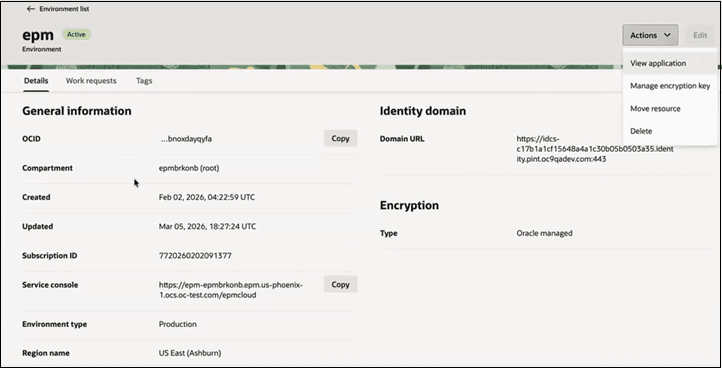
- On environment’s detail page, click Actions, then select
Manage encryption key.
- Select Encrypt using customer-managed keys. The system
displays the available vaults and keys for the region in the current
tenancy.
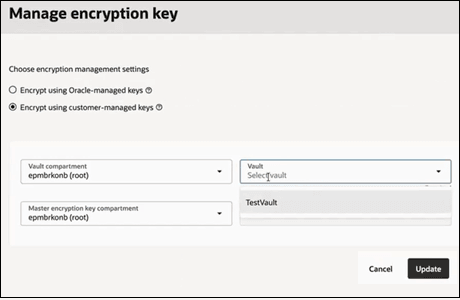
- Select the vault and keys, and click Update.
Important Considerations
- Do not disable or delete the key after enabling encryption
- Plan key rotation carefully to avoid service disruption
Learn More
For detailed setup instructions, IAM policies, and advanced configurations, refer to Use Bring Your Own Keys (BYOK) in Vault Service.