Working with Print All Selections Sequence
The Print All Selections Sequence controls how pages are grouped and ordered when generating the PDF output. This feature helps organize content from multiple sheets and print selections.
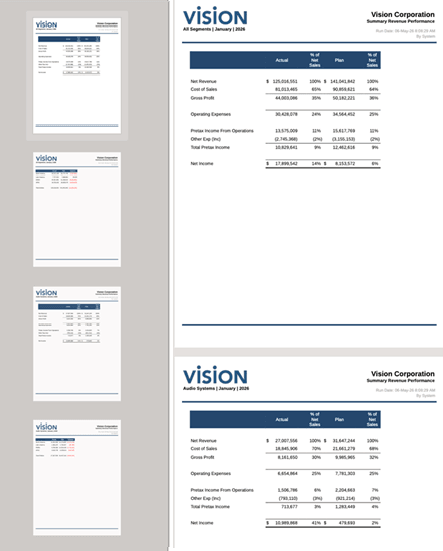
- By Member (default): Processes print selections across
all sheets by interleaving content from different sheets. For each selection,
all sheets are processed before moving to the next
selection.
Example Flow: A report with two sheets, each containing one grid and Print All Selections is enabled.
Sheet 1 → Sheet2 (Selection 1)
Sheet 1 → Sheet2 (Selection 2)
-
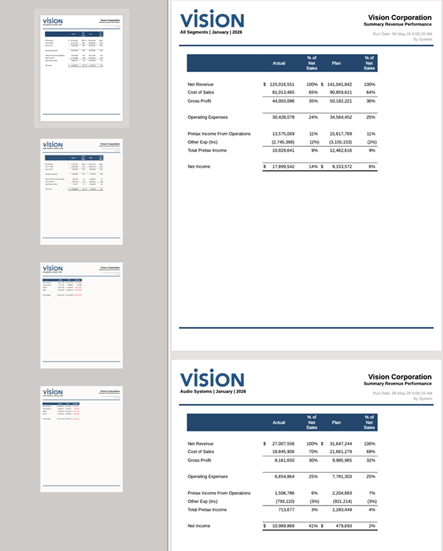
By Sheet: Processes all print selections for one sheet before moving to the next sheet.
Example Flow: Output is generated for a report with two sheets, each containing one grid and Print All Selections is enabled.
Sheet1 → Selection A, Selection B
Sheet2 → Selection A, Selection B
-
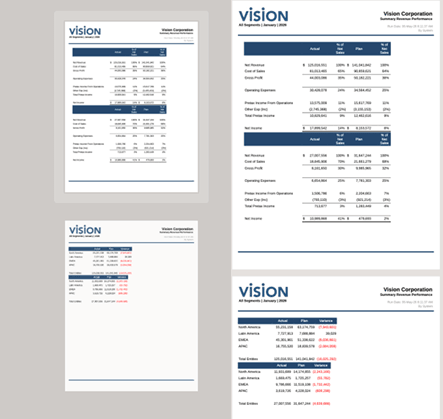
On Same Sheet: Stacks multiple print selections on the same physical pages for each sheet. Content continues stacking until the page space is exhausted, then flows to the next page.
Example Flow: Multiple selections appear together vertically (stacked).
Sheet1 → Selection A + Selection B
Sheet2 → Selection A + Selection B
Note:
Use the Border field to place borders around the report header, footer, and body. You can adjust the header and footer size by dragging the header or footer boundary line on the design canvas.