Editing and Deleting Comments
You can edit a thread entry when it is the last entry in the thread that you posted.
You can delete a comment that you posted. You can also delete a comment thread entry that you posted when it is the last entry in the thread.
To edit or delete a comment:
- From the comment list in the Smart View Panel, click a comment that you started.
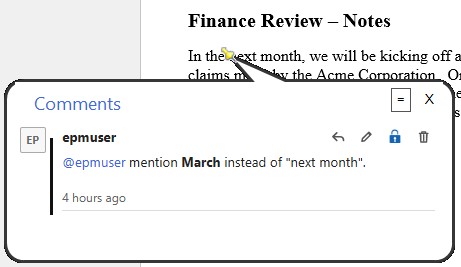
-
To edit your comment:
-
In the Comments dialog box, click
 next to the comment.
-
Click
 to post your edited comment.
To cancel any modifications done to the comment, click
 and close the Comments dialog box.
-
In the Comments dialog box, click
-
To delete your comment:
-
In the Comments dialog box, click
 next to the comment.
Note:
You can only delete the last entry in a thread. Deleting the last entry does not delete the entire comment thread.
-
In the Comments dialog box, click