Moving Calculations from the PCM_CLC Calculation Cube to PCM_REP Reporting Cube
You can move calculations for given time periods from the PCM_CLC calculation cube to the PCM_REP reporting cube in order to keep the amount of data in the PCM_CLC calculation cube small.
To move calculations from the PCM_CLC calculation cube to the PCM_REP reporting cube:
-
From the Home page, select Modeling, and then Calculation Control.
-
On the Calculation Control page, select the POVs that contain the data you want to move, and click Copy.
-
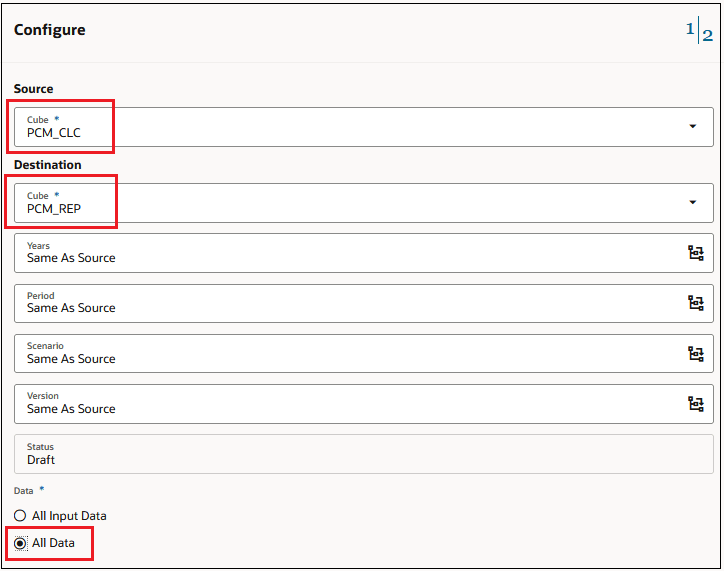
In the Configure dialog box, select PCM_CLC as the Source cube, select PCM_REP as the Destination cube, and select All Data.
-
Click Continue.
-
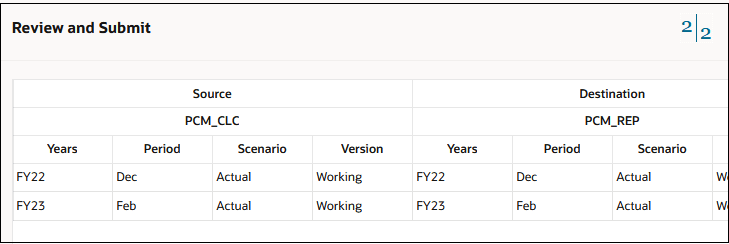
In the Review and Submit dialog box, review the information, and then click Submit.
-
Go to the Jobs console, and confirm that the job complete successfully and that the data is available in the target cube.
-
Return to the Calculation Control page, and select the same POVs.
-
Click More Actions and select Clear to clear the data in the source POVs that you just copied.