Resource Tree
You can use the resource tree to see a hierarchical view of your organization’s resources, typically sorted by geographical region. The resource tree displays all types of resources, except for Users/Dispatcher/Admin type. The resource tree displays to the left of the page.
- Names that begin with a space (for example, " myBucket").
- Names that begin with an underscore (for example, "_myBucket").
- Names that begin with punctuation characters (for example, "!myBucket", "+myBucket").
- Names that begin with currency symbols (for example, "$myBucket").
- Names that begin with numbers (for example, "1myBucket", "2myBucket").
- Names that begin with alphabetic characters, sorted according to the configured locale. For example: "ábaco", "Ábaco", "apple", "Apple", "aTest", "ATest", "banana", "Banana".
- Names that begin with symbols or emoji are sorted after alphabetic names according to the locale-specific sorting rules. This includes most Unicode symbols in the ranges U+2100 through U+2BFF and U+1F000 through U+1FAFF, except U+212A and U+212B. Characters in the U+2000 through U+20FF range are excluded so that standard punctuation continues to follow the normal locale-aware sorting behavior.
You can hide or unhide the resource tree using the pin icon. This is how the resource tree with pin button is displayed:
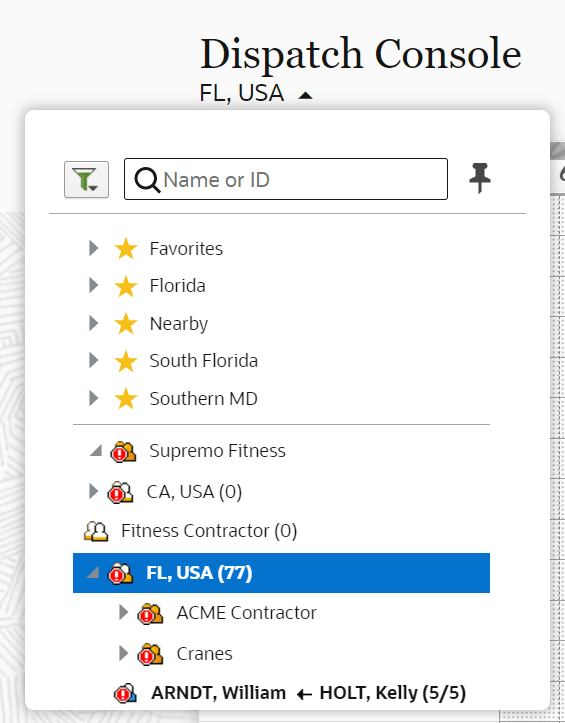
When you select a resource from the resource tree, the resource’s activities display in the work area on the right. You can expand and collapse the resource tree entities using the forward and down arrows.
-
Field resource: This resource can perform work, has work skills, associated work zones, and has a related user that is an actual person, or a crew, or people performing work.
-
Vehicle: This resource can have work skills, inventory, and geolocation tracking enabled. When assigned to a team it may add the required work skills and inventory to be used by the team.
-
Tool: This resource represents specific tools such as 30-feet ladder and excavator. This resource can have work skills, inventory, and geolocation tracking enabled. When assigned to a team it may add the required work skills and inventory to be used by the team.
-
Bucket: This resource is used to accumulate work that is not yet distributed to mobile workers. Only the application can assign activities to this resource. This resource is used for Quota Management.
-
Organization unit: This resource aggregates mobile workers, vehicles, and tools in the tree-like hierarchy to simplify management and reporting. This resource is used for Quota Management.