Financial Analysis Hub Security Considerations
Setting security for the Financial Analysis Hub enables you to control which users can view, edit, run, or delete Financial Analysis configurations.
The following security considerations apply for the Financial Analysis Hub:
-
Service Administrators have full access across all tabs within the Financial Analysis Hub. They can create, edit, and manage all configurations without restriction.
-
Financial Analysis Hub security is based on application security. If application security is enabled only at the Entity level, any user not having access to any entity is not able to create configurations, perform validations, or view results on the Analysis or Validation page for that entity.
-
When application security is enabled across multiple dimensions (for example, Entity and Data Source), the combined security restrictions apply. For example, if a user lacks access to any Entity or to a particular Data Source member, they are unable to create configurations involving those member combinations, or view related data on the Analysis or Validation page for that Entity and Data Source member.
-
If a user does not have access to any configuration, the Analysis or Configuration page displays the following error message: "No Data to display".
-
Users with Read Access only cannot create configurations, even though the Create button is displayed. For Users with Viewer access, the Create button on the Configuration page is disabled.
-
Configurations created by Service Administrators, Power Users, or Users are available to other users based on the access to those members.
Figure 23-1 Financial Analysis Hub Security Access
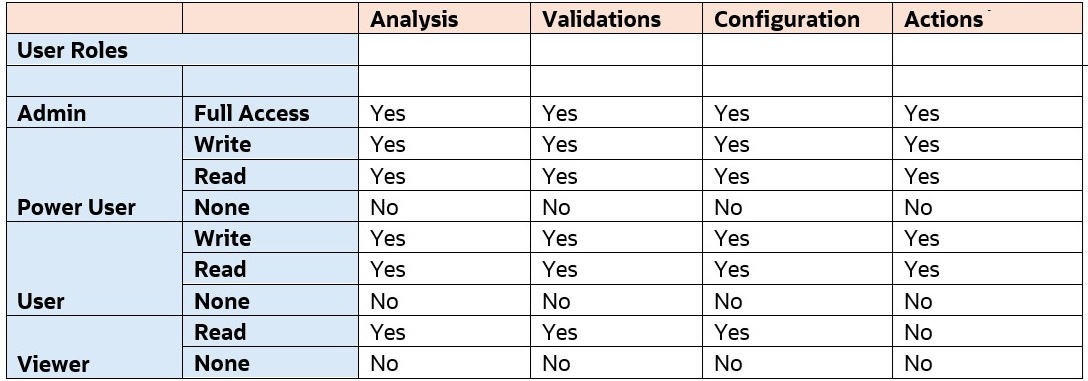
Figure 23-2 Financial Analysis Hub Available Actions
