Set Up a Transaction Source for Identifying Cost Adjustments from Oracle Joint Venture Management
Set up a transaction source named "Oracle Fusion Joint Venture Management" to identify the source of cost adjustments imported into Oracle Project Costing. This transaction source is a required parameter for the processes run by joint venture accountants and project accountants to create and send cost adjustments to Project Costing.
You set up a transaction source with a document that includes document entries to identify raw cost adjustments and a document entry to identify burdening cost adjustments. The document entry for burdening is required only if Project Costing is set up for burdening.
If you configure the integration to support burdening, provide joint venture accountants with the name of the burdening document entry to run the process to create cost adjustments. The other transaction values are required but are prepopulated.
Project accountants can also use the document entry values for filtering purposes when reviewing cost adjustments imported into Project Costing.
You must be an application implementation consultant to perform these tasks.
Add a transaction source:
- Navigate to Setup and Maintenance and select the Project Costing Base functional area under the Project Financial Management offering.
- In the Project Costing Base task area, select Show - All Tasks and then select the Manage Project Transaction Sources task.
- On Manage Project Transactions Sources, select Add.
-
On Create Source, complete these fields to define the transaction source:
- Transaction Source. Enter
Oracle Fusion Joint Venture Management - Description. Enter
Oracle Fusion Joint Venture Management - Processing Set Size. 1,000 is recommended.
- Transaction Source. Enter
- Select Save and Close.
Add a document to the transaction source:
-
Select the Oracle Fusion Joint Venture Management transaction source you just created.
-
In the Documents area, select Add and complete these fields exactly as shown:
-
Document. Enter
JV Partner Reimbursements -
Description. Enter
Joint Venture Management Partner Reimbursements -
From Date. Enter today’s date or the date you plan to start creating cost adjustments from Joint Venture Management.
-
-
If processing cost adjustments for only raw costs, select these options:
- Import raw cost amounts
- Accounted in Source Application = Raw
-
If processing cost adjustments for both raw costs and burdening costs, select these options:
- Import raw cost amounts
- Import burdened cost amounts
- Accounted in Source Application. Select the option according to the
burdening setup in Project Costing:
- Raw and burdened
- Raw and burden
- Raw, burden, and burdened
The option you select here must correspond to the burdening setup in Project Costing. Make sure to check with a project accountant if you’re unsure of which option to select.
Also, coordinate this setup with joint venture accountants, who must configure their joint ventures to identify the correct burdening costs.
Caution: When you save the document with the “Import burdened cost amounts” option enabled, then burdening related processing becomes active for all joint ventures in the Joint Venture Management application. - Select Save and Close.
Add document entries to the document:
- Select the JV Partner Reimbursements document you just created.
-
In the Document Entries area, add document entries for raw costs.
- Add each document entry exactly as shown in the table.
-
For each entry, select Miscellaneous Transaction for the Expenditure Type Class.
Name Description Distribution Joint Venture Management document entry for original distribution Distribution Reversal Joint Venture Management document entry for distribution reversal Rebill Joint Venture Management document entry for rebill distribution
-
If supporting burdening cost adjustments, complete these fields to add a document entry for burdening:
- Name. Enter
Burdening Distribution - Description. Enter
Joint Venture Management document entry for burdening distribution - Expenditure Type Class. Select
Burden Transaction
- Name. Enter
- Select Save and Close.
Before you select Done, review your Oracle Fusion Joint Venture Management transaction source and verify that it’s configured correctly.
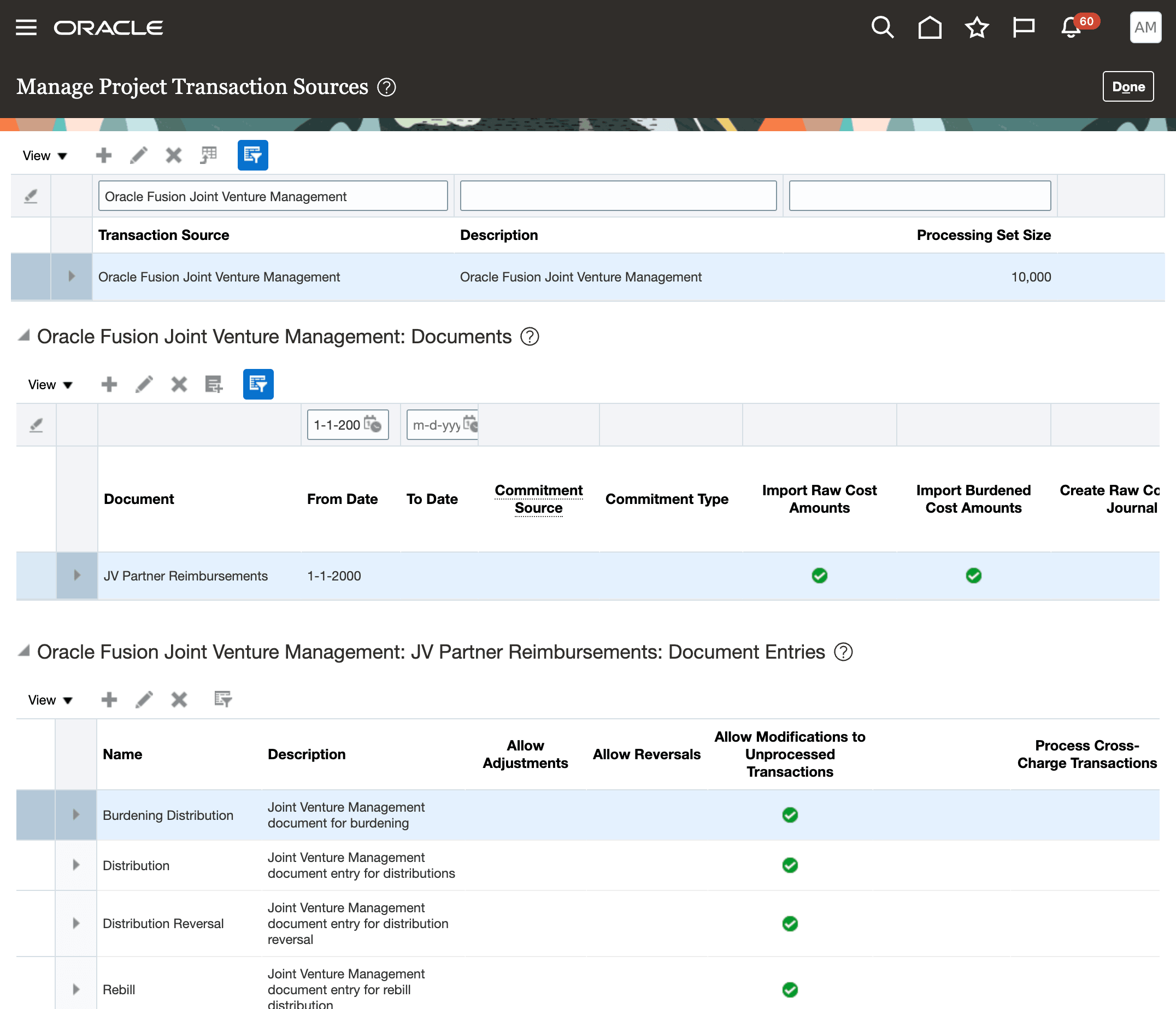
The following image shows the sections on the Manage Project Transaction Sources page for the transaction source, document, and document entries that were created as described in the preceding steps. The first section displays the transaction source with a description and processing set size. The second section shows the document with a from date and check marks in the Import Raw Cost Amounts and Import Burdened Cost Amounts columns. The third section includes rows for the following document entries: Burdening Distribution, Distribution, Distribution Reversal, and Rebill. Each entry includes a description and a check mark in the Allow Modifications to Unprocessed Transactions column.