Overview of Balance Initialization
When migrating payroll data from a legacy payroll application to Oracle Payroll, you might need to set initial balance values. Use HCM Data Loader to load balance values into batch views.
For mid year payroll implementations, Oracle recommends using Balance Initialization to migrate year-to-date earnings, deductions, taxes, and other payroll balances from the legacy payroll application. This approach enables payroll processing to begin in Oracle Payroll on the agreed go-live date while maintaining accurate balances and statutory reporting for the remainder of the tax year.
After loading the balance values, submit the Load Initial Balances process. The process validates the batch data and creates balance adjustments to establish the required balance values for each employee.
For each initialized balance, the Load Initial Balances process automatically creates elements with the Balance Initialization classification and adds them as balance feeds.
Oracle recommends using Balance Initialization instead of recreating payroll runs for periods that were already processed and paid in the legacy payroll application. Recreating historical payroll runs before the go-live date can increase reconciliation effort and add complexity to payroll balance validation and statutory reporting.
You can't initialize balances after payroll has been run for an employee. In this case, either roll back the payroll run or use balance adjustments to update the balances.
Example
In the middle of the year, your company hired a group of employees as part of an acquisition. The original company already paid them their earnings and withheld their taxes. In your company's ongoing payroll, you can initialize these employees' payroll balances for that year. This way, you ensure that all further statutory reports are accurate for the entire year and not just for the period they worked in your company.
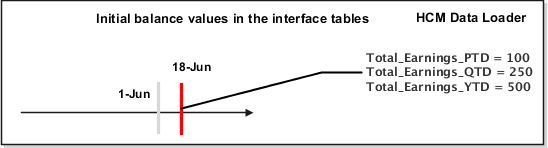
As this image shows, you can initialize the total earnings balances for period-to-date, quarter-to-date, and year-to-date as of 18-Jun.
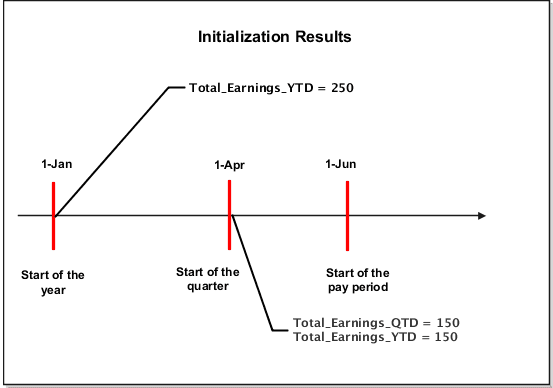
This image shows the initializing results as of 18-Jun.
Use the InitializeBalanceBatchHeader.dat file to create the VisionBatch batch.
METADATA|InitializeBalanceBatchHeader|LegislativeDataGroupName|BatchName|UploadDate
MERGE|InitializeBalanceBatchHeader|Vision Corporation US LDG|VisionBatch|2018/06/18|
In the InitializeBalanceBatchLine.dat file you initialize these three balance values for the total earnings balance.
|
Balance |
Value |
|---|---|
|
Total_Earnings_PTD |
100 |
|
Total_Earnings_QTD |
250 |
|
Total_Earnings_YTD |
500 |
METADATA|InitializeBalanceBatchLine|LegislativeDataGroupName|BatchName|LineSequence|UploadDate|PayrollRelationshipNumber|PayrollName|BalanceName|DimensionName|Value
MERGE|InitializeBalanceBatchLine|Vision Corporation US LDG|VisionBatch|1|2018/06/18|10001|Monthly Payroll|Total Earnings|Core Relationship Period to Date|100
MERGE|InitializeBalanceBatchLine|Vision Corporation US LDG|VisionBatch|2|2018/06/18|10001|Monthly Payroll|Total Earnings|Core Relationship Quarter to Date|250
MERGE|InitializeBalanceBatchLine|Vision Corporation US LDG|VisionBatch|3|2018/06/18|10001|Monthly Payroll|Total Earnings|Core Relationship Year to Date|500
When you run the Load Initial Balances process, it sets the values for each balance relative to the upload date. For example, for an upload date of June 18, the balance values include all payment dates up to and including June 18. The process creates date-effective balance entries (adjustments) to ensure the legislative balances are correct.
As this table shows, the balance initialization process creates adjustments on the first day of the time period relevant to each dimension.
|
Adjustment Date |
Adjusted Balances |
Adjustment Value |
|---|---|---|
|
1 June (Start of the pay period) |
|
100 |
|
1 April (Start of the quarter) |
|
150 |
|
1 Jan (Start of the year) |
Total_Earnings_YTD |
250 |
It is important to note that when you initialize balance values, (for example, Regular Salary) it will not feed other balances (for example, Gross Earnings). In the normal course of a payroll run, the application will maintain itself and this is not an issue. However, run results created from initial balance uploads only feed the specific balance for which they are loaded.
Considerations and Prerequisites for Balance Batches
- Create separate balance initialization batches for each legislative data group (LDG).
- Although the HCM Data Loader upload is multithreaded, the subsequent balance processing is not. Therefore it's suggested that you create multiple batches so that the Load Initial Balances process may process concurrently.
- Within the same batch, ensure that you include lines for every balance to be initialized for a person. You can’t split batch lines for the same person across multiple batches.
- The date you specify on the batch header record applies to all lines, unless you enter an override date at the line level. The date at the line level must be on or before the date on the header.
- You can’t initialize balances once you have run any payroll processes.
- When initializing involuntary deduction balances, you must create the involuntary deduction card before processing the balance initialization.