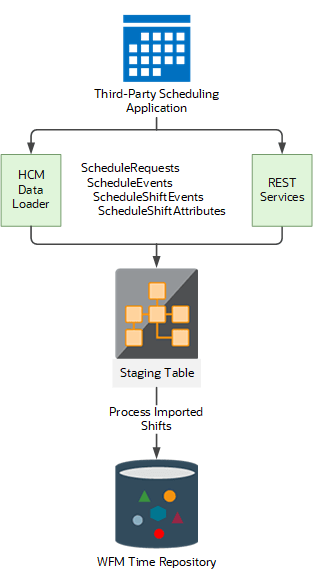
Overview of Importing Third-Party Schedules
You can import up to four levels of schedule business objects. The same business objects are used to import either planned schedules or workforce schedules. If you import workforce schedule, the staffing department from your schedule generation profile is specified on the schedule request.
Then, managers view and optionally edit these imported objects the same way they manage their WFM schedules.
Here's the hierarchy of the objects in the import file.
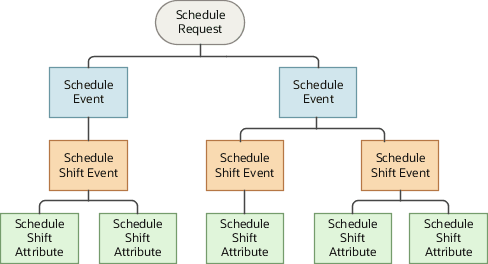
Here are import scenarios for each schedule business object and level.
| Import Scenario | Affected Schedule Object | Schedule | Level |
|---|---|---|---|
| Import full schedules from January 1 to 7 for Chris's team. | Schedule Request | Planned Schedule | 1 |
| Import Leslie's full schedule from January 1 to 7. | Schedule Event | Workforce Schedule | 2 |
| Import Leslie's shift on January 5. | Schedule Shift Event | Planned & Workforce Schedule | 3 |
| Import open shift for Charge Nurse on January 5 | Schedule Shift Event | Workforce Schedule | 3 |
| Import time attributes related to Leslie's shift on January 5. | Schedule Shift Attribute | Planned Schedule | 4 |
Basic Import Process
Here's the basic process for how you Import third-party schedule data.
- Import the schedules to the staging table using either REST services or HCM Data Loader.
- Load the imported shifts to the planned schedule table of the time repository using the Scheduled Processes task and Process Imported Shifts process.