Overview of DSN Reporting
French legal employers have the obligation of reporting absences.
This is done via a specific report (Event DSN – Signalement d’évènement Arrêt de travail) instances where an employee has an absence event that implies a potential payment by Social Security (e.g sick leave, maternity, work accident). This absence needs to be declared to national authorities within five days from the start date of the absence. This notification will be used by CPAM (the authority in charge of paying absence Social Security indemnities) to initiate the payment process.
There are two types of DSN files:
- Monthly DSN declaration (Fr: DSN mensuelle): Sent once per month and reflects data of the corresponding monthly payroll.
- Event DSN (Fr: DSN evenementiel): Sent on a on-demand basis to report absence events that are potentially liable to payments by Social Security payment or report termination events. Additionally, it could be sent to produce one-off requests of variable data.
Work flow of Event DSN File
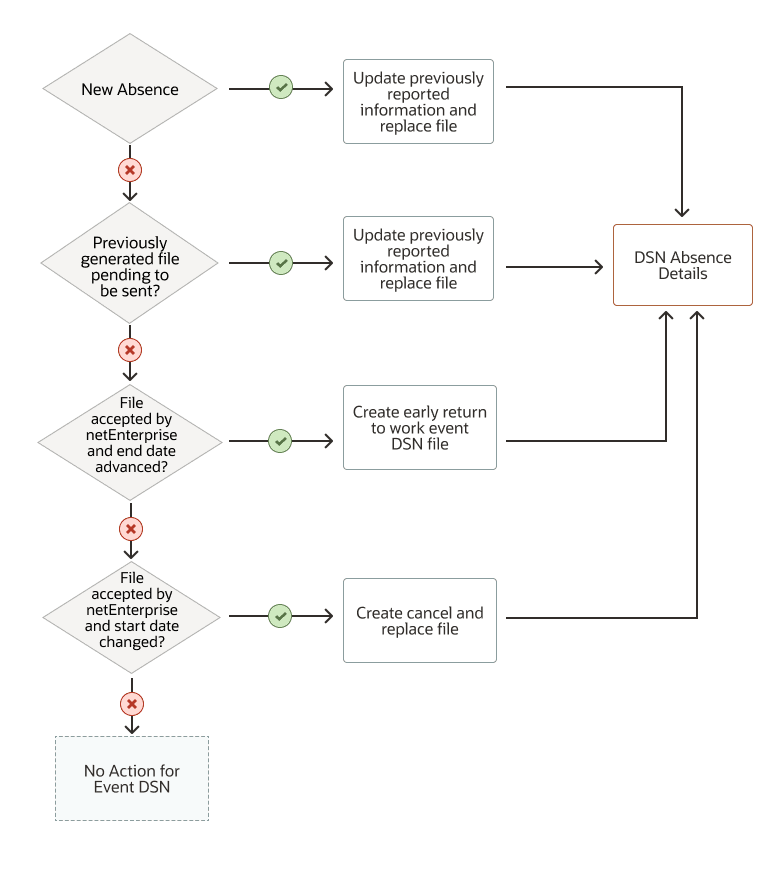
Two sick leave events and two work accident events where the second event is considered to be a relapse of the first one will be considered as a single event from the file generation point of view.
The type of actions that are supported are:
- Generation of file upon first time entry of the absence event.
- Generation of a Cancel and Replace event DSN for change of start date.
- Generation of a Cancel and Replace event DSN for change of subrogation dates.
- Generation of an Early Return to Work file in case the absence end date is advanced.
While executing the process it will be possible to:
- View the events that have been extracted and their related statuses in the dashboard UI
- Download and view the file the was produced.
Supported Events and Solution Architecture
Absence Event DSN, Early Return to work DSN files are supported for the following absence types:
- Sickness
- Maternity
- Paternity
- Adoption
- Work Accident
- Travel Accident
- Occupational Disease
The ESS process will read the absence changes comparing to the previous submission and will prepare the reporting information for next submission. This process reads the changes in the absences and store the information to be reported after analyzing the previous submission status, acceptance status of previous status. The flow ‘Absence Event DSN’ will then trigger DSN validations as per 2025 DSN Specs and generate the files.
Solution Architecture
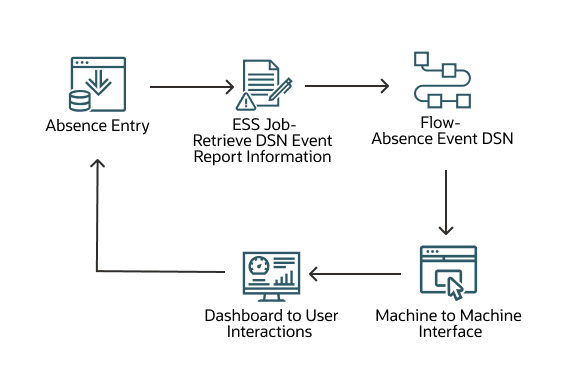
Both the ESS Job and the Absence Event DSN flow can be scheduled either independently or in sequence. If scheduled independently it would be recommended to schedule them in a way that supposes an interval between the ESS job and the Absence Event DSN in order to be sure to avoid possible locking or misinterpretation of the event data preparation in progress.