Add OpenAPI Descriptions for a Decision Service
Descriptions for the decision service as a whole and for each input and output field can be added and these will be included in the OpenAPI definition for the decision service project. These descriptions allow you to better define the requirements or intent of a given decision service or field. For example, for a field "country", you could add a description such as "the primary country of residence, expressed as an ISO 3166-1 alpha-2 code".
Add a description for the whole decision service
To add an Open API description for the decision service:
-
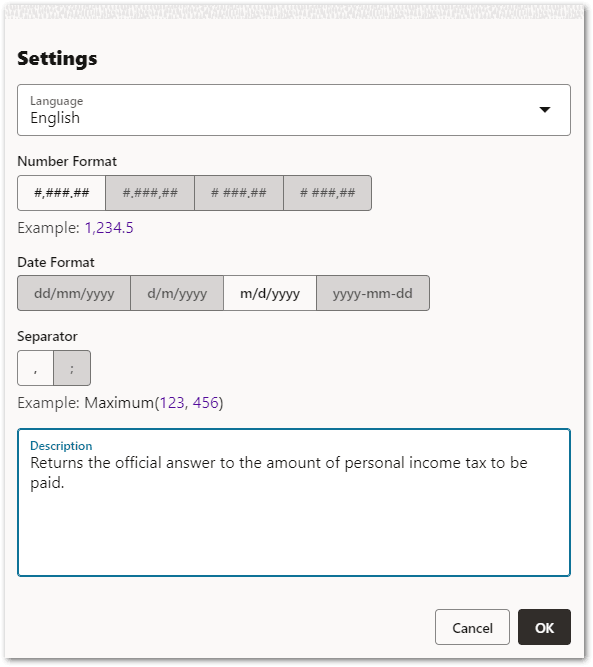
In the decision service project, click Actions and select Settings.
-
In the Settings dialog in the Description field, provide a meaningful description for the decision service.
-
Click OK.
The description will appear in the OpenAPI definition for the project (you can access the swagger.json from the run project web page). For example:
"paths": {
        "/": {
            "post": {
                "description": "Returns the official answer to the amount of personal income tax to be paid.",
                "parameters": [
                    {
                        "in": "body",
                        "name": "body",
                        "required": true,
                        "schema": {
                            "$ref": "#/definitions/TaxcalculatorInput"
                        }
                    }
                ],
...
The description will also appear in the OpenAPI definition if the project is deployed.
Add a description for an input or output field
To add an Open API description for an input or output field:
- In the Edit view, select the Input or Output tab as applicable in the contract editor.
- For the an input or output you want to add a description for, click the pen icon to open the input or output for editing.
- In the Description field, provide a meaningful description of the field.
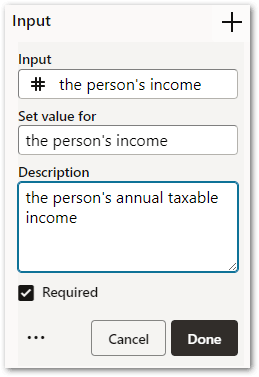
- Click Done. On the Input and Output tabs, contract fields that have had a description added are shown with an information icon.
This description will appear in the OpenAPI definition for the field (you can access the swagger.json from the run project web page). For example:
        "TaxcalculatorInput": {
            "type": "object",
            "properties": {
                "the person's income": {
                    "type": "number",
                    "description": "the person's annual taxable income",
                    "format": "double"
                },
                "the tax year": {
                    "type": "number",
                    "format": "double"
                }
            },
            "required": [
                "the person's income",
                "the tax year"
            ]
        },
The description will also appear in the OpenAPI definition if the project is deployed.