Interview Styling and Behavior
Sometimes, the out-of-the-box styling options and control types available for Intelligent Advisor interviews do not meet all business requirements. For instance, you may have a requirement to unify the interview styling and behavior with your corporate look and feel. In these cases, as a developer, you may be asked to help with customizing the appearance or behavior of those interviews.
Customization of interview styling and behavior in Latest Version Interviews is performed through a JavaScript-based extension mechanism. (Note that this is different from August 2016 interviews which use Custom Controls to modify the appearance and behavior of an interview.)
Note: Before using JavaScript extensions, you should check if any of the out-of-the-box features of Intelligent Advisor can be used to Configure the Appearance of the Interview or Change the Appearance of Interview Items to meet your needs. It is important to keep in mind that the Intelligent Advisor interview application will be upgraded in the future. Be careful not to do anything that feels like it might be dependent on a particular layout or behavior of an interview in any particular version. For example, you should never attempt to walk up and down the HTML structure of an Intelligent Advisor interview screen in your JavaScript, to affect the layout or appearance of HTML elements on the screen. The structure of the HTML used for Intelligent Advisor interview screens is very likely to change in future Intelligent Advisor versions.
The core of the extension mechanism is the AddExtension object which is added to the global OraclePolicyAutomation object that is available on the client.
OraclePolicyAutomation.AddExtension(<extension object>);
An extension object is a regular JavaScript object, which has keys corresponding to the extension feature, and values corresponding to the handlers. For example:
{
<feature X> : <handler X>,
<feature Y> : <handler Y>
}
If a handler is a function, then it indicates the extension potentially supports the feature and the function will be invoked with appropriate context (depending on the feature). If the handler returns a null/undefined value this means that the extension does not support the particular request.
JavaScript extensions are added to a project in custom interview style files. For more information, see Add JavaScript to Interview Screens.
The architecture of interview extensions is shown in the diagram below.
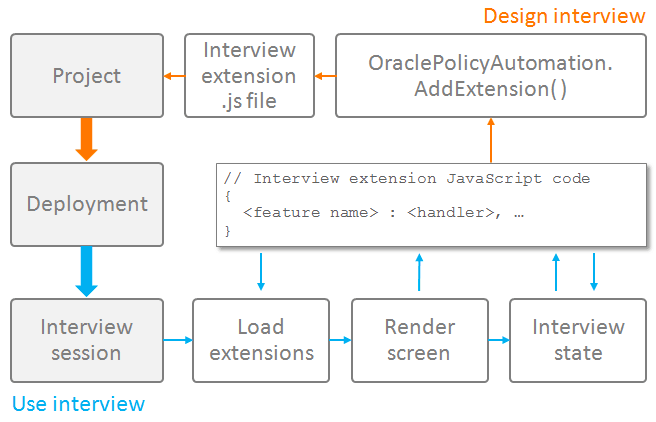
Extensions allow you to:
Note that JavaScript extensions can reference images and other resource files, as well as custom stylesheets, added to the policy model as custom files.
Interviews support having multiple extensions, although if multiple extensions provide exactly the same customization, then only one will be used for that purpose.
Tip: Interview extensions are demonstrated in the following example policy models installed with Policy Modeling: DMV Document Guide (used to render a custom header where a car moves across the header as the interview progresses), Loan Advisor (used to render a custom container to display a generated pie chart) and Path Finder (used to render a custom navigation bar that includes images).