| Number/Currency |
Decimal, Integer, Long, String |
Integer/Long:
-
When stored as Integer/Long, it is rounded to the nearest whole number. When stored as Text, it is stored with full precision and unformatted (the decimal separator is a dot).
-
B2C Service currently only supports numbers in the range - 2,147,483,645 to 2,147,483,647. To restrict users from entering invalid numbers when the Intelligent Advisor attribute is stored as Integer/Long, specify an input validation with - 2,147,483,645 as the minimum value and 2,147,483,647 as the maximum value.
Decimal:
-
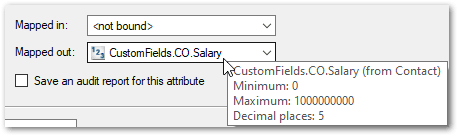
B2C Service 22B supports decimal data types (in both built-in and custom object fields). When an Intelligent Advisor attribute is associated with a Decimal field, the properties of the Decimal field (the minimum and maximum values allowed for the field, and the number of digits to the right of decimal point) can be seen by hovering over the field name in the Mapped out drop down in the Edit Attribute dialog:
-
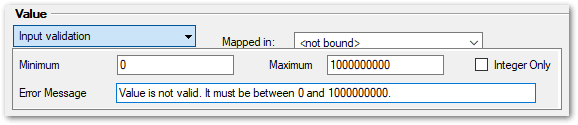
The input validation for the attribute is automatically updated with the minimum and maximum values for the field from B2C Service:
-
If the mapped out value in the interview exceeds the specified maximum of decimal places in B2C Service, the value will be rounded to the maximum allowable number of decimal places when it is saved to B2C Service. For example, if a number attribute with a value of 1.235 is mapped out to a Decimal field with a maximum allowable decimal places of 2, then it will be rounded to 1.24 when it is saved in B2C Service.
|
| Date |
Date |
B2C Service currently only supports dates after 1 Jan 1970. For pre-1970 dates, you need to:
- Create Integer fields in B2C Service for each of the date components (for example, dob_day, dob_month and dob_year). Refer to the Oracle B2C Service User Guide for details on how to create custom fields.
- Create three corresponding number attributes in Policy Modeling.
- Map the Intelligent Advisor attributes to their respective B2C Service fields, as required.
- Create a non-mapped Intelligent Advisor date attribute (for example, the date of birth).
- Write rules in Policy Modeling to extract the three components (day, month and year) of the date attribute into the three number attributes. See Get the date, day, month or year for more information.
- Use the date attribute, as needed, in other rules and on screens.
Alternatively, to restrict users from entering pre-1970 dates (for example, if you know that the values will be recent), specify an input validation with 1970-01-02 as the minimum value.
|
| DateTime |
DateTime |
Stored in the equivalent UTC (Coordinated Universal Time) format |
| Auto* |
All of the above B2C Service data types |
*This will only appear within Policy Modeling |