Interview Tab
The Interview tab is where you define the screens for an Intelligent Advisor interview for the project you currently have open in Policy Modeling.
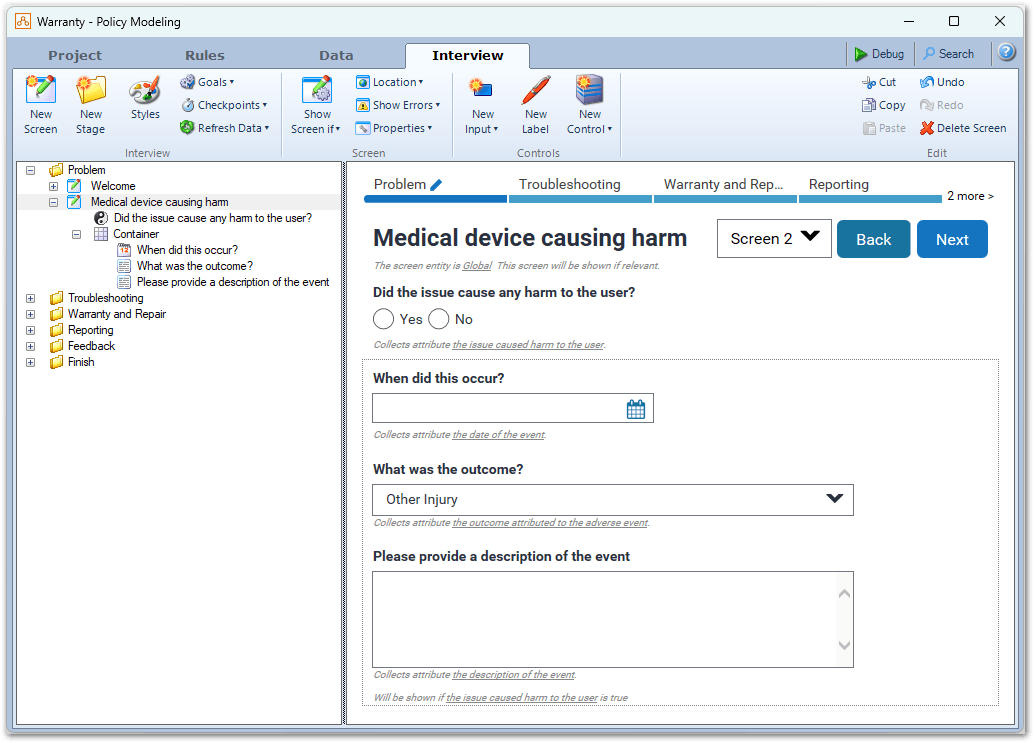
The top portion of this tab displays commands to access various features.
The left hand pane, known as the screen list, shows the screens organized into interview stages folders. Each screen lists the controls on that screen. The following icons are used for the screens in the screens list:
-
 indicates a screen that is shown conditionally
 -
 indicates a screen that submits data
 -
 indicates a screen that does not have a next button
The right hand pane, known as the screen layout view, shows the screen selected in the screen list and provides a visual representation of the screen being authored. You select controls in this view and modify them using the buttons in the command bar.
If any errors are detected when creating screens, an error pane will be displayed below the command bar. You can click on the error text to open the screen containing the error so that you can fix it.