Infer Existence of Entities to Satisfy the Relationship
You can create entity instances to become members of a relationship using an inferred entity instance rule. The syntax for inferred entity instance rules is:
- <relationship> (<identifying value>) exists if, or
- InferInstance(<relationship>,<identifying value>) if, or
- in table form (where multiple instances are needed):
Table 1. Rule table template for inferring entity instances as members of a relationship Relationship <identifying value> Condition <identifying value> Condition
The identifying value can either be a fixed value ("spouse") or a non-Boolean attribute (the tax year) which is then used as the identifying attribute for the entity instances created.
At runtime, each rule in the above form will be evaluated, and an instance will be created for any condition that is true, and any instance for which no condition returns true will be destroyed.
Note: When writing rules to infer entity instances, you need to make sure the containment relationship is set for the relevant entity, or your policy model will be likely to return unknown values at runtime. For more information, see Ensure a Decision Can Be Made.
Combining inferred instances with manually created instances or temporal values is not allowed.
Only a single attribute of the entity instance can be inferred as a part of the entity rule. For example, the type of benefit ("unemployment benefit") can be set but the amount of the benefit would have to be set using a separate rule.
A relationship that participates in an inferred entity instance rule is considered to be an inferred relationship. This means that an inferred relationship rule cannot be used to prove the same relationship used in an inferred entity instance rule.
Entities contained by an inferred relationship can only be output mapped, and only if the data mappings for the Global entity are set to create a new record in the connected application. For more information on setting up mappings for the Global entity, see Load Data From Application Tables Into the Global Entity and Save Data to Application Tables From the Global Entity. For more information on output-mapping entities, see Save data to an application table from other entities.
Tip: The B2C Service Simple, Retail Discounts, Service Delta and Student Benefits example policy models that are installed with Policy Modeling demonstrate the inferred entity instance functionality.
Assuming you have the data model below:
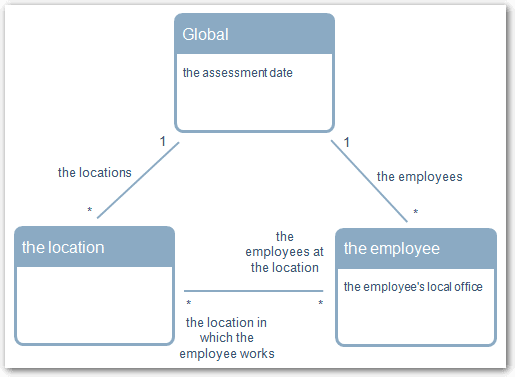
you could write three different kinds of rules to infer entity instances, as shown in: