Write Inferred Entity Rules In Excel
Entity instances can be inferred using Excel rules. Inferred entities can be used:
-
as data to drive other decisions
-
as information that will be shown directly to users
-
as results that will be passed back to a connected application
For example, if you wanted to infer the possible holiday destinations as well as the tourist attractions in a country you could set up your data model like this:
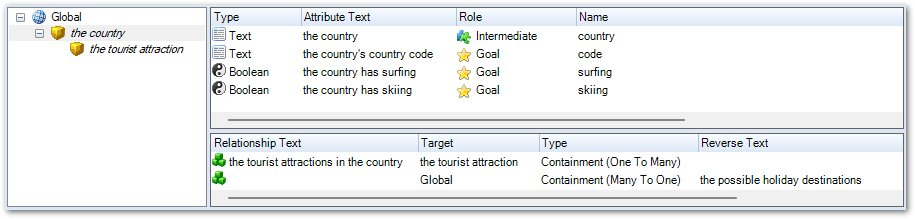
(The Entity Structure view on the Data tab in Policy Modeling shows inferred entities in italic text for easy identification.)
You could then use an Excel rule to infer the entity instances and entity attributes like this:
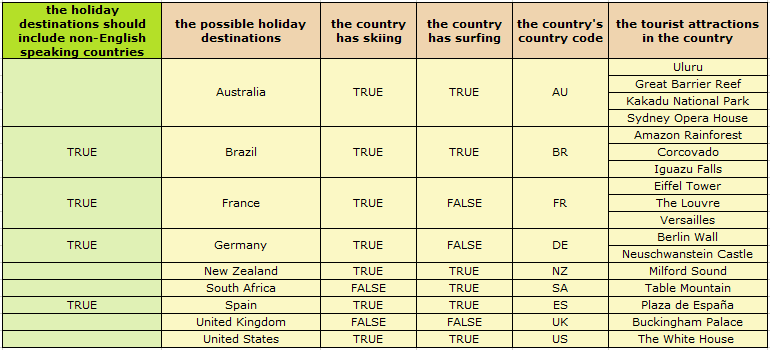
In an interview, the user answers whether they would like the holiday destinations to include non-English speaking countries and then this sets the attributes of the inferred entity.
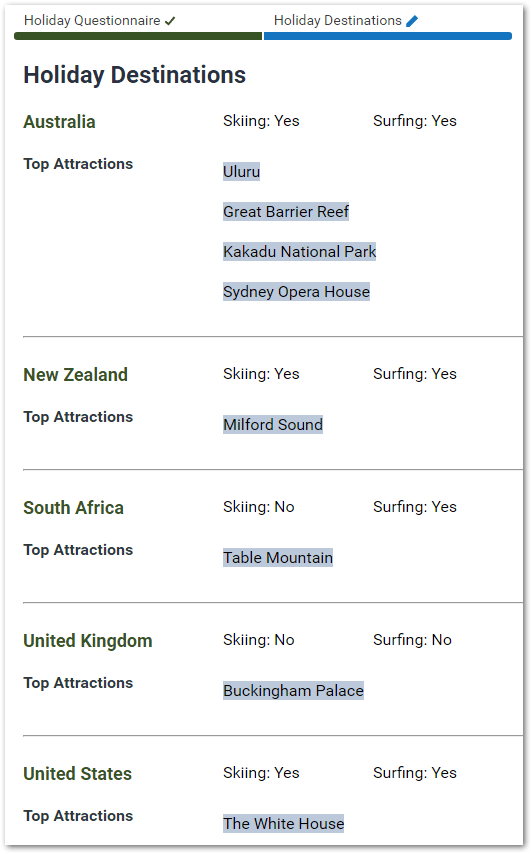
Tip: To see these rules, open the Holiday Destinations 1 project in Oracle Policy Modeling. Note that to write inferred entity rules in Excel you need to have a basic knowledge of writing general rules in Excel. If you are not familiar with writing rules in Excel, see Define Decision Tables In Excel Workbooks to learn more.
For more information on writing inferred entity rules in Excel, see:
- Infer Entity Instances In an Excel Rule Table
- Create Nested Inferred Entities In an Excel Rule Table
- Set All Attributes of the Inferred Entity In One Excel Rule
- Use Conditions In Excel to Control When Entity Instances Should Exist
- Use Conditions In Excel to Set All Attributes of the Inferred Entity
- Example: Use a Global Attribute Condition to Set All Attributes of the Inferred Entity
- Example: Use an Entity-Level Attribute Condition to Set All Attributes of the Inferred Entity
- Test the Creation of Entities Inferred In Excel Rules