Write Rules Using Custom Functions
When using a custom function, you need to:
-
create a rule that infers the return value specified in the custom function definition, and
-
call the function, using the custom function name, in one or more rules
For example, if we had an IsWorkingDay custom function defined in Policy Modeling:
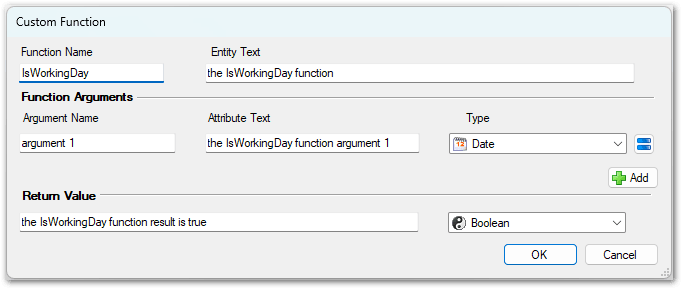
Then we could create a rule that infers the return value 'the IsWorkingDay function result is not true':

We could then create multiple rules that call this function:

Note that the rule inferring the return value needs to use the custom function argument attribute ('the IsWorkingDay function argument 1') and should not use the value that you want to pass into the custom function (for example, 'today's date').
At runtime, each invocation of the custom function creates an instance of the custom function entity, setting the argument attributes to the values that were passed into the custom function. It then evaluates all the rules associated with that entity, and finally returns the value of the return attribute to the expression that originally called the custom function.
To check the operation of your custom function you can use the decision report in the Debugger.
Tip: You can either use the Decision view or an explanation on the Interview view to see the decision report.
When a custom function is relevant, the decision report will include:
-
Each of the expressions used as function arguments
-
The decision tree for the return attribute of the custom function (which will eventually lead back to the argument attributes)
For example, using our custom function example above, we could provide today's date and tomorrow's date as inputs in the Debugger and then view the explanations for the goals 'today is a working day' and 'tomorrow is a working day':

Note that:
- A rule can’t use attributes or relationships from a custom function unless it is inferring an attribute or relationship belonging to that same custom function.
- The containment relationship of the custom function entity cannot be referenced in a rule.
- A relationship cannot allow a rule outside of the custom function to see instances within the custom function.
- A custom function cannot use a rule loop to infer the return value. For more information, see Custom Functions and Rule Loops.
- A custom function can call another custom function. For more information, see Custom Functions Calling Other Custom Functions.
- In this particular IsWorkingDay custom function example:
- 'the public holiday' entity instances are inferred in an Excel rule.
- The return Boolean attribute 'the IsWorkingDay function result is true' treats "result" as a verb which means the default parse is actually "the IsWorkingDay function result/do not result is true". To fix this you simply edit the parse of that attribute in the Edit Attribute dialog to change it to "the IsWorkingDay function result is/is not true".