Badges
Badges let you create digital awards that recognize customer achievements and loyalty.
Note: Badges can be used to highlight member milestones, encourage repeat engagement, or recognize completion of specific program goals.
Badges give members a visual way to track accomplishments in your loyalty program. You can create badges for achievements such as completing activities, participating in campaigns, reaching milestones, or earning recognition during a specific time period.
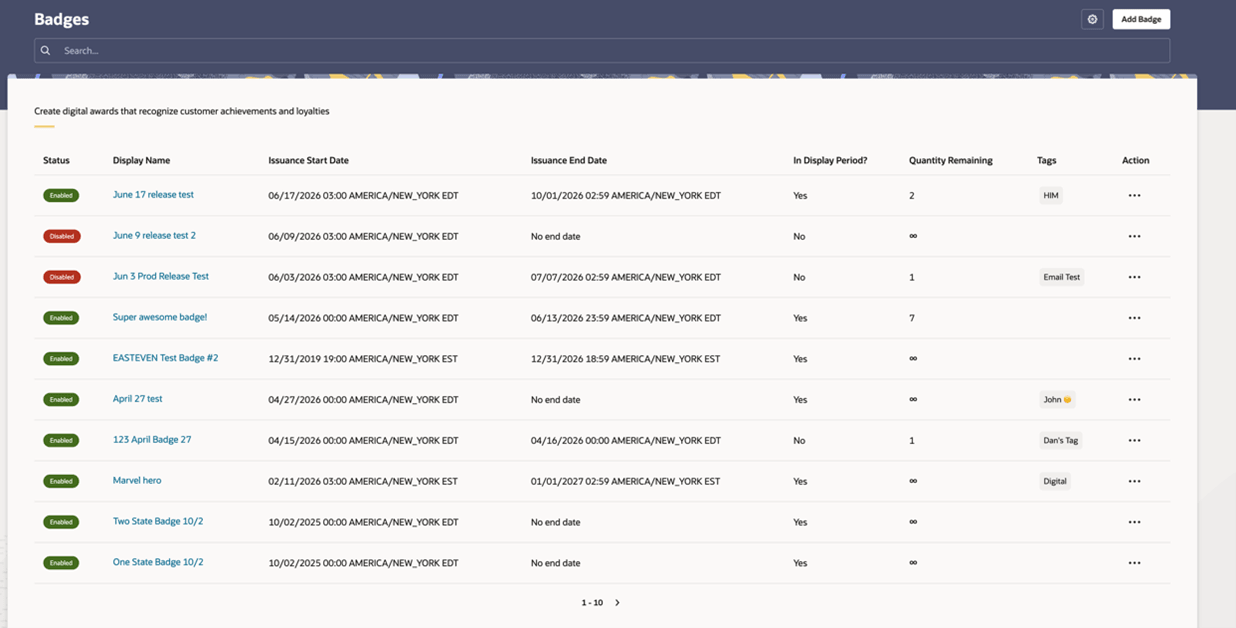
The Badges page lists all badges that have been configured. To quickly find the badge you are looking for, use the search field to narrow the list of results.
-
Status: Indicates whether the badge is enabled or disabled.
-
Display Name: The member-facing name of the badge.
-
Issuance Start Date: The date and time when the badge becomes available to issue.
-
Issuance End Date: The date and time when the badge is no longer available to issue. If no end date is configured, No end date is shown.
-
In Display Period?: Indicates whether the badge is currently within its configured display period.
-
Quantity Remaining: The number of badges still available to issue. An infinity symbol indicates that there is no quantity limit.
-
Tags: Any tags associated with the badge.
-
Action: Provides additional options for managing the badge.
To create a badge, click Add Badge.