About Buying Groups
The Buying Group feature of Fusion Marketing allows organizations to formally define, track, and use groupings within accounts and opportunities, in a way that reflects real-world customer dynamics. Its ultimate aim is to identify and target all contacts that are relevant to the buying decision.
Buying groups definitions use segment-based criteria to define personas, behaviors, and target accounts. Each type of segment is restricted to attributes that are appropriate for the use case. For example, personas are limited to Job Title, Job Department, Job Level, and Job Function. These segments are then added to buying group definitions for each target product, as appropriate. In addition, buyer roles, role priority, and role weight can also be configured directly in the UI.
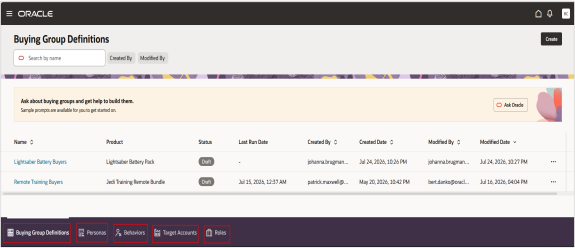
| Term | Definition |
|---|---|
| Buying Group | An account-specific collection of contacts or individuals associated with a real-world product or solution buying process. The Buying Group serves as a focused container, identifying all key contacts involved in and relevant to a particular product’s go-to-market motion within an account. Buying Groups aim to include every meaningful participant. |
| Buying Group Definition | Establishes the blueprint for which personas and buyer roles
should be included for a specific product or solution. It serves as
the foundation for assigning contacts to Buying Groups at the
account level, even in the absence of in-market behavioral signals.
Each definition is product-specific, associating personas (such as
IT Director or Procurement Manager) with the appropriate buyer
roles. When activated, the Fusion Marketing application automatically generates and refreshes Buying Group and Buying Group Member data every day by evaluating active definitions against the customer evolving account and contact data. |
| Buyer Role | Describes the function an individual plays in a buying process (for example, Decision Maker, Influencer, Ratifier, End user or Champion). Roles clarify the expected contribution, influence, or responsibility a contact has in a group. Multiple contacts can play the same role, but only one role per persona or behavior segment is allowed. If contacts in multiple personas have different roles, then they get assigned to the highest priority role. |
| Persona | Represents a segment of contacts with similar characteristics,
typically defined by attributes such as job function, seniority, and
department. In a Buying Group Definition, each persona is assigned a
buyer role reflecting their likely participation for a given product.
|
| Behavior | Behaviors are used to evaluate engagement and drive automated marketing decisions by tracking customer interactions across digital and business touch points. |
| Target Accounts | Accounts are configured as part of the buying group definition. An account segment is a set of criteria that identifies a list of account profiles that have something in common. |
The Buying Groups feature can increase and improve campaign and sales effectiveness by allowing go-to-market (GTM) teams to focus on the most relevant personas and roles for each product. By modeling real-world buyer group structures and roles, organizations can ensure engagement strategies align with actual purchasing dynamics.
- For each GTM product, create a Buying Group Definition by associating relevant personas and assigning them appropriate Buyer Roles.
- Validate that each Buying Group Definition has complete coverage of buyer roles to support your GTM processes.
- Only one Buying Group Definition is allowed per product.
- Behaviors are observable customer actions or engagement activities that indicate interest, intent, interaction patterns, or progression within a marketing or buying journey.
- Account segmentation is the process of dividing profiles into groups based on shared characteristics or behaviors for better analysis, personalization, or targeted actions. You can add target accounts to a buying group.
Steps to Enable and Configure Buying Groups
Here are the high level steps to enable and configure buying groups:
- Create Buyer Roles that make sense for your organization’s needs, and assign
them a priority and a weight.
Priorities are used to assign buying group members to a particular role when they qualify for more than one, and weights are used for calculating metrics around role coverage and engagement.
- Define Product List
- Ensure the list of products is current and correctly identifies what products can be associated with new Buying Group Definitions.
- Configure a query to provide the product list.
- Configure and run a data science model with the title mapping algorithm in the Intelligence Workbench.