Get Started with Buyer Personas
User Personas is the area where you create and manage persona records for the people you want to target. From the list page, you can search for existing personas, open a persona by selecting its name, or create a new one by selecting Create Buyer Persona.
The Buyer Personas tab is used to define persona records based on job-related attributes. Here's a sample of the Buyer Personas list page:
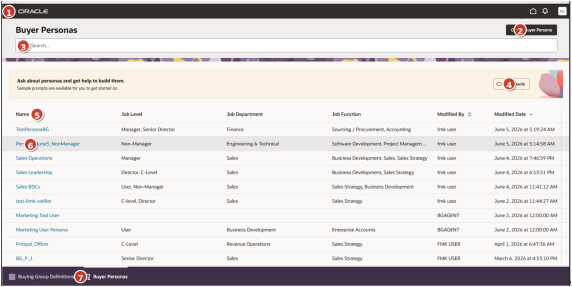
| Number | Area | Description |
|---|---|---|
| 1 | Global application header | App menu, Oracle branding, home, notifications, and user profile controls. |
| 2 | Create Buyer Persona | Starts the persona creation flow from the list page. |
| 3 | Search | Filters the visible persona list based on entered text. |
| 4 | Ask Oracle help panel | Provides prompt-based help for building personas. and indicates AI-assisted guidance is available for creating or refining personas |
| 5 | List header and sortable columns | Defines persona attributes and available sort controls. |
| 6 | Persona records | Shows one persona per row; linked names open records. |
| 7 | Bottom tab navigation | Switches between Buying Group Definitions and Buyer Personas. |
Create a Persona
Use this procedure to define a persona and summarize the audience or role characteristics associated with it.
- Sign in to Oracle Fusion Cloud Applications with a user account that has the required Buying Groups access.
- Go to .
- Select Create Persona.
- Enter the required Name for the persona.
- Enter the required Description.
- Select the relevant Job Level value.
- Select the relevant Job Department value.
- Select the relevant Job Function value.
- Review the persona list page to see details such as Modified By and Modified Date.
- Use the Ask Oracle panel when you need guidance defining a persona.