About the Data Viewer
The Data Viewer is a feature that lets you view records in Fusion Unity Data Platform. You can view a maximum of 200 records and select up to 50 columns. You can add records and choose which columns to add or hide.
Here are the steps to access and use the Data Viewer:
- Sign in to Oracle Fusion Cloud Applications with a user account that has the required Data Viewer access.
- From the navigator, select and a screen similar to the following is displayed.
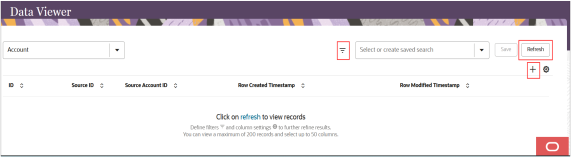
- Select + to add a record and you can select either
Data warehouse or Staging
methods. If you select:
- Data warehouse, then added records are saved to the warehouse and can be used immediately.
- Staging, then added records are saved in a draft state and processed after the data warehouse job runs.
- You can select or create saved search and use the filter icon to define filters to narrow your search for the records you want to view.
- Select Refresh to find and view the most recently updated records.