Fusion Marketing Promotion Codes
You can get a promo code by raising a service request on My Oracle Support.
If you received a promotion code to activate a functional area or feature of an offering, follow these steps to use it. You need the Configure Oracle Fusion Applications Offering privilege (ASM_CONFIGURE_OFFERING_PRIV) to enter the promotion code in the application.
Note: A privilege is the most granular unit of access control. It
represents permission to perform a specific action or access a specific resource within
the application.
Once you have the code:
- Sign in as an administrator.
- Navigate to .
- On the Enterprise Information page, click the Manage Promotion Codes link.
- On the Manage Promotion Codes page, click Enter Promotion Code.
- On the Enter Promotion Code dialog box, enter the promotion code.
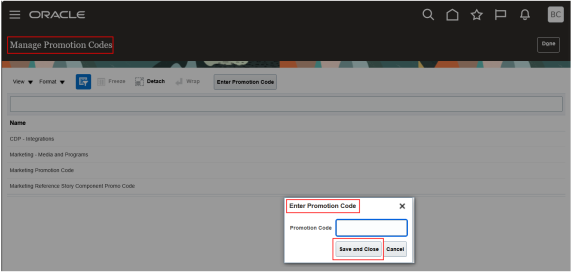
- Select Save and Close.
The promotion code you entered appears in the Part Number column on the Manage Promotion Codes page.